MacOS X would like to know how to create this measure with different notes in the second verse
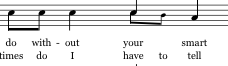


I would use the Speedy Entry Tool’s feature Voice 1 / Voice 2 which allows two Voices in the same layer.
By default, Speedy enters all notes in Voice 1.
When the Speedy rectangle is on the second quarter-note, launch Voice 2 (shortcut '), and enter the two eighths.
You can switch back to Voice 1 with the same shortcut (= ').
Flip stems as needed.
Resize the V2 notes as needed.
You can attach the lyrics via Click Assignment.

Please sign in to leave a comment.
3 comments
Date Votes