New post
Avatar
0

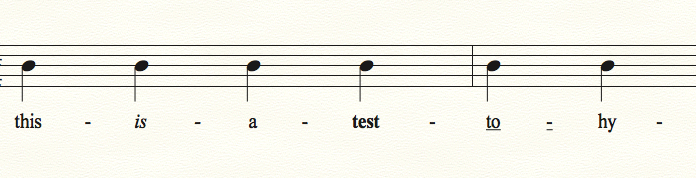
When I try to Underline a syllable, the hyphen directly to the right also gets underlined. Same thing happens for Italic and Bold.

For example, I go to the Lyrics Tool and type some words into the score under the notes: "Sum-mer-time and the li-ving is ea-sy"

Then I underline "Sum," "li," and "ea" by hi-lighting each and going to the Text Menu and selecting Style > Underline. Each syllable gets underlined, but also the hyphen to the right of each.

Any way to stop that from happening? I can't imagine that's a standard way of displaying underlined lyrics to also underline the hyphen in between syllables!

(The reason for the underlines is to show foreign vocalists where the natural emphasis is in each word independent of the music, which could be dictating a different emphasis. My above example isn't that great, but you get the idea.)

24 comments

Date Votes
Avatar
1

The hyphen in lyrics is tied into the "skip to the next syllable" paradigm, and as such, is tied to the preceding syllable. (My theory, anyhow!)


Why not italicize the stressed syllable, instead?

Comment actions Permalink
Avatar
1

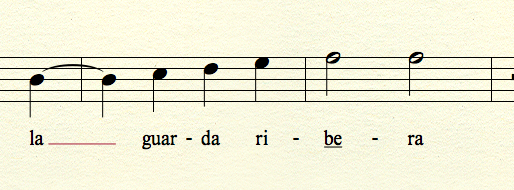
Tried this out and it seems that the underlined hyphen is tied to the first letter of corresponding syllable.


In the word "Al-might-y," if you underlined the M in the second syllable, the next hyphen is also underlined. This does not happen if you underline any of the other letters in the syllable.


Very odd.

Comment actions Permalink
Avatar
0

> Same thing happens for Italic...<


Of course it will. If you don’t like the spacing, insert an extra space before the first letter.

Comment actions Permalink
Avatar
1

Slightly OT and maybe picayune but... ‘living’ should be syllabified ‘liv-ing’. FWIW.

Comment actions Permalink
Avatar
1

I was able to use both bold and italics, without affecting the hyphen. As you say, the underline gets the hyphen, as well. So, either the bold or italics might be an option for the accents.


And by the way, you can avoid going to the text menu for each syllable. Once the lyrics are in, while still in the Lyric tool, click on the note to select its syllable, and tap ⇧⌘ B, or ⇧⌘ I for bold or italic. (That's on a Mac, but I'll guess that Windows has similar keystrokes.)


Comment actions Permalink
Avatar
0

Your hyphen after the italicized "is" is actually italic! Look closely  :)


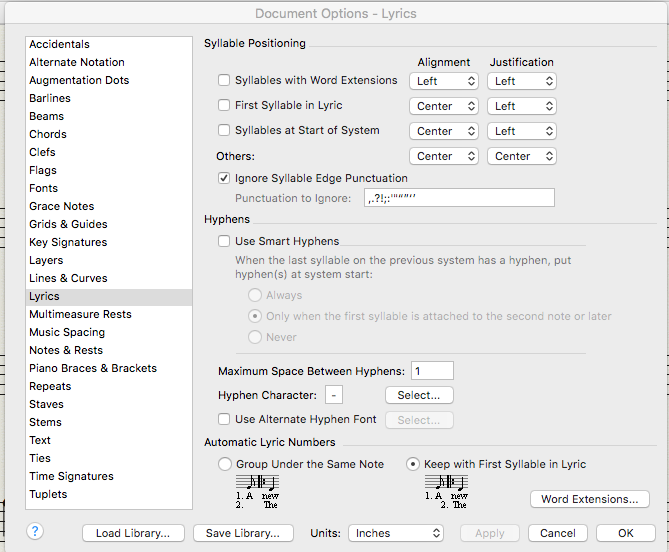
The way I found to prevent the underline (and other formatting) from affecting the subsequent hyphen was to turn off "Use Smart Hyphens" under Document Options > Lyrics.


Thank you, everyone, for all the assistance and good ideas.

Comment actions Permalink
Avatar
0

So, obviously a bug with smart hyphens. Do you report this on the feature request forum or open a support ticket?

Comment actions Permalink
Avatar
0

>So, obviously a bug with smart hyphens.<


What makes you think that? It doesn't work the way the OP wants but that doesn't make it a bug. As I explained, it's working as designed and the result is expected.


Feature request? Certainly but how many users will ever want or need this? Especially when MikeR, Eric and I each suggested a workaround.

1) The hyphen is italicised — nothing wrong with that, is there?

2) Turn off Use Smart Hyphens

3) Insert a space after the hyphen

Comment actions Permalink
Avatar
0

You're confusing "doesn't work the way the OP wants" with "doesn't work as expected by a reasonable person."


No reasonable person would expect a hyphen to ever be underlined, italicized, or bolded just because a lyric syllable is. Definitely a bug, because Finale didn't have this error in previous versions. Ergo, it's not "working as designed."


If one actually wanted to be able to underline, italicize, or otherwise adjust the formatting of the hyphens, that would be the feature request. One would also want this to be implemented better so that the underline wouldn't break between the syllable and hyphen, which makes it look even more buggy.

Comment actions Permalink
Avatar
2

And personally, I would rather see a true hard hyphen. In any case, we have been promised a major overhaul of the entire lyrics paradigm. Still waiting...

Comment actions Permalink
Avatar
0

MIKE H.,


This is what makes me think it's a bug:


I can't really think of an advantage here. When you disable Smart Hyphens, the underlie goes away but then you don't get the hyphens over a system break. It should be noted too that underlining the first letter of a syllable triggers this.


Also, I'm genuinely curious about how users are supposed to report bugs. Perhaps it should be a feature request to add a Bug Report forum?

Comment actions Permalink
Avatar
1

You submit a bug report by using the Submit a Request tab at the top of the page. They will probably never post a list of reported bugs, although in the past, they have occasionally confirmed that they could duplicate an issue.

Comment actions Permalink
Avatar
0

>You're confusing "doesn't work the way the OP wants" with "doesn't work as expected by a reasonable person."<

No reasonable person would expect a hyphen to ever be underlined, italicized, or bolded just because a lyric syllable is. Definitely a bug, because Finale didn't have this error in previous versions. Ergo, it's not "working as designed."<


Sorry but you are quite wrong. Not only am I a reasonable person but I know quite a lot about computers, systems, logic and a few other subjects.

When I saw the OP, opened Finale and did some checking, my only thought was, "How could something called Smart Hyphens work any other way?" Nothing posted has changed my mind. 


Well, I got curious enough to do some testing and am absolutely convinced there's no bug (at least, in the Mac versions). There is the desire for a feature that does not exist. When turning off Smart Hyphens gives the exact result the OP wants, I don't see this feature happening soon if ever.


First, let's dispense with this nonsense:

> ... because Finale didn't have this error in previous versions.<


Nope. That is flat-out not true.

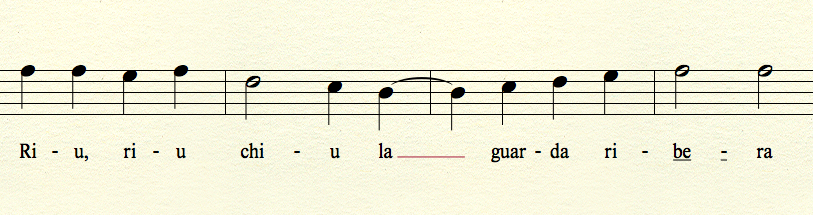
Here's a pair of screen shots from Finale 2011.

Without Smart Hyphens checked:

This is Finale 2011 with Smart Hyphens checked:

There is no point in posting similar screen shots from 2014.5 and 25.5 because the results are identical.


Since 2011 cannot be installed after Mavericks and has issues with Yosemite & Sierra and absolutely cannot work in High Sierra... Can we agree that I do not have to look at versions 1998, 2002, 2007 or 2008 to prove my point? Come to think of it, I have no idea how far back Smart Hyphens goes nor am I interested in the answer.


>This is what makes me think it's a bug: ... I can't really think of an advantage here. When you disable Smart Hyphens, the underlie goes away but then you don't get the hyphens over a system break.<


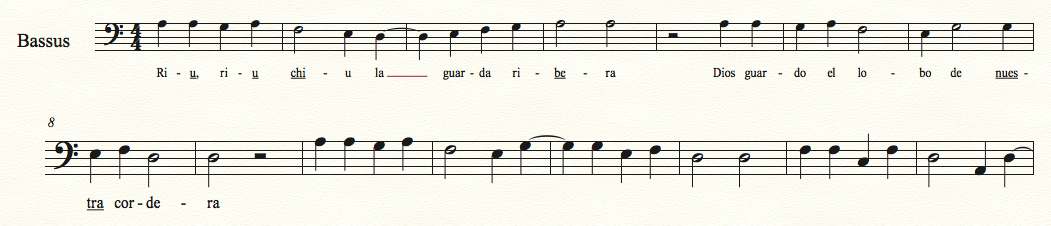
I cannot duplicate this and have no idea how you got that result. This was done in 25.5 over OS 10.13.3 with Smart Hyphens unchecked:

BTW, my Spanish is not that bad. I was underlining syllables at random.


Here's the screen shot of my Lyrics Options from 25.5 when it was behaving for me. If you got to it another way, you should compare.

And there it is.


Comment actions Permalink
Avatar
-2

Here's how I do it.

1 Enter the lyrics however you normally do so

2 Uncheck Smart Hyphens unless lyrics entered with them already off

3 Using the Lyric Tool, highlight the letters you want underlined. It defaults to the syllable but, if you click inside the syllable after highlighting, you can select individual letters (see the example below).

4 From the menu bar, select Text and scroll to Style, then to the action (Italic or Underline) you want. You can also change the size of any or all the letters.

5 Release the mouse

6 Click to a different part of the document or to the arrow to check your work


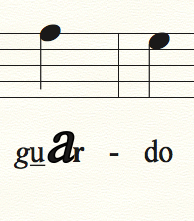
In this screen shot, I have used all 4 Styles: Plain, Italic, Underline and Bold and changed the size of one of the letters.


Comment actions Permalink
Avatar
1

Nope, it's a bug. Because you'll never see any engraver ever put isolated underlines under hyphens in lyrics. Why? Because it looks like the engraver messed up! Also, it doesn't accomplish anything at all musically, and it doesn't resemble any type of standard (or nonstandard!) lyric notation ever used.


I feel bad for how much time you wasted on all that nonsense above, especially since all it did was demonstrate that, despite how much you supposedly know about computers, systems, logic, and a few other subjects, you can't identify a simple little programming error. Maybe next time use those 45 minutes to do something productive instead of wasting that time trying (and failing) to prove a silly point on a forum almost no one reads.


I look forward to seeing your next major score with all the hyphens underlined! lol.

Comment actions Permalink
Avatar
-1

I don’t understand. The solution to your issue is to turn smart hyphens off—it gives the exact result you want but not the way you want.


What took time was disproving your false claim that no earlier version had this issue—and it didn’t take much. Making things up to get more attention is an old gambit on user support boards. I don’t know why people do it but it happens.


I get it that you don’t understand things. That’s ok. 


Anyway, you brought up a problem that very few will ever have. A solution was found. This is answered whether you like it or not.


if you want Smart Hyphens to behave the way you want, put in a feature request. It’s been that way for at least 8 years. if Marketing and upper management decide that a feature is important enough, the resources may be allocated so that it may be implemented in a future version. Or not. Not my issue and never will be.

Comment actions Permalink
Avatar
1

> I don’t understand.


Yes, that's evident. Stop wasting everyone's time trying to prove to Picard that there are five lights instead of four. The bug is as obvious as your condescending attitude.

Comment actions Permalink
Avatar
-2

Who cares whether you call it a bug or not?

It works (or doesn't work) the way you want. Mike H has outlined a solution that does (or doesn't) satisfy you. If you want to pursue this further, why not "Submit a request"?

Comment actions Permalink
Avatar
1

I think this getting a bit out of hand and it seems there is some misunderstanding.


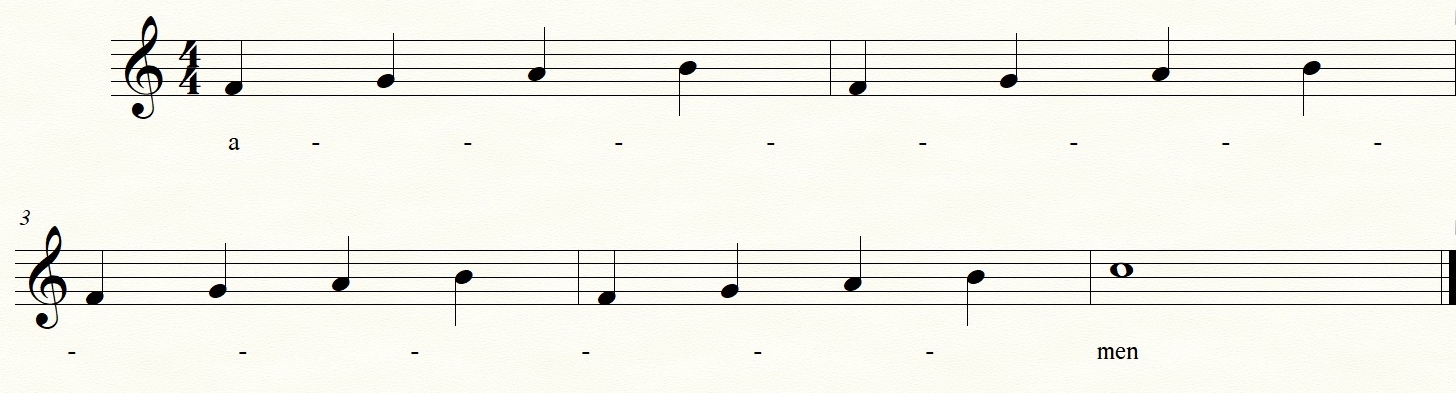
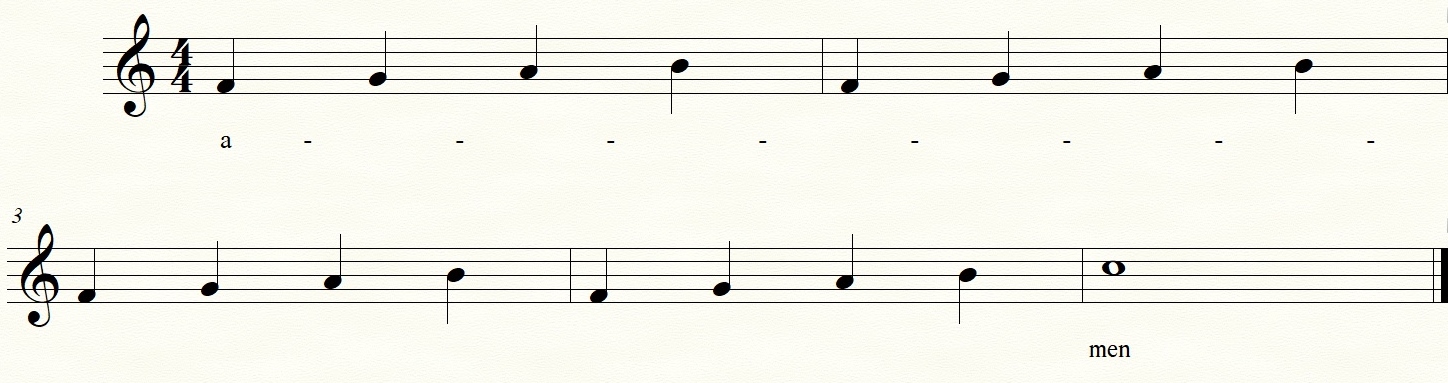
Smart Hyphens are designed for melismatic passages over a system break. Here's a traditionally engraved example of this:

(MIKE H., your examples do not contain melisma over a system break)


In Finale:


Smart Hyphens ON:

Smart Hyphens OFF:


Now, the bug is this:

When you underline the first letter in a syllable, the corresponding hyphen(s) is/are also underlined. Unless someone can give a legitimate notational reason for this, it is undisputably NOT desired behavior.


Turning off smart hyphens seems to be the only way to avoid this. However, if you have melismatic passages over system breaks in your document AND you want to underline certain syllables to show emphasis, you can't do this intelligently in the current functionality because of the underlined hyphen issue.

Comment actions Permalink
Avatar
2

Call it what you like. It is undesired behavior, when using a certain function in a certain way. MM can fix it, or not, as they choose. You can work around it, or not, as you choose.


As another suggestion, use a line as an expression, and put them in where you want them.


Can we move on, please?

Comment actions Permalink
Avatar
0

Well said, George. And here's the proof:


Nick M. (MakeMusic)

Jul 11, 10:24 AM MDT


Hi Eric,


Thanks for contacting MakeMusic Customer Success.
 
This certainly produces an undesired outcome within the software. It looks to be an oversight.
 
This issue is reproducible, and I'll be sure to let out development team know about this issue, so this can be on their radar. 

Please let me know if you have any further questions about this issue.
 
 
So MakeMusic considers it a bug. Case closed.
Comment actions Permalink
Avatar
-2

except they did't say that.


An undesired outcome within the software is not a bug if the software is performing as designed. That's a really interesting response seeing that this is an old complaint going back to 2010.


Thanks for the report.


Comment actions Permalink
Avatar
0

lol. You've got spunk for sure, but your refusal to accept the obvious doesn't change the fact that 'undesired outcome within the software' is just technobabble for "bug." Kinda sad that you can't see that, you being an "expert" and all.


If it was a desirable outcome (or 'performing as designed'), it would be called a "feature." Since no one will ever purposefully underline hyphens between syllables (as George so adroitly demonstrated above), then it's not a feature. Ergo, it's "undesirable." And what do we call something in software that's undesirable? You got it: a bug. And now that MakeMusic is aware of it, they're going to fix it.


Please accept my apologies that George, Mike Rosen, I, and MakeMusic have all proven you thoroughly wrong. I know it sucks. You have my sympathy. But I bet the next time on some other thread you'll be right! So go get 'em, tiger! :)


OK, I'm unsubscribing from this thread. You've wasted enough of my and everyone else's time already. I don't need to see what other arrogant denials you vomit up going forward. This case is closed, whether you like it or not!

Comment actions Permalink
Avatar
-2

Wouldn't it be nice if this board had a moderator? Insults should not be tolerated.


Comment actions Permalink

Please sign in to leave a comment.