

I'm on a Mac G5 (Sierra 10.12.6) using Finale 25.0.3.276.
When I cut and paste, particularly when working in a compound meter like 6/8 or 12/8. Finale changes the rest value. For instance, (see attached screenshot) a dotted quarter rest is changed to a quarter rest followed by an eighth rest. While this doesn't change the "value", it does change the "look".
The only "fix" I've found is to manually go back in and "correct" each instance where this happens - a very cumbersome and tedious process, particularly when working with a full orchestral score. Is there any way to avoid this?
Additionally, does anyone know why Finale does this? It doesn't make a whole lot of sense musically or aesthetically.
It has been suggested to work with the quantization settings:
MIDI/Audio menu > Quantization Settings > More Settings... > Check the "dotted rest" options.
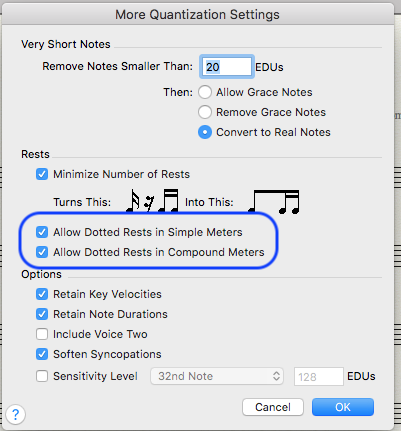
but unfortunately, that doesn't seem to really fix it. Now the cut and paste becomes:

This would be fine at the beginning or end of the measure, but in this case having the dotted half rest in the middle of the measure (while not changing the "value") looks aesthetically and interpretively awkward and wrong.
I also tried adjusting the note value sensitivity in the quantization window, but still get the long rest in the middle.


3 comments
Date Votes