How do I create a triplet as below (it's the first half of a 4/4 measure)? I don't seem to find it in the manual. Thanks!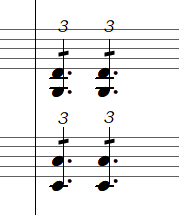 Finale 25 | Win10


Are you looking to have 4 dotted quarters in one measure of 4/4? Why? This looks like a shorthand notation for 4 quarters played as 8th note triplets; is that correct? If so, it would be incorrect notation.
Could you explain what it is you're trying to communicate with the notation?
J D Thomas ThomaStudios
@Peter: Thanks for your reply. I tried both the Speedy Entry method and the procedure described in: "To enter a tuplet at the end of a measure" from the manual. Neither worked. Copying and pasting (as described in the manual) doesn't work either: while pasting the tuplet, it looses its triplet number. I'm doing something wrong obviously but I can't figure out what it is. There must be a way to make this common notation work? I'm at a loss here. Thanks!
These steps work for me:
Speedy Entry Tool.
Position the crosshair on the desired scale step.
Use the Speedy sub-tool Tuplet Tool:
Open the Tuplet Definition (= Ctrl-1 on Windows Finale, Option-1 on Mac Finale).
Since the Tuplet Definition defaults to {3 Eighths in the space of 2 Eighths}, you can immediately hit Return (= OK).
5 (entering the quarter-note)
. (dotting the quarter-note)
Repeat these steps for each beat until the measure is filled.
Michel,
That's what I thought you were looking for. In that case, you only need to notate quarter notes, without the dot, since that's what they mean.
I just did a quick mockup by entering an 8th note triplet, starting with an 8th to define the triplet, backing up with the arrow key and making the 1st 8th a quarter note, then entering an 8th rest and pressing the o key to hide the rest. This defined one triplet for one beat. I then modified the triplet to not show the bracket and I centered the triplet number over the beam (or notehead if you want it that way). I then copied that one beat three more times to fill the measure. I believe it gets the look you're going for:
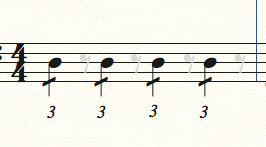
You really don't need the dots Michel. In 4/4 they are completely unnecessary and notationally incorrect, at least IMO. You could add them ala the articulation tool, but why bother? This notation will be performed as intended, 4 groups of 8th note triplets. If the dots were there, I suspect hands would raise asking about it during rehearsals, and just wasting valuable time. Besides, it looks wonky with the dots! It's not 12/8 after all.
That workaround actually took me about 20 seconds to do the entire measure. And it's completely copyable.
@ J D Thomas: I hate do dissagree about the notation but the notation is intended as a shorthand for a triplet of 3 eigth notes. A 12/8 measure would not be notated with a triplet number. To be honest I can't remember ever coming across the notation you propose. And I'm pretty sure that the players in my rehearsals would raise there hands to ask why the quarter notes are short of a dot. :-) !
Surely in 12/8 it's unnecessary due to the underlying feel. In 4/4, my proposal WILL get you exactly what you're looking for, every time, no questions. I lived and worked in LA for over 21 years and I used shorthand notations of this manner frequently, and never had a question raised. An 8th triplet is 3 8ths played in one beat, as you know. The dot is not needed.
I guess we'll have to agree to disagree on this point.
Anyone else have an opinion?

… @ Peter T.: I just noticed that a measure notated in the procedure you mentioned can not be copied (it loses its triplet numbers and the dots after the quarter notes when pasting). Can you verify that? …
Finale will “recalculate” the copied measure - and thus eliminate the triplets - unless you use Stack Selection.
In Other Words:
Just use Stack Selection, and the “triplets measure” can be copied.
To make a Stack Selection of a single staff, first create a Staff Set of only that staff:
Scroll View.
Staff Tool.
Hold down the correct modifier key (= the Alt key? - or the Ctrl key? - I’m not sure), and go to
View menu > Staff Sets > Program Staff Set …
When you are viewing that {single staff} staff set, you can make a Stack Selection of just that staff.
Please sign in to leave a comment.
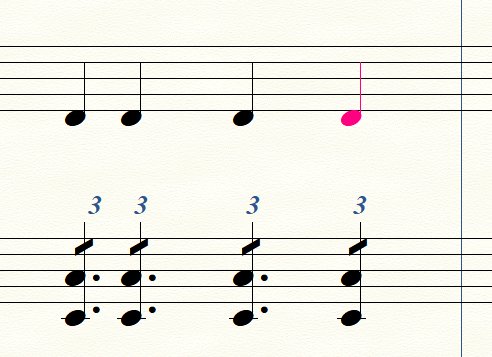 The tuplets are nicely lined up with the quarter notes above but Finale refuses to put a dot after the last quarter note. ??
16 comments
Date Votes