New post
Avatar
0
 
  •  

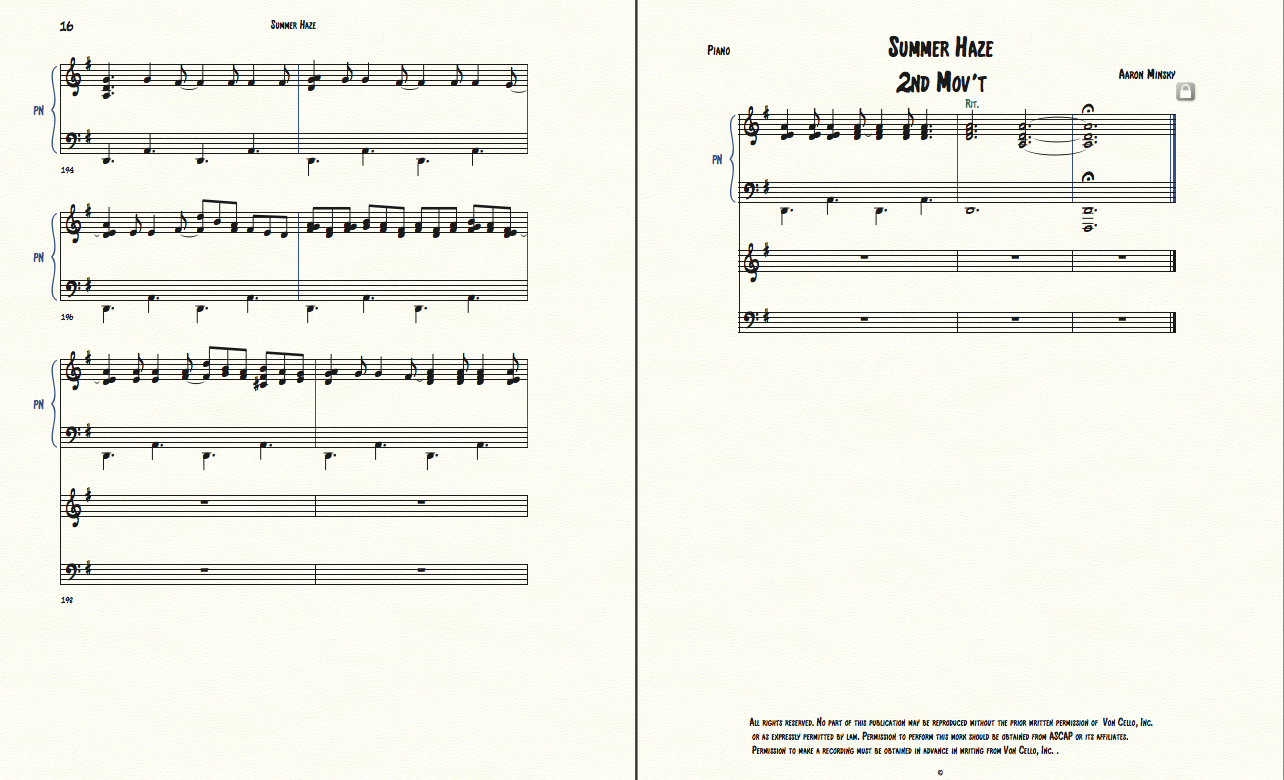
    On my piano score two extra staves appeared below the piano part several pages into the piece. This only occurred on pages 16 & 17. I tried highlighting them with the staff tool and hitting delete. That made the staves disappear but so did all the notation from the staves in the rest of the piece. Also the staves for the piano part that remain at the bottom of page 16  do not line up with the rest of the staves on that page. Any ideas? 

34 comments

Date Votes
Avatar
0

Can you give us an screenshot of the offending page?

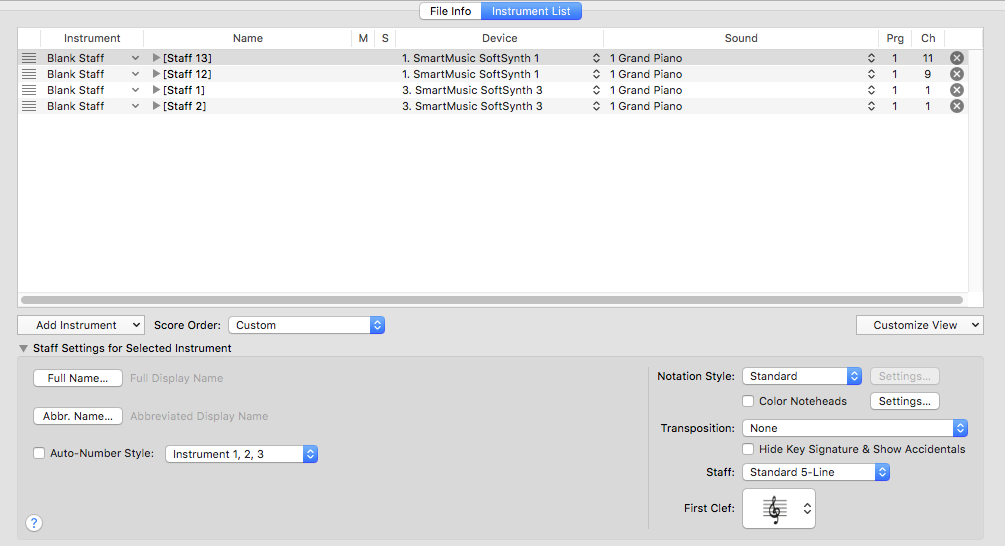
Can you give us an screenshot of your Score manager panel?


(You do not say which operating system you are using, so I cannot give you a suggested way to make an edited PNG screenshot. Knowing your computer operating system and the version of Finale you are using can often help us help you.)

Comment actions Permalink
Avatar
0

Thanks. Mac El Capitan 10.11.6. Finale 25.5.0.259 

Comment actions Permalink
Avatar
0

Comment actions Permalink
Avatar
1

What do you see if you go into scroll view? You may be able to move all of the notes into the correct staves, there, and then delete the “wrong” ones by clicking the X at,the right end of the line, in Score Manager.


BTW, this is why I do all of my note entry in scroll view, only switching to page view when it’s time for the final layout.

Comment actions Permalink
Avatar
0

In scroll view its even more bizarre. In one movement the extra staves are on the bottom. In the next they are on the top! And they appear throughout the piece which they don't do in page view. 


Comment actions Permalink
Avatar
0

Put the notes where they belong (I assume in the staves with the grand staff brace) with copy/paste. Then delete the extras.

Comment actions Permalink
Avatar
0

I moved the music all to the top staves and deleted the bottom as you said, and it worked! The staves are removed from page view. Thanks. 

I still have some places where the staves need to be aligned but I think I can do that by unlocking the systems and using the staff tool. 

Then I need to add another line above the piano part. I'll let you know how that goes. Thanks again. 

By the way, any ideas on where those extra stave lines may have come from... or why they appeared? 

Comment actions Permalink
Avatar
0

Glad that helped.

No idea why it happened; just one of those things.

I would suggest that you add the staff in the Score Manager now. And stay in scroll view until you have all the notes, in. That will make page layout go more smoothly.

Comment actions Permalink
Avatar
0

… On my piano score two extra staves appeared below the piano part several pages into the piece. This only occurred on pages 16 & 17. I tried highlighting them with the staff tool and hitting delete. That made the staves disappear but so did all the notation from the staves in the rest of the piece …


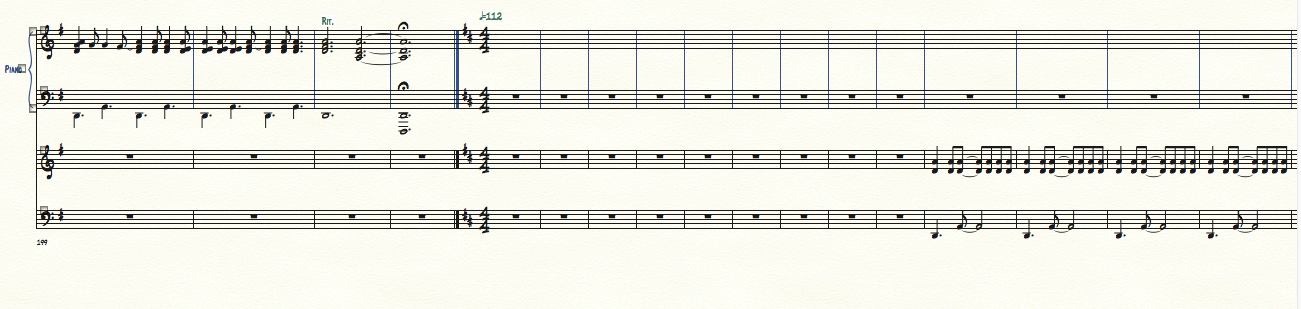
Take a look at the document from Scroll View - and look at all the measures in the entire document.

You should see four staves.

From your description it is my guess that there is music in each staff somewhere (not everywhere).

By cutting and pasting (from Scroll View) you might be able to keep all the music in two staves only so that the two remaining staves are completely empty through all the measures in the document.

With the Staff Tool you can make all four staves show everywhere in Page View.

Then, delete the two empty staves.


… the staves for the piano part that remain at the bottom of page 16  do not line up with the rest of the staves on that page …


Go to

Document menu > Page Format > Score…

and take a look at the settings there.

These are the settings Finale uses when creating new systems/pages (already existing systems are not affected).

Make sure that the settings are as you need them (= probably as the settings in the already existing systems/pages).

Then switch to the Page Layout Tool, and use the command Redefine Pages to correct pages with wrong formatting:

Page Layout menu > Redefine Pages > …

Comment actions Permalink
Avatar
0

Thanks all for your help. I have to do something else right now, but I will get back to this tonight or tomorrow. I am very pleasantly surprised to see there is such a helpful community willing to help others in this way. Thanks again! 

Comment actions Permalink
Avatar
0

>> By the way, any ideas on where those extra stave lines may have come from... or why they appeared? 


Did you import the notes for the two movements? That may have been where they ended up on different staves. Glad you have found a solution.

Comment actions Permalink
Avatar
0

So now I have the piano part on two staves throughout the piece with no extra lines, but I need to add an ossia staff above the piano part (in which to copy the cello solo part). Any ideas on how to do that and the problems that may occur since there will be many extra pages to compensate for another line of music. Thanks! Aaron 

Comment actions Permalink
Avatar
0

Add an additional staff, and hide it where you don’t want it. Again, it’s easiest in scroll view.


Or, create your ossia measures in another document, export them as graphics, and import them into your main doc. (No playback this way, though.)

Comment actions Permalink
Avatar
0

Thanks, I didn't realize you would create another staff. I thought there would be a way to create a narrower staff for the part. Is there a way to do that? If not, it's okay. 

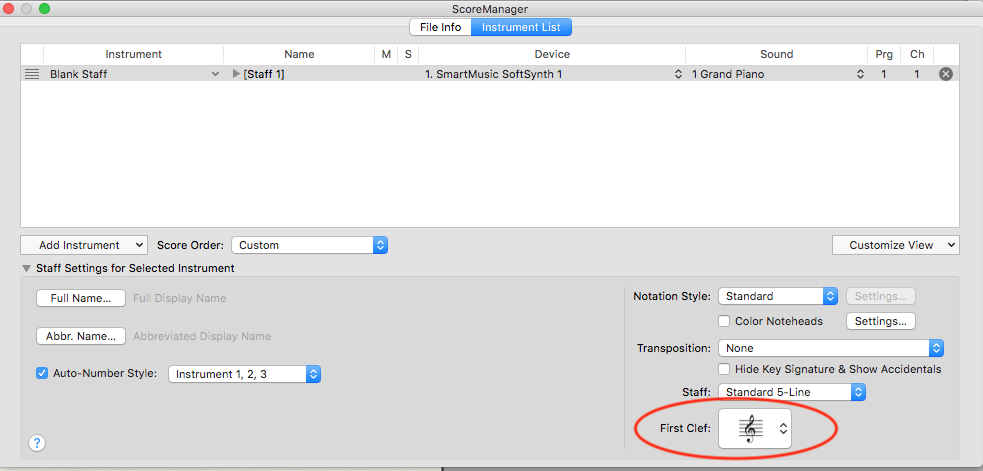
One weird thing is that the staff came up with a treble clef. I clicked on it and tried to change it in the change clef window to bass clef but it won't change. Can you help with that? Thanks. 

Comment actions Permalink
Avatar
0

You can create the staff, and use the % tool to resize it to 70% or so; whatever you like. You would do that in the score.


I don't know why you are having trouble changing the clef in the score. You can also change the clef in the Score Manager. In Score Manager, select the staff, and in the lower right corner, you will see the clef selection box.


Comment actions Permalink
Avatar
0

Why are all the staves in Aaron's Score Manager shot listed as blank staff in the left-hand column? If Aaron wants to add a Cello, I suggest he choose "Cello/Violoncello" in the left-hand column of the Score manager, and clefs and such should take care of themselves.


Then he should apply the percent tool to size it as he wishes and hide it where he doesn't want it, as Mike R says.

Comment actions Permalink
Avatar
0

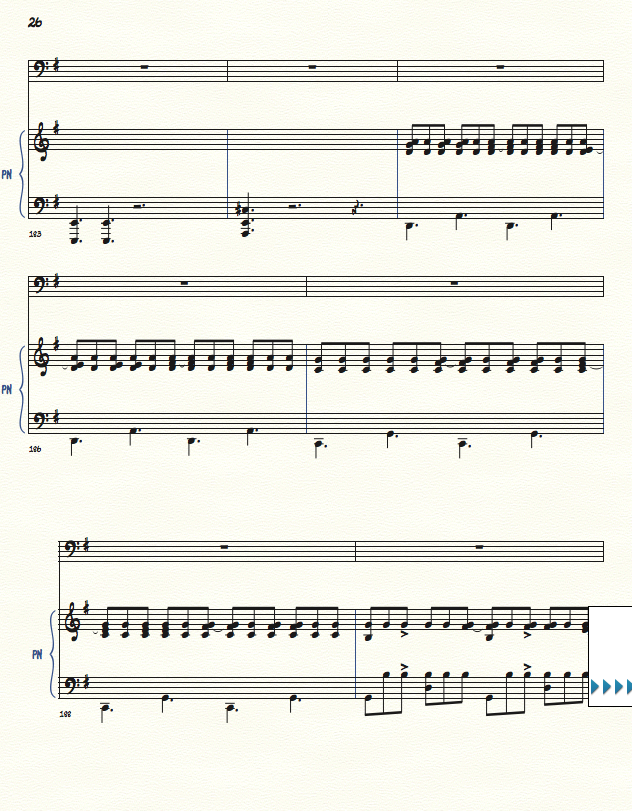
I appreciate the help. I got the clefs working and imported the cello part but other problems arose. Here's a view of p. 26:

The bottom stave is not aligned. I tried dragging it with the staff tool but it will not move. Actually, it will move down but not up or to the side. 
Also, the page numbers stopped after this page. Any solutions? Thanks. 

Comment actions Permalink
Avatar
1

Rather than the Staff tool, you use the Page Layout tool to adjust the indent. Choose the Page Layout tool, and the lines that appear will make it pretty obvious!


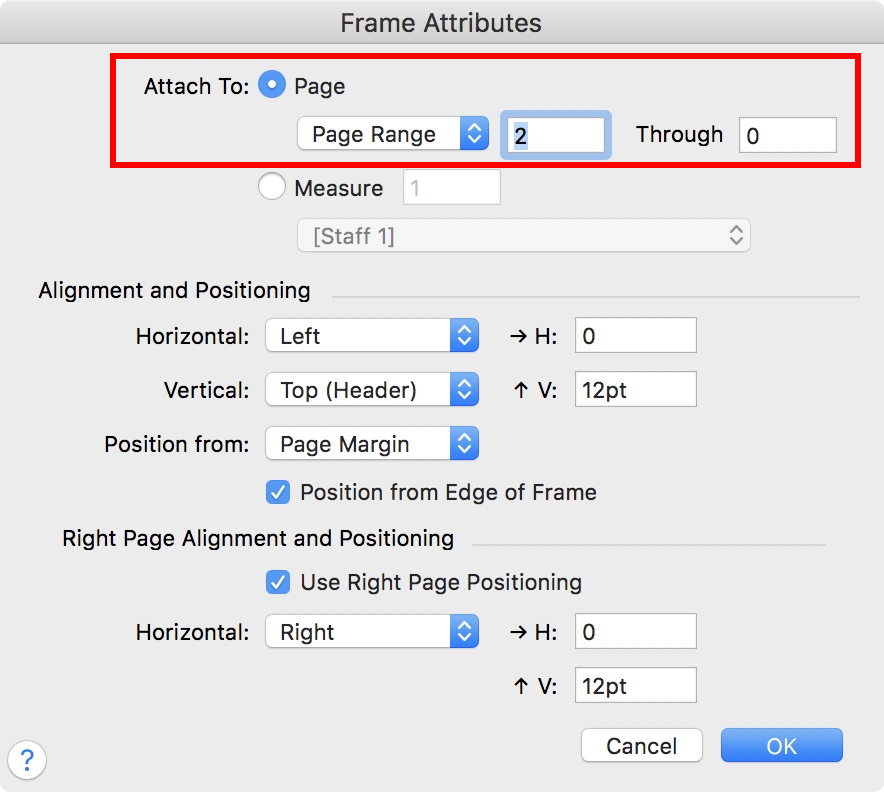
Check the page range dialogue box for the page numbers issue. I believe that's in the Text Frame Attributes.

Comment actions Permalink
Avatar
0

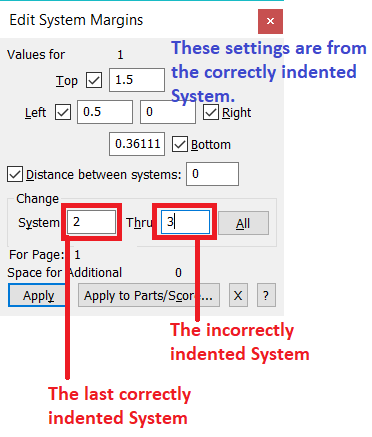
The easiest way to correct your indented system (as Mike says) is to...

  1. Use the Page Layout Tool.
  2. Open the Edit Margins panel from the Page Layout Menu if it is not already open.
  3. Click on the handle to the last correctly indented system (which will pre-populate the Edit Margins panel).
  4. Populate the From box with the System number of the last correctly indented system (should already be correct).
  5. Populate the Thru box with the System number of the incorrectly indented system.
  6. Click Apply to apply the change.


Comment actions Permalink
Avatar
0

Thanks for the tip. I was able to move the staff over but I still can't make it go higher. I would like to drag it closer to the staff above. Any ideas? 

I went to the Text tool and clicked on the first numbered page - page 2. Then I went to "Frame Attributes" dialog box and put in the number 2 until the last measure 44. It started with the 2 on page 3. So I put in the number 3 and it started on page 3 with a 3... which is good... but it removed the 2 from page 2. Weird! Should I just type in the 2 with the text tool? Or is there a better way to globally get all the page numbers in? 

Another weird thing is that at the bottom of the page where the scroll buttons are, if you to to the last page it says 43, not 44. I wonder if this is affecting the numbering too. 

Comment actions Permalink
Avatar
0

… Should I just type in the 2 with the text tool? …

Try this:


Comment actions Permalink
Avatar
0

The problem is probably in the top margin. About .5 inches should be enough. You don’t need 1.5.


Adrian’s method is completely fine, but, being lazy, I generally drag them! In the Page Layout tool, each system will have a boundary box. Once you figure out which handle applies to which line, you can move them around as you like.

Comment actions Permalink
Avatar
0

Thanks again guys. That is pretty amazing... that you have to put in only the page you want to start numbering (in this case p.2) and NOT put in anything in the "Through" box. I suppose this is a bug that they should fix. 

I understand now the ways to move a staff into alignment on the right side of the page. The problem that remains is how to move the staff up. If you look again at p.26 above, you will see too much space above the third system. I tried the Page Layout tool and now matter which tab I pull it won't move. In the Staff tool I can make it move down but not up.

I can move the other systems up and down. And when I do the third system follows along, but I cannot move the third system independently up to close the gap. Very frustrating. Any ideas? 

Comment actions Permalink
Avatar
0

You will need to adjust the system margins, like I said. Either system 2 has too much space below, or system 3 has too much, above.

Comment actions Permalink
Avatar
0

I have to confess that I usually adjust margins using the number boxes in the Edit Margins panel. I do this partly for precision but mostly because I tend to adjust multiple systems at once for consistency (or what appears to me to be consistency, LOL) through the score.


I like the convention of using zero as a token for "through the last page/system.etc."

Comment actions Permalink
Avatar
0

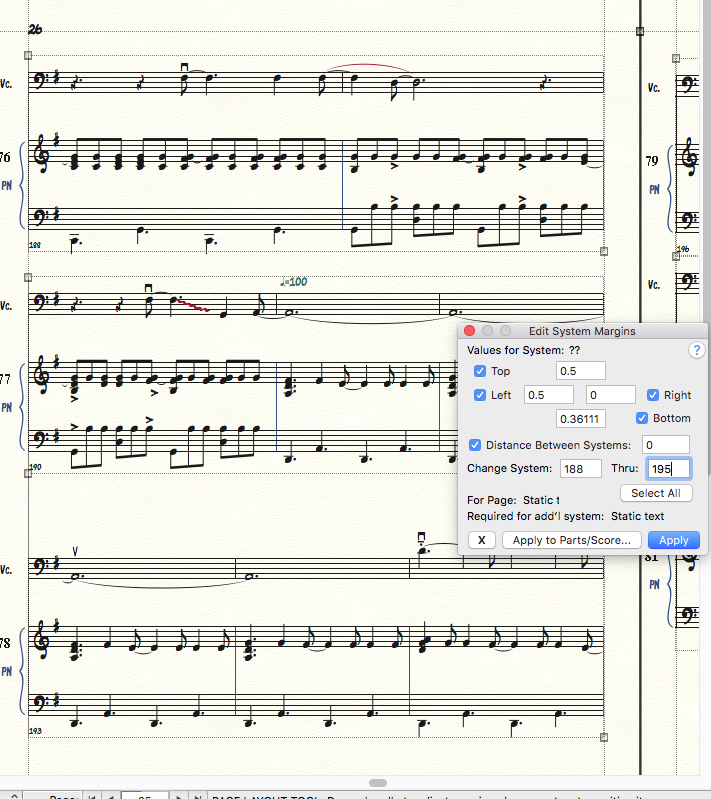
Sorry if I'm a little thick on getting this. I went into the Page Layout Tool and selected Edit System Margins. I wasn't sure what to put in for Change Systems so I put in the measure numbers on P.26. I put in .5 for the top margin and hit "Apply" and nothing happened. What am I doing wrong? Here's a screen shot:

Comment actions Permalink
Avatar
0

Aaron,

give me a call at 206 five two three 9628. This will be easier over the phone.

Comment actions Permalink
Avatar
0

… I wasn't sure what to put in for Change Systems so I put in the measure numbers on P.26 …

In your screen shot I can see that the three systems on Page 26 are System 76, System 77, and System 78.

The system numbers are displaying to the left of each system, but only when you are in the Page Layout Tool.

Comment actions Permalink
Avatar
0

Hey thanks, I never noticed those numbers! That solved the problem... 

So I see sometimes you can't just grab and move things because they are being controlled from above through these other windows. 

That's some deep program knowledge. Thanks everyone for your help! 

What's weird is - why would this happen on only a few pages of my score? All the other pages had staves movable in any direction 

though the Staff Tool. Is it a bug or did I do something to make this happen? 


Comment actions Permalink
Avatar
0

I am confident your situation being able or unable to move systems is not a bug. Many of Finale's abilities work in a layered way, so I expect you are either trying to change the wrong parameter in the Edit Margins panel or (especially if you are dragging) are running up against a page margin set in a different panel.


Although not without faults, Finale is a capable and sophisticated program which has a definite learning curve but lets one do amazing things. (I remember how long it took me to gain confidence in the program decades ago, and I still learn things--often from posts here by Peter and the two Mikes, R & H.*)


* R&H: Rodgers & Hammerstein?

Comment actions Permalink

Please sign in to leave a comment.