Many of the older files I open in Finale 25
are a mess because some fonts are substituted by asian characters. Is there a way to get around this problem?
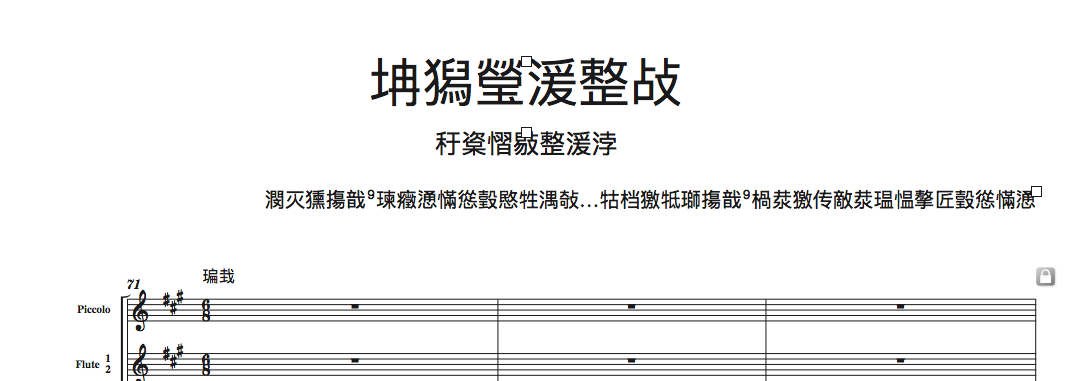


Have you checked your fonts for name conflicts? I've seen this before... If the original font is not present but Finale sees a font with the same name, it will simply display the font with the same name.
Then - does this font substitution occur if the same legacy file is opened on a different mac? or a windows machine?
Are your "original" fonts in a similar format? i.e. .otf, .ttf, .ttc, .dfont, .suit, .fog ???
I'm not sure how Finale handles all of the different font file types, but I do know that if you have outdated font file types for a font that Finale is attempting to display, you can get what you posted above. Make sure your "original" and the other necessary fonts are saved in a modern OS font file type... could solve it...
Finally - experiment with these options in the Finale Preferences dialog before you open your legacy files: 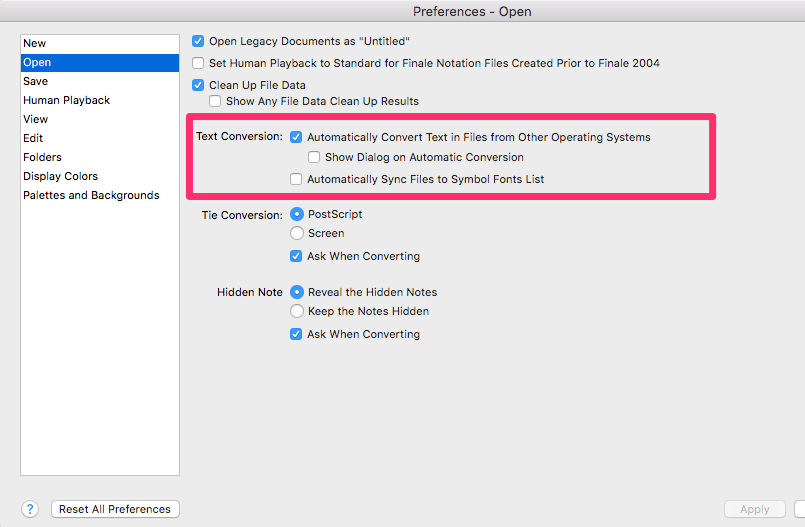
Good luck!
OK... as I said, this is somewhat common.
High Sierra installations often cause path issues. I've seen this in 32 of 32 OS 10.13.x installs I've done. Do a Safe Boot by holding the Shift key and logging in when prompted. After the desktop icons rebuild, reboot again. There's a possibility this will fix a number of issues including this as it rebuilds paths and sets your caches to default.
Assuming that doesn't do it... Remove all Finale fonts from Users/(user)/Library/Fonts and trash them. Reboot and see if that solves the problem. You may get lucky.
If that doesn't do it. remove all fonts from Users/(user)/Library/Fonts You can move them to a desktop folder. If they copy instead of move, that's ok. Trash the ones left in the directory.
Install your other fonts into Library/Fonts. If you open each font and click on Install, they should install in the proper directory—the ons in the desktop folder will remain untouched (leave them for now). There will be warnings—ignore and click through. Reboot and see if you still have a problem.
That should do it but, if not, I'll show you how to do a complete removal and reinstall of all Finale fonts.
Thank you so much Mike for this detailed explanation. I have tried the first two ideas (shift-restart, remove finale fonts from [user]).
I have so many fonts installed that I don’t want to reinstall them all individually. And I wasn’t sure what you meant by «install your other fonts»...
Now it seems that one of my text fonts is now working. Still work to do.
Maybe I would worth a try with the last workaround you mention at the end.
Éric
Please sign in to leave a comment.
11 comments
Date Votes