New post
Avatar
0
Hallo,
 
after updating to MAC OS X high sierra (+current Finale version 25.5)
have new font problems (non MM)- in this case with the old and trusted Toccata font.
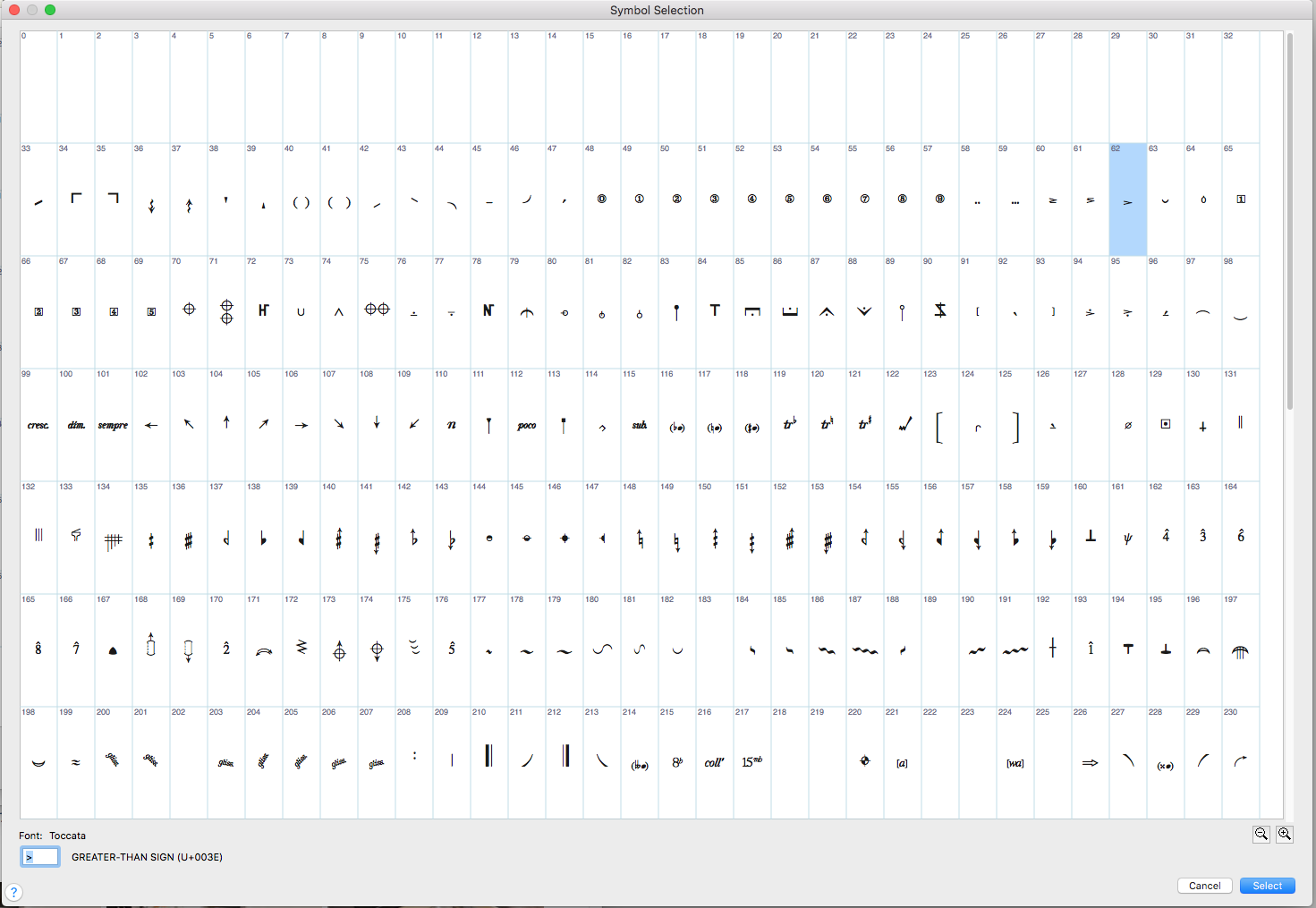
It seems it has lost many of its contents (but not all)-  as can bee seen in this screenshot,
many slots are just empty now:
many signs that I use in my custom articulations and expressions are now not showing on screen- and when printing to pdf they are actually replaced even with wrong signs from wrong slots!!!
In this example the selected, now empty slot 192 used to contain a number 3 in a circle...
it was used in an articulation, on screen now nothing is displayed- but when printing its not empty,
but the quarter tone accidental from slot 141 is put in instead.
very strange... and there seems to be some kind of method here as the same offset happens for example for slot 191-
when printing (only) the sign from slot 140 is inserted...
 
It would be EXTREMELY time consuming to make new custom articulations or expressions with a different font and to replace them globally at exactly the same spot and in many files.
 
It seems like a solvable problem as the font displays in font Book correctly with all the signs that are somehow missing now in finale.
(and yes- I have resolved duplicates and validated the font....)
 
ciao,
Dan

24 comments

Date Votes
Avatar
0

Do a Safe Boot. You may (probably) have corrupt paths. Every instal of High Sierra I have done has had this issue.


Shut down. Boot while holding the Shift key. Log into your User account when asked. When your desktop icons finish rebuilding, shut down and boot normally. This can take up to 15 minutes if booting from an SSD, a lot longer if a mechanical hard drive. Be patient.


If that doesn’t do it, where are your fonts installed?

Comment actions Permalink
Avatar
0

That's not it I'm afraid- I tried safe boot, even a second time and ran first aid then.

I also did some of the usual trouble shooting procedures like checking it in a test user account-

no success.

The problems persists no matter where I have the font installed:

HD/user/library/fonts

HD/library/fonts

I tried them both (restarting Finale of course)- it's the same

There is also a third font folder (HD/system/library/fonts) but here one would have to trick the system first before it allows any change here- I don't think that would help anyway.

Seems nonlogical that it would have to do with paths etc. as the font is recognized, but Finale does not seem to be able to access it the right way anymore. I can see all the signs just fine in FontBook...


Comment actions Permalink
Avatar
0

>There is also a third font folder<


Yes there is and, no, you do not get to touch it since it contains the Core Fonts. Speaking of which, you are not running OS 10.13.0, I hope as there are major font problems that were resolved in 10.13.1.


>HD/library/fonts<


That's where all Mac fonts should be installed to be available to all applications except for Core Fonts. If there are any Finale fonts in HD/user/library/fonts, trash them as those are old and can cause conflicts—sometimes 25 fonts don't install properly in the presence of old fonts. You can reinstall the 25 fonts only in a Custom Install and there are other ways as well.


If none of that works, I'd be resetting the Finale Preferences.


Comment actions Permalink
Avatar
0

-it's the latest OS version (10.13.6)

-yes, all my fonts that finale needs, including Toccata, are in HD/library/fonts

no duplicates in the user folder either...

-resetting preferences doesn't help either


Comment actions Permalink
Avatar
0

Hi Daniel - would you be able to tell us what type of font file these third party fonts might be?  What are the letters following the "." in the font name?

I'm only guessing, but if what Mike has suggested isn't working, is it possible that your third party font has a duplicate font ID number that might be creating the conflict?

Is your third party font a commercial font? Something you made yourself?

Or - if your font is a type that might not be fully supported in High Sierra?

I'm only speculating at this point, but I did find a couple of "custom" fonts in my system too that simply didn't work when I updated to High Sierra... had to remove them and convert them to different formats - then they worked perfectly.


Comment actions Permalink
Avatar
0

Toccata is a commercial font, many engravers know and use it- it's nothing out of the ordinary.

The version I'm using now (and that used to work under Sierra) is a font suitcase (.suit)

I also have a true typ version (.ttf)

I tried both version separately and at the same time- always the same result.

I'm not using the .ttf because FontBook found a problem during validation- the .suit version passes without problem

As I said, High Sierra can see all the signs in FontBook which leads me to assume the problem is more on Finales side.


Comment actions Permalink
Avatar
0

could someone with same system and finale version try this font on their system?

Comment actions Permalink
Avatar
0

I don't have this font - but glad to try it.....?

Comment actions Permalink
Avatar
0

Hey Doug,

I don't see a way to contact you directly via your profile in this forum (or do I overlook something?) where I could send it to you.

Also- I don't think I should upload it here, so I searched for a link where you can download that font:

http://www.efn.org/~bch/tocfug.sit.hqx

It's the old developer site and the download to try out is legal.

Comment actions Permalink
Avatar
0

Join the Finale Forum. It's an unofficial site but many of us who post here are members.

https://www.finaleforum.com/ 


You can contact other members back channel without posting your contact info in public.

Comment actions Permalink
Avatar
0

OK - I opened and installed the toccata.suit...

I then opened Finale - it wouldn't show several characters... lots of blanks, etc... similar to what you are experiencing, I think.

I opened it up in Fontographer - all the characters are there... so I generated a new version of Toccata.ttf that isn't bundled in a .suit container.

This one seems to work OK. I'm seeing all of the characters (I think I am anyway)...
here's a screen shot of that same articulation select symbol window from my machine:


It does appear that the individual symbols are mapped to different key numbers in my version - maybe the "export" from Fontographer took care of that?

Can I send this new version to you somehow? email maybe?

Comment actions Permalink
Avatar
0

Hi Doug,

thanks for trying!

the mappings are actually fine, I checked on my old mac (running el Captain) where the font works fine!

I realize now the slot numbers I mentioned in my orig. post came from the slots of the font "zapf dingbats" after I tried to replace toccata with it in my custom articulations- anyway, just a bit of confusion there... doesn't matter...

I tried to join that finale forum that Mike suggested, but an hour later I'm still waiting for the account activation e-mail ;(

I was a member of the old forum at forum.makemusic.com, so this would be the 3rd finale forum... It's getting a bit confusing and cumbersome...

so here is a yahoo adress that I created- I'd be happy to try out the .ttf you created if you could send it to:

foxsummertrot@yahoo.com

Comment actions Permalink
Avatar
0

OK - I sent you the font - let us know if that version works any differently.

Comment actions Permalink
Avatar
0

Thank you Doug, I got the font... it sounded very promising indeed- but unfortunately the problem remains.

I tried a safe reboot as well.

I created a little example file, maybe it's helpful to post it here-

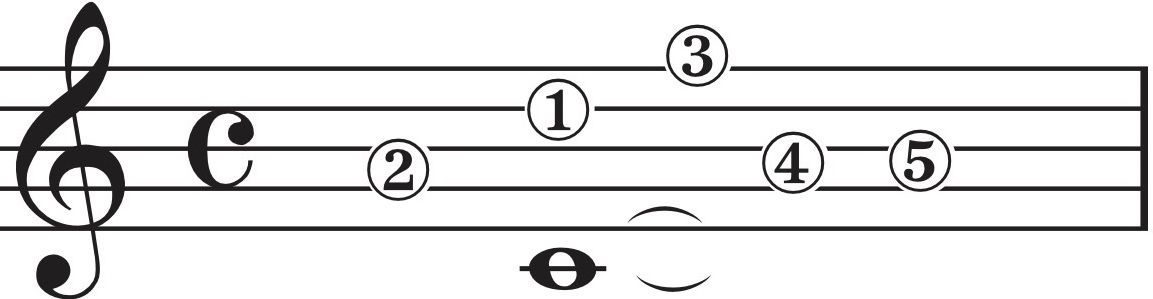
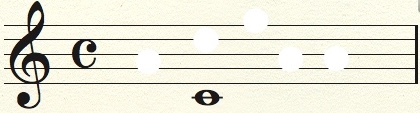
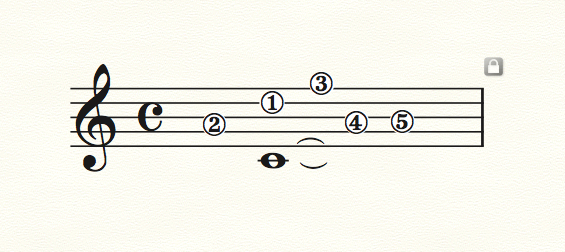
this is how some articulations made with toccata elements should look (and always did on my older mac):this is how it looks on high sierra:

one can see that all the toccata font based elements have disappeared-

since the numbers in circles have also a white background (to cover up the staff lines) behind them done as a shape in shape designer, one can still see these elements as they are not font based...

I can't upload the finale file here, but I'll mail it to you Doug (and to anyone interested)


Comment actions Permalink
Avatar
0

Well that's a bummer...!

I got your file - opened it and it looks like your first example above:


I can't remember if this was discussed earlier - have you trashed your Finale preferences?

If you dig into the shape designer, does your custom shape look correct?
Try ungrouping the shape and click on the text object - check the font? is it Toccata?

Did you un-install your original Toccata font before you installed the one I recreated?

Is it possible to consider updating your MacOS to High Sierra?


I'll see if there are some other settings that might recreate your hollow articulations... so far, the only way I can recreate your second example is to ungroup the shapes and type in a different character.

I still wonder if it's a font conflict. Try this:
Remove every non-system font on your mac except the Finale fonts and Toccata - restart and open the document. If it appears correct - it's a font thing.  To find the offending font, reinstall all of your original fonts. Then remove half of them. Restart, reopen and view. If the problem persists, continue this process by removing half of the remaining fonts each try (except Toccata, of course). If it ever does appear correctly - you will know in which batch the offending font conflict resides.

Then, remove all fonts, add back the font group with the offending font and then remove them a couple at a time. By this point the list of suspects should be pretty small. 

I've used that method to quickly narrow down a font issue among the hundreds I have installed. 

Also (off topic...) - how is it to work with that 43" display?  What pixel dimensions do you get through your HDMI connection?


Comment actions Permalink
Avatar
0

>Would you consider updating your MacOS to High Sierra?<


According to the OP, that's when this started. The signature still indicates Sierra.

Comment actions Permalink
Avatar
0

>The signature still indicates Sierra.<

yes, it's been just a few days and I didn't update that yet as I might downgrade again... but for know I put it to high sierra...


Comment actions Permalink
Avatar
0

I can't remember if this was discussed earlier - have you trashed your Finale preferences?
If you dig into the shape designer, does your custom shape look correct?
Try ungrouping the shape and click on the text object - check the font? is it Toccata?
Did you un-install your original Toccata font before you installed the one I recreated?

YES to all...

Is it possible to consider updating your MacOS to High Sierra?

well- AFTER upgrading to high sierra this started started... so just to make sure: did you do your testing on high sierra?

I'll see if there are some other settings that might recreate your hollow articulations... so far, the only way I can recreate your second example is to ungroup the shapes and type in a different character.

I don't understand what you're saying here I'm afraid...

But just to make clear: I can find workarounds and re-crate those signs and shapes I need with other fonts, that's not the problem-

but this is what I want to avoid at all cost (putting it then into hundreds of files and we know there would always be checking, adjusting needed etc...)

Comment actions Permalink
Avatar
0

>I still wonder if it's a font conflict. Try this:
Remove every non-system font on your mac except the Finale fonts and Toccata - restart and open the document. If it appears correct - it's a font thing.<

Hey Doug- you're ON to something here!!

I temporarily moved all fonts except MM fonts and toccata to a second disabled fonts folder and restarted (mind you- Finale, not the whole computer as I was dreading doing that for hours...)

And: problem gone!

to me, this is new, I have always heard of font conflicts but never had any myself (and I just moved out over 500 fonts for this...)

this reminds me of the old times of pre-X mac OS systems, when extension conflicts where the cause of most problems and crashes, and the procedure you described (and which awaits me now) of trying to isolate the culprit, was very similar back then... either by hand or with the help of "extension manager"...

ok some annoying tasks lay ahead- but logic says now it's neither Finales nor THIS fonts fault...

thanks Doug ;)

Comment actions Permalink
Avatar
0


>Also (off topic...) - how is it to work with that 43" display?  What pixel dimensions do you get through your HDMI connection?<

It's been fantastic, I wonder how I ever could get along without it...

I get the full UHD (4K) resolution 3480 x 2160 pixels at 60hz (not 30- also not un-important...)

the connection is via USB-C cable (it's basically thunderbold...), not HDMI...

I'd be happy to share my experiences in a new topic if you want to create one...

I actually researched quite a lot for a working 4K setup, maybe other people on this forum interested in this would benefit from that... at least if your work includes big projects like operas (like mine does on a regular basis) you can never really have enough screen real estate...

Comment actions Permalink
Avatar
0

p.s.

if anyone ever has a similar problem:

in my case the culprit causing these problems was the font  "Opus Fonts" (no ending...)

...hmm.. interesting, as it's from that other notation grogram...

but I have to say in fairness- the other fonts from the opus family don't seem to disturb anything (yet)

Comment actions Permalink
Avatar
0

That's terrific! Glad you are back up and running.

Interesting that it was the Opus Fonts... as I have Sibelius Ultimate 2018.7 installed, including all of the "Opus" fonts - and there are a lot of them.  No issues here though - I've had it installed for about two years - maybe you have some older font versions - who knows...

Comment actions Permalink
Avatar
0

>... "Opus Fonts" (no ending...)< Would be from a very old copy of Sibelius that would have run over OS 8 or earlier. OS 9 would let some of them run but Apple was insisting on file extensions by then. OS X requires them although they can be hidden (still).


Old code can cause all sorts of problems. I've a part time gig where I service and maintain Macs for a few clients. My top 10 list of known problem children include HP print drivers from 2005, Bresink Temp sensor, Finale 2009 Help files (!!!) and a few others. All can screw up modern Mac programs. There are a few others but they cause kernel panics. Most show up in crash reports or in Console.app as they try to load. Whether or not this would have appeared in Console... probably not but we'll never know.


I've been following this and glad you found it. My next suggestion was to have been remove all music fonts from your system and reinstall your current music apps. This would have solved the problem but would be pretty time consuming. Not as much as a clean install (the only suggestion left) — the one I did in 2012 took me three days.

Comment actions Permalink
Avatar
0

A note to anyone following this thread: 

The free version of the Toccata and Fughetta fonts available in the shareware download (tocfug.sit.hqx) is a very old version that was not developed with OS X in mind. Some of the character mapping in that version does not work well in later OS X versions. 

Toccata and Fughetta have been completely rebuilt since that version and the current version for sale works with all version of OS X. It is still available for sale for Mac and Windows; information can now be found at https://slipsong.com/aboutfonts.html

The free demo version available for evaluation is still the old version. If you have any questions, you can contact me at blake[at]slipsong.com.

--Blake Hodgetts

(developer, Toccata and Fughetta fonts)

Comment actions Permalink

Please sign in to leave a comment.