New post
Avatar
0

Hi everyone--

A pretty specific problem I need help with. I have a piece in 12/8 with a small section I want to notate in 6/4 with an indication in the time signature that we're still in a 12/8 world. Without getting into all the other notational ways to make this work (I'm including something in the tempo marking, I'm looking at beaming, spacing, etc.), I specifically want to ask about how to create a time signature that says 6/4 (12/8). 

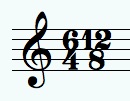
The most plausible solution I think I found (in another forum) is to create a time signature in 6/4 that DISPLAYS as a composite of 6/4 + 12/8. Then, the directions I was given are to go to Document Options > Time Signatures > Composite Time Signature Plus Sign Character > and then change the symbol from a + to a blank space. Then I would build a parenthesis expression and (annoyingly) have to place that expression in each staff around the 12/8. 

So far so good.

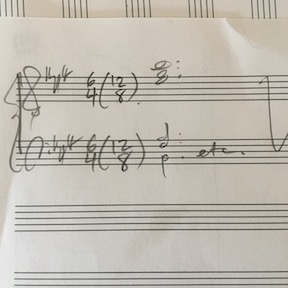
But none of the blank spaces in the Symbol Selection window that pops up work (and there are a lot of them). Most of them just leave a blank space that is way too big. (See my attached screen shot.) And what's most frustrating is that there is no way to change or adjust the size/font/shape/spacing of any of these symbols in the window. 

The other idea - which I'd prefer not to use because I'm just over here burning with a resentment about all the workarounds Finale requires of you when you try to do something like this - is to just create an entire expression like this (12/8) and then stick that in after 6/4 on each staff. 

Any thoughts or experience with this? Thanks!


MacBook Pro

2.2 GHz Intel Core i7

16 GB

macOS High Sierra

Finale 25.5

9 comments

Date Votes
Avatar
0

I noticed the same thing, but found the cause : the choice of the blank symbol that replaces the  + sign. Try 202, another blank symbol, you will see that the 2 time signatures get closer to each other. The space allows the insertion of a parenthesis (to save time, define a double parenthesis as one expression).

Comment actions Permalink
Avatar
0

Thanks for the reply - the problem with 202 is that now there is NO space between them to put parentheses. 

Comment actions Permalink
Avatar
0

OK, it worked in a previous version... But try various blank spaces, hopefully one of them will be ok... Tell us which one you find best.

Comment actions Permalink
Avatar
0

I've tried them all... none of the available ones work. Either no space at all or (with most of them) way too much. 

Comment actions Permalink
Avatar
0

13 is a bit better

Comment actions Permalink
Avatar
0

Thanks, just tried it... I don't see a difference. Maybe building an entire expression is the solution. I just hate to do it because it creates a mess of formatting problems that will be difficult to deal with "globally" for these 6 or so measures. Sheesh. 

Comment actions Permalink
Avatar
0

In my case it makes a (slight) difference. Dont forget to OK the main window to  apply it. Still, the parentheses should be very thin, almost vertical.

Comment actions Permalink
Avatar
0

Another idea : try the - sign (95). It gets superimposed over the 3rd line. Still visible but not much.

A dot may also work, hidden by the parentheses.

Comment actions Permalink
Avatar
0

Not bad! That's the one I'll go with. Thanks!

Comment actions Permalink

Please sign in to leave a comment.