

Hi everyone--
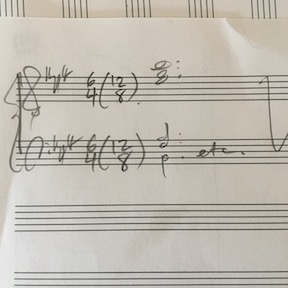
A pretty specific problem I need help with. I have a piece in 12/8 with a small section I want to notate in 6/4 with an indication in the time signature that we're still in a 12/8 world. Without getting into all the other notational ways to make this work (I'm including something in the tempo marking, I'm looking at beaming, spacing, etc.), I specifically want to ask about how to create a time signature that says 6/4 (12/8).
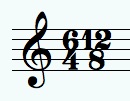
The most plausible solution I think I found (in another forum) is to create a time signature in 6/4 that DISPLAYS as a composite of 6/4 + 12/8. Then, the directions I was given are to go to Document Options > Time Signatures > Composite Time Signature Plus Sign Character > and then change the symbol from a + to a blank space. Then I would build a parenthesis expression and (annoyingly) have to place that expression in each staff around the 12/8.
So far so good.
But none of the blank spaces in the Symbol Selection window that pops up work (and there are a lot of them). Most of them just leave a blank space that is way too big. (See my attached screen shot.) And what's most frustrating is that there is no way to change or adjust the size/font/shape/spacing of any of these symbols in the window.
The other idea - which I'd prefer not to use because I'm just over here burning with a resentment about all the workarounds Finale requires of you when you try to do something like this - is to just create an entire expression like this (12/8) and then stick that in after 6/4 on each staff.
Any thoughts or experience with this? Thanks!

MacBook Pro
2.2 GHz Intel Core i7
16 GB
macOS High Sierra
Finale 25.5


9 comments
Date Votes