New post
Avatar
0

I am needing to insert fingering diagrams for saxophones to demonstrate which multiphonics I need. It would be easiest if I could import a screen shot right into the part, since it comes from the book that I was told to consult. Alternatively, is there a way to create these diagrams? This is new territory for me... Thanks


I'm using Mac and my Finale is 25.4.1.163

8 comments

Date Votes
Avatar
0

You can use the Fretboard Editor in the Chord Tool to create woodwind fingering diagrams.


In the Fretboard Editor, create a new fretboard instrument with only two strings.

Add as many frets as needed.

Insert filled circles (filled with Black or filled with White) where needed.

Comment actions Permalink
Avatar
0

Thanks! I'll try that.

Comment actions Permalink
Avatar
0

I tried this now and really couldn't figure out how to make it work.

I saw where you could change the number of strings and frets, but none of it looks like the blank space with black dots and circles with a horizontal line that I see in all the fingering diagrams. Is there a different way to do it or am I missing something?

Comment actions Permalink
Avatar
0
Comment actions Permalink
Avatar
0

If you are not wanting to install a saxophone fingering font, try this site:

https://fingering.bretpimentel.com/#!/saxophone/

You can create almost any sax fingering you could imagine - even includes the Selmer series III altissimo octave key...

The idea is that you create your fingering, then click "save" and it saves a .png or .tif image to your computer. You would then import it into Finale and place it where you need.

A more flexible option might be to import these fingering images as shape expressions so you could assign them to notes - retaining all of Finale's spacing and positioning options. Remember - if you simply import a graphic onto a Finale page, every time you change the music positioning, you would need to go in and reset all of your fingering images.

The Shape designer feature is not hard to master, but has it's quirks. I got these results by saving a fingering example as a "large" image from the web site link above - then reducing it down to the size I needed within the shape designer window. Takes a little trial and error though.


I did one additional step - I opened the original image in Photoshop and "saved for web" to make it transparent and remove the white area around the finger buttons. You wouldn't need to do this as it won't print the white - just looks better on-screen.

That said, the easiest fingering method that I have found is installing a fingering font and creating your fingering as a text expression, using the correct key sequence to build the desired fingering.

Matt Hindson's site has a free saxophone fingering font:

http://hindson.com.au/info/free/free-fonts-available-for-download/

Comment actions Permalink
Avatar
0

Doug... this is helpful.

One thing: I have never imported into the shape expressions. Is it as obvious as it sounds? Go to expressions, then shapes, then import??

Thanks

Comment actions Permalink
Avatar
0

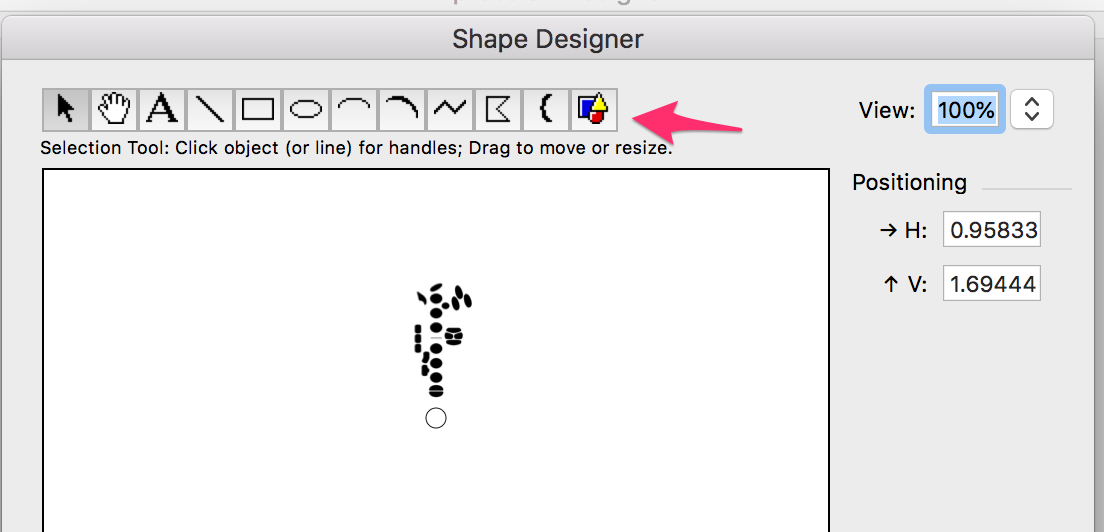
Click on the "graphics tool" within the shape designer - then click anywhere in the drawing window - up comes a dialog box asking you to navigate to your desired image.  Highlight it, then click "Open":


At that point - your image will appear at 72 PPI - probably too large.  Click on the selection tool (arrow), then click on your image in the drawing window - handles will appear. Click and drag a corner handle to reduce it's size proportionately.  Unfortunately - holding down the shift key won't keep it proportional (like in other apps), so you have to "eye it". Just keep the fingering circles round as you reduce it's size. Lots of trial and error until you get the hang of it...

There is a lot of info in the on-line manual to get you all the way... good luck.

OK.... I have to say once again that using a sax fingering font would be much easier and provide more consistent results. The only drawback of using a fingering font would be when sharing your original Finale file - you would need to share the font as well. Otherwise the font based fingerings won't work when opened on another computer. The work around there is to share your files as PDF documents.

Comment actions Permalink
Avatar
0

That worked! Thank you for teaching me something new!

Comment actions Permalink

Please sign in to leave a comment.