New post
Avatar
0

I'm trying to delete chord symbols.  I must be missing something simple. 


With the Chord tool selected, I can change chords, or add chords, but if I select the chord and use the delete or backspace key to get rid of it, it reappears after I leave the selected space with tab or return.

The manual says I can create, move, or delete chord symbols with the chord tool, but I don't see where it says how to do it.


Windows 10, Finale 25.5.0.290

6 comments

Date Votes
Avatar
0

I've found that if I use the selection tool, not the chord tool, I can select the chord and delete it. 

Is this the only way to do it? It would be easier to stay in chord tool, and the online manual does say I can delete chords with the chord tool.

Comment actions Permalink
Avatar
0

Indeed you can delete chord symbols while being in the Chord Tool.


When you are in the Chord Tool, there is a handle on each chord symbol.

You can drag-select across multiple handles, to select several chord symbols at the same time.

When the handles are selected, you can delete the chord symbols, by hitting the Delete key.


You can also use the context menu, but the Delete key is faster.

Comment actions Permalink
Avatar
0

Thank you Peter!  I didn't even see the handles - need new glasses.  They're small, but I'll practice working with them.

Comment actions Permalink
Avatar
0

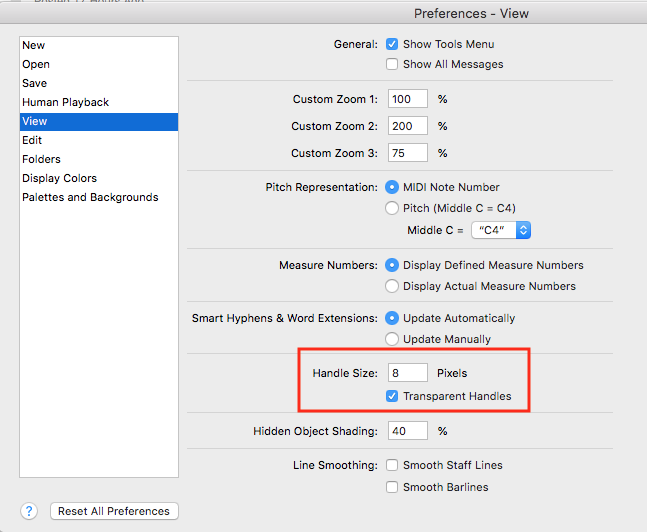
You can enlarge the handles in Preferences > View


Comment actions Permalink
Avatar
0

Thanks Mike, that's a big help.  I'm trying to decide whether it's better for me to go with larger handles, or just uncheck the Transparent Handles box.  I'll have to see how it looks with other items that have handles.

PS I see yours are set at 8 pixels, even smaller than mine which were 9 pixels.  Maybe the default it different for Mac.

Comment actions Permalink
Avatar
0

That’s possible.Anyhow, I hope it helps you.

Comment actions Permalink

Please sign in to leave a comment.