New post
Avatar
0

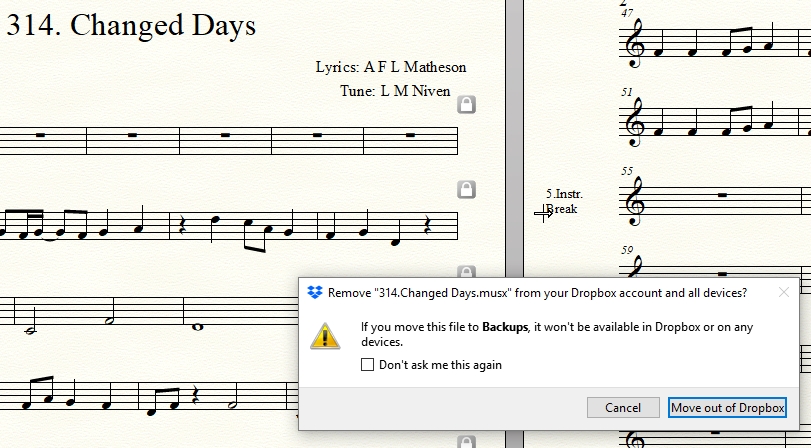
Every OTHER time I save i get a message that reads:


"If you move this file to Backups, it won't be available in Dropbox or on any devices."


I hit cancel and then save again without incident, but if I save again, I get the warning. It happens every other time.

12 comments

Date Votes
Avatar
0

Where are you trying to save the file?

Comment actions Permalink
Avatar
0
Comment actions Permalink
Avatar
0

I'm getting the same problem as Jeff Marchant with Finale 26. I didn't get the problem with previous versions. I keep my musx music files in Dropbox folders. When I try to save a musx file, I get the message shown below..

I just click Cancel, then try saving again.That works.

Robert

Comment actions Permalink
Avatar
0

PS - this does not happen when I use Google Drive (Backup and Sync) folders.

Comment actions Permalink
Avatar
0

Not sure what other info you'd need Mike. Just like Robert above. I get this every other time I hit the save icon. All my folders are in Dripbox folders on my hard drive. Several people need to be able to access these files. I have used Finale for decades and this just started happening this year. Something has changed in Finale.

Comment actions Permalink
Avatar
0

At the risk of stating the obvious, pausing Dropbox stops the problem, as far as I can tell. R

Comment actions Permalink
Avatar
0

Just read Mike's link about information needed. Here is mine: 

Finale 26

Windows 10 Build 1803. 

Have used Finale without issue since 2012.

Comment actions Permalink
Avatar
0

The issue is simple: Dropbox is too slow. I run into this all the time when I make changes to, say, a Word doc where I'm logging the progress of an album I am mastering for a client. Hit Save and wait while the blue arrows spin for a few seconds and the green check shows. Uploading a DDP file takes many hours. 


As a way to share files with others, it's very good but Dropbox is not designed for this use. Way too many keystrokes on way too many support boards about way too much lost data from people using it as their primary backup... Google it.


>PS - this does not happen when I use Google Drive (Backup and Sync) folders.<


Yep. Even that can hiccup now and then causing lost work but it's rare. I use it with my day job—and that's not optional. Sometimes the internet just doesn't want to behave.

Comment actions Permalink
Avatar
0

Thanks Mike; that makes sense. I've contacted Dropbox support and will report back if anything comes of it.

(I also use Screencast-o-matic for screencasts. Their support people advised me some time ago to stop using Dropbox for saving production files presumably for the same sort of reasons.)

Comment actions Permalink
Avatar
1

Yep. I always save to my local drive, If I need to share it with anyone, even myself, I Copy then hit Paste into Dropbox. It's so 1990s but it works.


I do not share Finale files with anyone else so I don't have to worry about someone overwriting my work. Since Dropbox only has a copy, I never worry about losing work.

Comment actions Permalink
Avatar
0

***Not solved but at least understood (for Windows) ***

Summary: Finale backs up changed musx files to a Backups folder not in the Dropbox tree.

Detail: (apologies for the length and unsolicited opinions):

  1. Dropbox support prompted me to find the Backups folder mentioned in the warning message. For my Windows 10, it's C:\Users\Robert\Documents\Finale Files\Backups. This folder is not in the Dropbox tree. (By the way, there is a lot of other interesting material under the Finale Files folder that I never knew about.)
  2. Makemusic support confirmed that changed musx files are first saved to the Backups folder, then saved as the primary project file. They wrote "... Dropbox does seem to be reporting accurately. My assumption is that Dropbox is recognizing the older musx file that we are using to create the backup file in your Backups folder. I don't imagine that you would get this message from Dropbox when Finale is not going through the process of creating a backup ..."
  3. Makemusic support added "... you are able to change the location of your Backups folder in your Finale Preferences. "Edit > Preferences" and selecting Folders. I wouldn't recommend this though since any issues with your Dropbox folder could cause some file corruption down the line. Likewise, I wouldn't recommend working with your original document from the Dropbox folder. I save all of my work to my local disk and then back up that particular folder to Dropbox on a schedule ..." The writer doesn't seem to trust Dropbox. :-\

That's it. This and other correspondence is causing me to re-think why I use Dropbox for Finale files at all, pace Mike H. I don't share Finale files although I do access them at different time from my PC and from my laptop. Perhaps it's the smell of fear: I don't really trust my hardware over prolonged sessions, so it's comforting to think that the Dropbox squirrel is continuously backing up to the cloud. (I've got CrashPlan but recovering would be very inconvenient.) 

If I did share, I would be inclined to use Google Drive (aka Google Backup and Sync). I use Google Drive successfully for songwriting collaboration with others, using the same DAW. (I tried Dropbox sharing in the past but got frequent conflicted copies.)

Finally, I'm very grateful to Freddie from Dropbox and Zachary from Makemusic for their unstinting help.

Robert

Comment actions Permalink
Avatar
0

I back up my most important files to a thumb drive I wear around my neck when I leave the house. I use Dropbox for other reasons.

Comment actions Permalink

Please sign in to leave a comment.