New post
Avatar
0

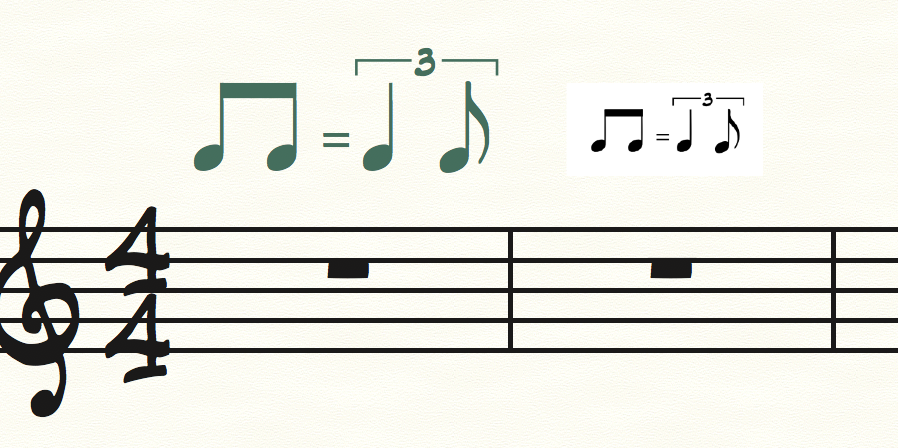
 I often use the swing tempo marking: two 8ths = quarter + 8th triplet group with the jazz font. However, it's usually just a bit too big, and I need to shrink it using the all-around handles seeing as it's a graphic object. The beam on the two 8th notes then displaces and looks messy, and can't be moved around within the shape designer.. only the entire shape. Unless I'm missing something, which is quite possible. Any suggestions how to tidy this up?

Mike [Finale 25.5, Mac 10.10.5
5 comments

Date Votes
Avatar
0

I’m away from the computer, but if memory serves, it’s text. The characters are in one of the fonts. If you look at it in the expressions Edit frame, you should see the font. But I’m not sure that just changing the font size will do what you want.


You might have better luck exporting it as a graphic, shrinking that, and pasting it back in. You can leave the original expression in place, and hide it, for playback.

Comment actions Permalink
Avatar
0

Not sure about that either, but will try it. Lived with this for so long now, may just continue if the workaround is too tedious. Many thanks for the prompt advice, appreciate it.

Comment actions Permalink
Avatar
0

Interesting. In the Engraved style, it's text, with the characters in the Maestro Times font. But in the handwritten style, it's a graphic.


I used the graphics tool, selected the tempo marking, and exported the selection as a PDF. Then, I used Place Graphic, chose my exported pic, and put it back in. Now, as a PDF, I could click on it, and reduce the size with the handles.


Comment actions Permalink
Avatar
0

It seems like you'll need to "ungroup" the "shape" and reposition/resize accordingly if you are looking for a solution within Finale.

Comment actions Permalink
Avatar
0

OK yea, good solution.. way to go from now on, thanks.  Always a few ways with Finale.. why we keep the faith I guess!

Comment actions Permalink

Please sign in to leave a comment.