New post
Avatar
0

I have just updated from Finale 2011 to v. 26 in order to correct the above. this did not cure the problem which occurs halfway through my piece ( sudden crawling pace on playback)

I am using windows 7 enterprise and 64 bit I have tried to assign a tempo maring but nothing happens. I have a deadline for the piece and feel deperate- HELP!

Sholly.

7 comments

Date Votes
Avatar
0

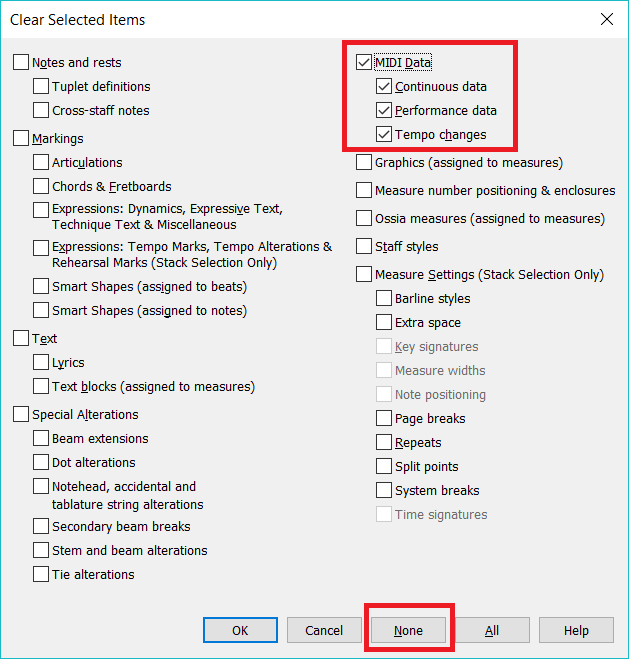
Try clearing the MIDI data, via the Clear Selected Items dialogue.

Comment actions Permalink
Avatar
0

Thank you Mike: Step by step please ( windows) as I am not v. Bright! D

Comment actions Permalink
Avatar
0

I cleared " all items" and my efforts disappeared. I " redid" and the music reappeared but the playback was nearly dead. So frustrating as I am trying to arrange a favourite piece for a lady who is terminaly ill. David.

Comment actions Permalink
Avatar
0
  1. Use the Selection Tool to select a measure.
  2. Then use CTRL+A to Select All. (CMD+A on a Mac: You didn't say whether you were on a Mac of PC.)
  3. Use RIGHT-CLICK (or Edit > Clear Selected Items) on the selection to bring up the Clear Selected Items Panel.
  4. Click the None button (at the bottom) and then the MIDI Data checkbox at the top.
  5. Click the OK button.

With luck that will help.


Comment actions Permalink
Avatar
0

Thank you, I have spent hours on this today, so tomorrow I will try your advice: thanks again. David

Comment actions Permalink
Avatar
0

Btw I run windows on 7 Enterprise. D

Comment actions Permalink
Avatar
0

14:49 on Sunday: THNK YOU  Adrian,

I am very grateful- this works!

I can now forge ahead with my project; I owe you a beer!

D. Sholl.

Comment actions Permalink

Please sign in to leave a comment.