New post
Avatar
0

I'm evaluating Finale 26 ... to upgrade from 2014.5 on a PC running Win 7. Have run 2014.5 successfully for many years. 

Using the Finale 26 evaluation version that I downloaded a couple of days ago ... When I try to use either the expression or the articulation tool, the selection box is empty. The expression selection box opens normally, but there are no expressions, dynamics, expressive text, technique text, etc to select from. When I select "all" expressions, the box is still empty - there are no expressions to select from. The framework of the box is there and various selection buttons (mostly greyed out), but there's nothing to select - box is totally empty. Ditto for the articulation selection box. My old Finale 2014.5 still has expressions and articulations working normally. What gives? Thanks for any help.

5 comments

Date Votes
Avatar
-2

Items such as expressions and articulations are document specific, not program specific.


To get expressions in the document, load an expression library (File menu > Load Library…), or create your own, new expressions.


To get articulations in the document, load an articulation library (File menu > Load Library…), or create your own, new articulations.

Comment actions Permalink
Avatar
0

I've been using Windows Finale 2020 for several months.  Up until today, the articulation selection box was fully populated.  Today, it is empty.  When i follow your instruction, several symbols load in, but they are not the most important ones.  Some are strange symbols i've never seen before.   

Comment actions Permalink
Avatar
0

Craig Buhler,


The better we understand, the better we can help.

Please be more specific.


What are you trying to achieve?

How are you trying to do it?

What happens when you do that?

What doesn't happen that you expect to happen?

Comment actions Permalink
Avatar
0

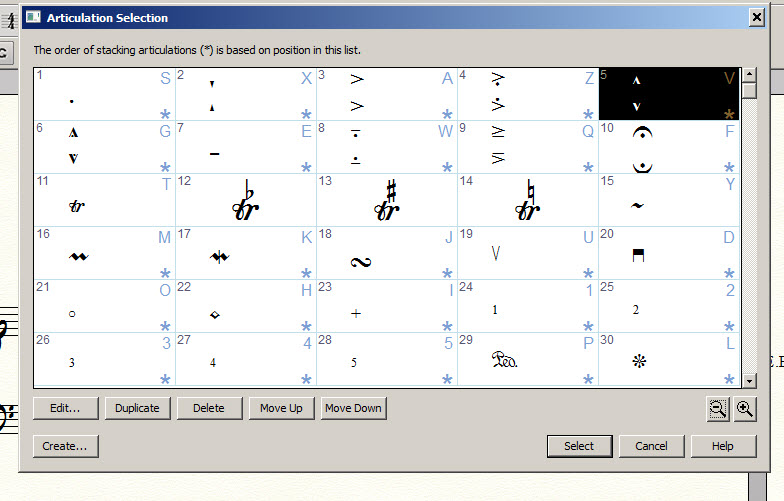
Windows Finale 2020 articulation selection window has always looked like this (see bottom picture).

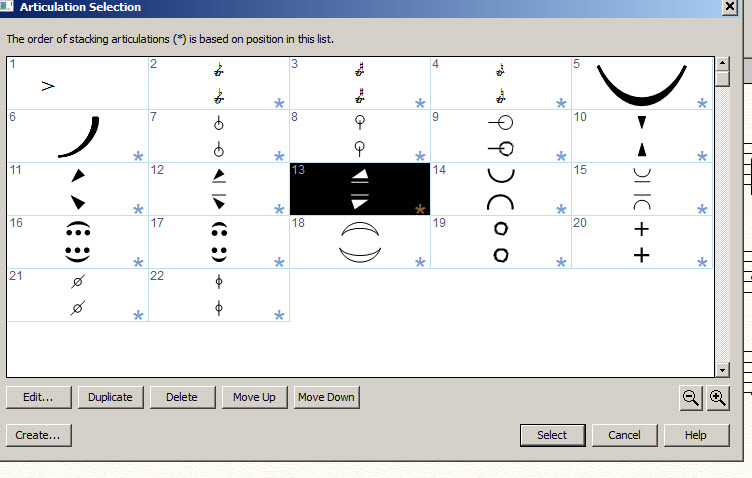
As of today, articulation selection window was empty.  When i clicked on FILE / LOAD LIBRARY / SHAPES, it now looks like this (see top picture).

Thanks for your assistance.


Comment actions Permalink
Avatar
0

… articulation selection window has always looked like this …


Articulations are document specific, not program specific.

In Other Words:

The window Articulation Selection does not always look the same.

What you see in the Articulation Selection, depends on, what document you have opened.


… As of today, articulation selection window was empty …


What document did you open today?


Some things to try:

File menu > New > Document Without Libraries (this will give you an empty Articulation Selection)

File menu > New > Default Document (this will give you an Articulation Selection with all the default articulations)

Comment actions Permalink

Please sign in to leave a comment.