New post
Avatar
0

I use Finale v25 with Windows 10.

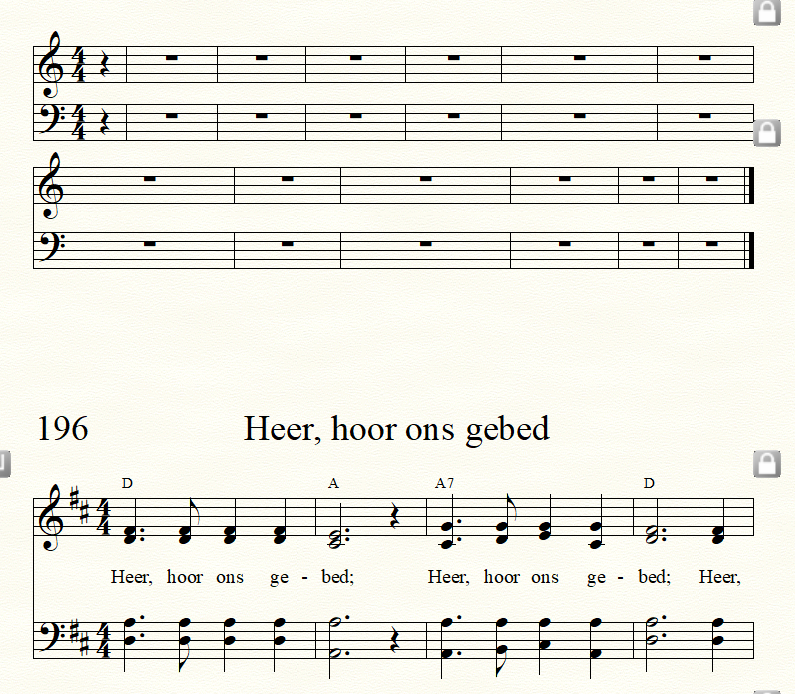
I am an inexperienced Finale user. We are creating a new hymnal from one published in English.  We have the original Finale files used by the publisher.  We are entering translated text into a format created by the publisher of the song book. Sometimes the songs use a page and a half. The second half has another song. . We can delete the notes and text but haven't found a way to delete the remaining staves.  Here is an example of what we are working with.
3 comments

Date Votes
Avatar
0

Is it the staves you want to delete or the systems or only the measures contained therein? (That would depend on how the publisher set up its template.)


You might want to try each on a copy of the file.

  1. Delete Systems using the Page Layout Tool and Menu.
  2. Delete measures by selecting the measures with the selection tool and pressing Delete (or using the Edit > Delete Measure Stack option).
Comment actions Permalink
Avatar
0

Thank you.  I have tried the options but they don't work.  I've also reset my preferences which also did not work.  If I am successful in deleting a system if effects the song below and pulls the 2nd system of that song into the top of the page.


Comment actions Permalink
Avatar
0

Not sure I understand your question, but If you have empty staves locally, you can hide them where they are not needed. (Staff menu -> Hide Empty Staves.).

So, don't delete staves, simply hide them whenever they are empty.

Another solution is to select a region and apply a staff style (via the Staff menu). 2 staff styles can Hide staves (Cutaway or Collapse in your case, probably).

Comment actions Permalink

Please sign in to leave a comment.