New post
Avatar
0

Hello, I am trying to create an expression that lets me say "tuplet quarter note = quarter note" in the middle of a piece, but I can't seem to find the tools to say that well in the Expressions Tool. I tried copy-pasting the triplet sign from another tempo expression, but I don't know how to recreate it in a way that looks good. Do I ultimately have to use the design shape tool instead of the text box?


Running Finale 25.5.0.290 on Windows 10 Pro

5 comments

Date Votes
Avatar
0

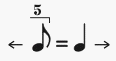
I created this by modifying the default Swing expression (as a text expression, not using the Shape Designer):

Is that what you are trying to do?


By The Way:

In a such symbol for metric modulation you often use arrows - to make clear, what is what.

One way to do it:

This solution takes a lot of horizontal space.

To use less horizontal space,

- put the arrows below the notes,

or

- use only one arrow: replace the equal sign with a right-arrow.

Comment actions Permalink
Avatar
0

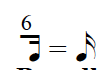
Hi Peter, I am trying to do a similar thing and cannot figure it out. I am trying to a metric modulation where the sextuplet sixteenth equals the new sixteenth. How did you enter the expression above with a 5? It seems like it should be possible with the Maestro Times font, but I cannot find any character map for Maestro Times on a Mac. I am running Finale 2014.5 on High Sierra.

Comment actions Permalink
Avatar
0
Comment actions Permalink
Avatar
0

… How did you enter the expression above with a 5? …


I created it as a shape expression, not as a text expression.

In the Shape Designer you can use multiple fonts in the same text block, and you can move/position text blocks as needed.

Comment actions Permalink
Avatar
0

Thanks to you both! I was able to do it with Shape Designer and MaestroTimes.

Comment actions Permalink

Please sign in to leave a comment.