New post
Avatar
0

In search of real Finale savant knowledge! Corrupted file here...

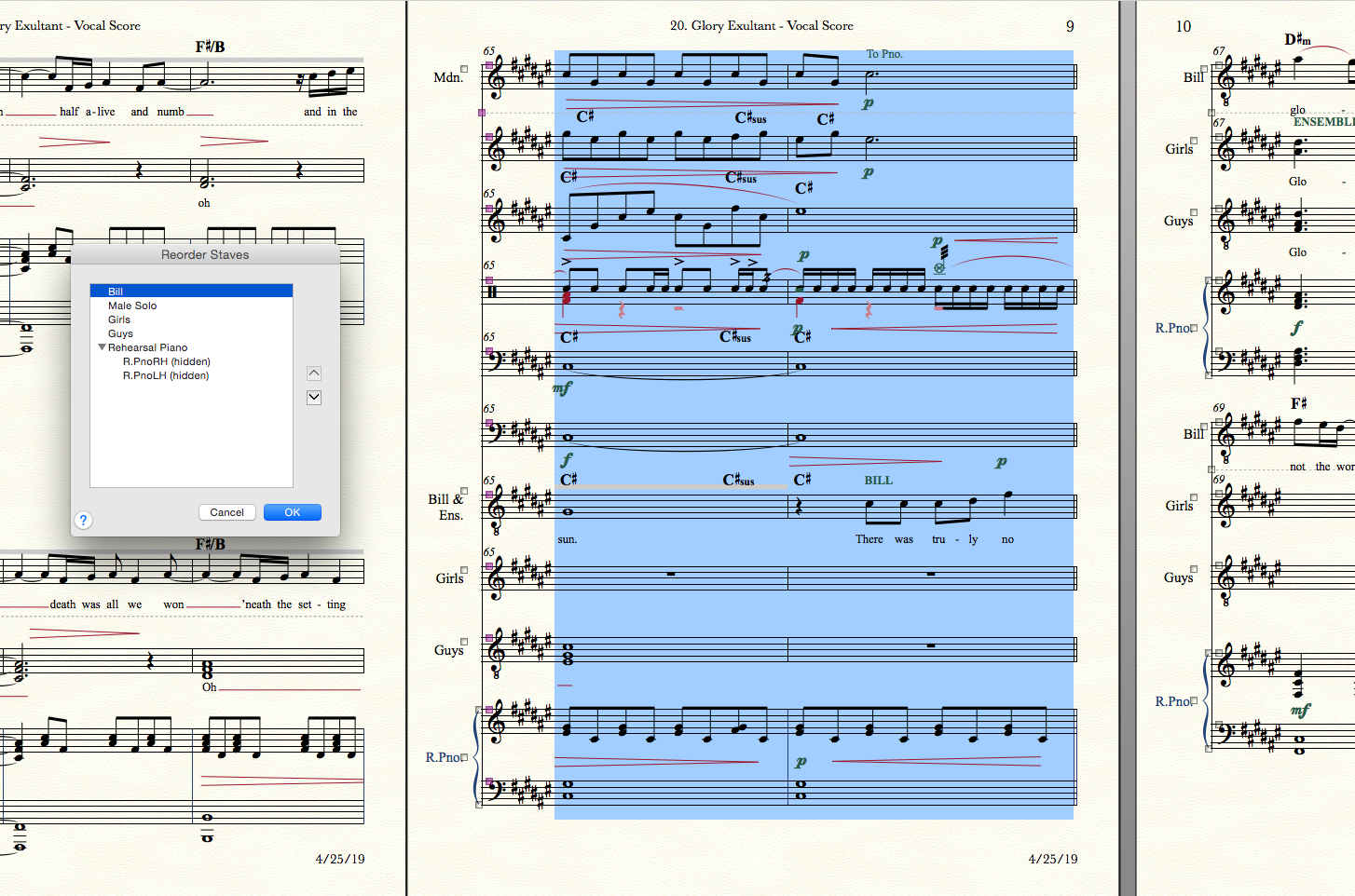
As the little dialogue box shows, this part has only 6 staves in it (4 vocals and a piano.) However, in this single system only, 6 additional staves from the score appear above the "Bill" staff which is supposed to be the top one. They're not even in the part, so how do I remove them? The names aren't appearing properly, I can't hide them, and I can't adjust them up/down with the staff tool either. They don't want to budge.

It's clearly a corrupted Finale file ghost, so I'm looking for repair tips. Again. This software is 30 years old and the files still get corrupted FAR too often.

Document > Data Repair > File Maintenance showed zero errors and repairs.

Adding the staves to the part and then removing them did nothing.

Adding the staves to the part, reordering them, and then removing them did nothing.
9 comments

Date Votes
Avatar
0
Comment actions Permalink
Avatar
0

Mike! We meet again, twice in a week or so. Many thanks for your supremely helpful suggestion.

If you (or anybody else) is interested in how this was resolved, the wonderful people in the Facebook Finale Power Users forum were able to help me without first demanding computer specs.

https://www.facebook.com/groups/finalepower/2236747599876029/

Comment actions Permalink
Avatar
0

So computer specs are now top secret? :-)

Comment actions Permalink
Avatar
0

Of course not, it's just odd that Mike would take the time to tell me that I posted my question "incorrectly" instead of offering help, which is what these types of forums are all about. I suppose he just wanted more detailed info before venturing a guess, but his tone is a bit condescending. I experienced the same thing last week in a MOTU forum.

No worries. Problem solved, moving on...

Comment actions Permalink
Avatar
0

Jeremy, thanks for explaining.


I'm sure Mike H was not being condescending. He is very generous with his time and expertise, but I can empathize with his thoughts when so often I've seen someone only reveal after 8 or 10 posts that he or she was using PrintMusic rather than Full Finale or on a Mac OS that would no longer support the misbehaving software.


I am glad you found a solution to your problem and would really like to know what you discovered since I have sworn off FB for security reasons.

Comment actions Permalink
Avatar
0

> Mike would take the time to tell me that I posted my question "incorrectly"<


I hadn't a clue but might have known had you posted the info I asked. Since I'm not a member of that closed FB group and you have not condescended to tell us the solution, I suppose that I shall remain in the dark.

Comment actions Permalink
Avatar
0

For anybody who can’t follow the Facebook link:


Person 1: What happens if you show hidden staves?
What happens if you move all those measures to the previous system?

Jeremy: Hiding empty staves does nothing. The oddity is locked to this system #24 no matter which measures are in it. All systems after #28 have the same problem. Redefining pages has no effect.

Person 1: And if you reflow these measures to the previous system, does it alter that system’s staff order too?

Jeremy: Yes, if these measures move to system #23 the staves are in the correct order and system #24 retains the weirdness.

Person 1: Not sure what stage of score layout you’re in, but this experiment might be worth it. Reflow all measures to appear in system #23. Then reflow all measures using the fit measures command. The new systems should be created with your page layout definitions. Hopefully the corruption will have disappeared.

Jeremy: Fantastic idea, but it didn't work.

Reordering the staves which are in the list and belong in the part makes the phantom ghost staves alternate between score order and reverse score order. Poltergeists...

(later...)

UPDATE: I created a new part and it didn't behave oddly. This avoids the problem instead of solving it, which I don't like because it's just a variation of "rebuild your whole file by copy/pasting into a clean empty one or converting to XML and back." It's a brute force non-solution, but I dodged the problems for today. Many thanks guys.

Person 2: I was about to say, create a new part, then use JW Copy Part Format to get everything looking about the same as the corrupted part (still some nudging to do though) then delete the corrupted part. I've done that when I've need to clear some lyric or chord left-hand arrow adjustments.

Jeremy: UPDATE 2: v26 and v2014 were unable to fix this corruption in the part, and recreating a completely new part was the only way around this. When going back to v2012 it was possible to merge all the systems down until the errors disappeared, update layout, unlock the massively crowded system, and the errors disappeared. It's still glitchy voodoo, but maybe that helps somebody.

Comment actions Permalink
Avatar
0

Jeremy,


Thank you for catching us up. Any time we learn the solution to a problem we haven't seen before, it helps us assist someone who may experience something similar later.

Comment actions Permalink
Avatar
0

Amen!


Thanks for the followup. If not a member of that group, you can't view the thread. Don't know how long ago I made my first request—made a second recently.

Comment actions Permalink

Please sign in to leave a comment.