New post
Avatar
0

Hi. I'm using Finale 26.1.0.484 on a MacBook Pro with Mojave 10.14.4

I'm trying to put in a piece with several tempo changes. The program holds the new tempo each time for two bars only and then reverts to the previous tempo. How can I make tempo changes stick?

many thanks

Annie O

9 comments

Date Votes
Avatar
0

… I'm trying to put in a piece with several tempo changes …


I suppose that your “several tempo changes” are expressions, right?


Three things control the tempo in a Finale document:


1) At the top of the Tempo Hierarchy is the recorded Tempo Changes (= in the MIDI Data).

This means that the recorded Tempo Changes will override 2) and 3).


2) Next in the Tempo Hierarchy comes the expressions with playback effect Tempo.

Expressions will override 3).


3) At the bottom of the Tempo Hierarchy is the window Playback Controls.


To fix your issue, eliminate 1) - that is

Selection Tool.

Select All.

Edit menu > Clear Selected Items…

In the window Clear Selected Items, de-select everything, and select only Tempo Changes.

Comment actions Permalink
Avatar
0

Hello

and many thanks for the swift reply. I've been battling with it on and off over the last two days. I did as you suggested, with no change to my problem. I therefore deleted all tempo marks (and checked by playing back and the markings HAD gone), went through your list again, put the tempo marks back in and - unfortunately! - it made no difference! I'm completely stumped ...

It may help to know that some parts of the song were copied from other parts as I was feeding it in. I know practically nothing about how Finale works. For example, I didn't/don't know that my tempo marks are 'expressions'.

If you - or anyone else - has any idea what I could try next, I'd be very grateful.

Yours, Annie O

Comment actions Permalink
Avatar
0

If clearing the Tempo Changes does not fix the issue, then the culprit must be some (other) expression(s) with playback effect Tempo.

Any expression (not just Tempo Marks) can have playback effect Tempo.

This can e. g. happen if a new expression is created by duplicating and editing an already existing expression with playback effect Tempo.


Test:

Make a duplicate copy of the Finale document.

In the duplicate copy, use the Clear Selected Items to clear all expressions.

If tempo changes now stick, then it is time find out, which expression(s) affect the tempo.

Comment actions Permalink
Avatar
0

Thanks. Please understand that I am a rookie here and also not a music scholar ... When you say 'clear all expressions', I can't see anything that says 'expressions'. There are Notes and Rests ..... MIDI Data ..... Measure Settings. As MIDI Data has a Tempo box, I've assumed this is where the expressions are and have selected MIDI Data to clear. This hasn't solved the problem.

Sorry to be so thick! Annie O

Comment actions Permalink
Avatar
0

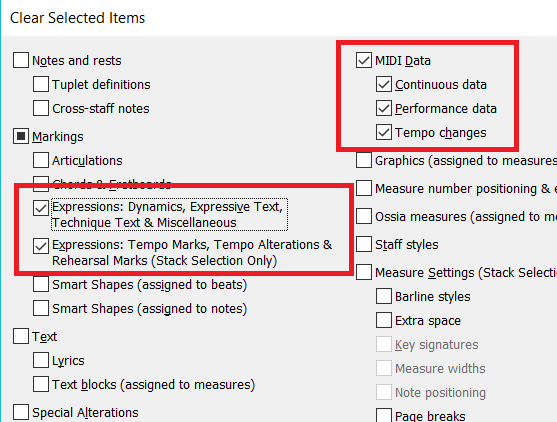
On a copy of your original file

  1. With the Selection Tool (arrow)...
  2. Edit menu > Select All
  3. In the selection panel first click the None button at the bottom
  4. Then configure your checkboxes like this and Apply/OK the changes


At this point your entire file should play at a uniform tempo, the one set in the playback bar at the top of your screen.

Comment actions Permalink
Avatar
0

I have a file that only plays at a uniform tempo.  I have deleted all expression marks and then readded a tempo mark and it will not change tempo. Please advise.  

Comment actions Permalink
Avatar
0

Lee Lamb,


Have you read this entire thread?

Have you tried the tricks mentioned earlier in this thread?

Comment actions Permalink
Avatar
0

Many thanks, Adrian and Peter. That worked! I did need to see the boxes.

FYO: I am learning this song (as recommended by my singing teacher - the composer comes from our area of the UK):

https://www.youtube.com/watch?v=ZkiXpf9OqOg

The tempo changes are important as they represent one dead man and one very alive man. I hope you think it's as beautiful as I do!

Thanks again

Annie O

Comment actions Permalink
Avatar
0

I did read the thread and tried the suggestions, but it didn't work.  I just deleted the doc and reentered everything into a new doc.  Problem solved.  

Comment actions Permalink

Please sign in to leave a comment.