New post
Avatar
0

Hey all!

I'm using Finale 2011.  Needing to typeset a piece with a non-standard key signature.  I know/understand how, in general, to make one.

However, after I go through and indicate for each accidental which I want it to be, the key signature it displays stops at the first natural....so not only does it not display the natural in the key signature, it doesn't even show any of the accidentals after that.

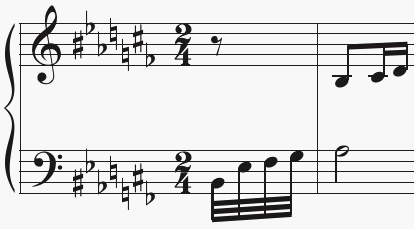
The key signature I'm trying to make is this:

When I create that in the AOrdAmt (-1 1 0 0 -1 -1 1), it displays only the Fb and C#, then nothing after it.
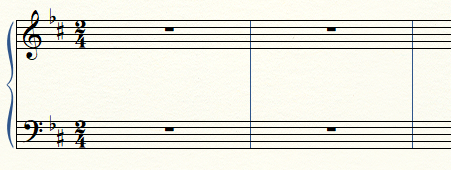
I cannot, for the life of me, figure out how to get it to show the rest of the key signature (including the naturals) and can't seem to find any helpful information on this exact topic.  I guess that when I've done non-standard key signatures in the past, they didn't have naturals in them, so I never ran into this problem before...

Any help would be greatly appreciated!

2 comments

Date Votes
Avatar
0

Maggie Grove,


1) Just curious:

For what instrument is this notation?

My first guess would be Harp.


2) To get naturals in the key signature, use Linear.

Do not use Non-Linear since Non-Linear does not display naturals (as you have found out).

You will have to bypass Linear Key Format 0 and Linear Key Format 1 since they are “hardwired”.

In Other Words:

Try Linear Key Format 2.

In the staff image at the top, use the vertical scroll bar to scroll to 7 accidentals (= 7 flats or 7 sharps).

On the Mac I can just position the cursor anywhere on the dialog box, and scroll up or down.


3) In the dialog box Accidental Order and Amount you can customise both the 7 flats and the 7 sharps.

The 7 sharps are called Unit 1, Unit 2, Unit 3, &c.

The 7 flats are called Unit -1, Unit -2, Unit -3, &c.

To get to the flats, click the button “Prev”.


4) You can have the key signature’s accidentals in any order, in any octave, in any clef.


Comment actions Permalink
Avatar
0

You're correct, it is a harp piece.

Thanks so much!  I managed to work it out now.  I had initially tried Linear, but it kept doing this weird thing where no matter which Linear Key Format I put it on, the scroll bar wouldn't show any keys but 7#s (it acted like I was scrolling through different ones, but they were all the same) and no matter how much I edited the AOrdAmt values, it never changed from 7#s.  That's when I switched to non-linear, thinking I could just make it what I wanted and not realizing it wouldn't show the naturals.  Restarting the program fixed the problem with it only showing the one key option, so I got it to work doing what you said.

Thanks again, much appreciated!!!

Comment actions Permalink

Please sign in to leave a comment.