New post
Avatar
0

    Okay, I only have sporadic access to the Internet so time is critical. How come I can't get the Ossia Tool to actually create an ossia???  I made a third staff, put in the copied (and altered) measures, followed the instructions to produce an ossia at a smaller percentage above the score measure, then did the hide and collapse staff per the instructions and it just made the whole thing disappear!  I don't really have any use for an ossia that's identical to the measure it references so is there any EASY way to do this?  I'm running Finale 26 on a Mac Notebook Pro with the Mojave OS.

12 comments

Date Votes
Avatar
1

First of all, the Ossia Tool is a very old part of Finale.


Today we have other options.


Instead of using the Ossia Tool you can create the ossia as a separate staff - use the Staff Tool, and hide the staff where you do not need it.

In this way it is easy to make the ossia’s barlines align with the corresponding barlines in the score.


If barline alignment is not relevant, consider adding the ossia as a separate system.

You can use the Page Layout Tool to add an extra system.

Comment actions Permalink
Avatar
0

Another method might be to create the ossia as a graphic, and paste it in the score.

Comment actions Permalink
Avatar
0

I would like to add Ossia in a Footnote. How can I do this?

Comment actions Permalink
Avatar
0

Probably best added as a graphic.

Comment actions Permalink
Avatar
0

Any idea how would I tackle this and the footnotes in general? Sorry, I'm new to this and I was kind of expecting a footnote option but there seems to be none.

Comment actions Permalink
Avatar
0

Thanks for your reply, btw :-)

Comment actions Permalink
Avatar
0

What do you mean by "footnotes in general"? Text footnotes would just be done as text inserts. Musical footnotes are probably best handled as graphics. Create the passage in another score, select and export the section that you want, and insert it into your primary.


If you could give us a screenshot or drawing of what you want, we can advise you better.

Comment actions Permalink
Avatar
0

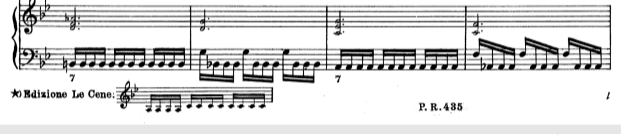
Hi Mike, something like this, but it may need even more vertical space (for two piano bars)

Comment actions Permalink
Avatar
0

I would do it the same way that was done. Just select the two-staff section. Adjust the layout as needed.

Comment actions Permalink
Avatar
0

So you suggest that I adjust the page layout individually to make place for footnote at the bootom and add the text and graphic there (the example I made is a simple one that I could quickly find, I need more place at the bottom of the page, about 5 cm).

Thus, any changes in measures, formating, etc. will not reflect the position of the footnote (i.e. when the measure referenced moves to the next or previous page due to some changes, everything has to be adjusted manually)? Did I get this right?

Comment actions Permalink
Avatar
0

I'm not sure. I don't know if graphics are measure-attached, or page-attached. I'm sure someone who knows will tell us!

Comment actions Permalink
Avatar
0

I've tried, they do not move or at least I do not know how to make them. Still, even if they move it leaves the page layout that needs manually adjusting. I guess the best I can do is make sure that I do this at the end when everything else is done and measure movement is unlikely as it gets.

And thanks a lot for your you help so far!

Comment actions Permalink

Please sign in to leave a comment.