New post
Avatar
0

So, I'm trying to write out lesson materials for guitar students. There really isn't much of anything in manuals to talk about specifics of guitar notation, etc. How do I notate unusual things like unison bends(with two of the same note on one stem), grace noteheads without stems, etc. Like this: 

https://drive.google.com/file/d/16VlJWMTgJi11p3HzcCWdxCX4WIEnO2Ro/view?usp=sharing 


Version 26.1.0.397

Operating System
Windows 10 Home 64-bit
CPU
Intel Pentium B960 @ 2.20GHz
Sandy Bridge 32nm Technology
RAM
4.00GB Dual-Channel DDR3 @ 665MHz (9-9-9-24)
Motherboard
Intel Corporation Oneonta Falls (CPU 1)
Graphics
Generic PnP Monitor (1600x900@60Hz)
Intel HD Graphics (Toshiba)
Storage
298GB TOSHIBA MK3275GSX (SATA ) 
Optical Drives
TSSTcorp CDDVDW SN-208AB
Audio
Realtek High Definition Audio

11 comments

Date Votes
Avatar
0

Michael Crutcher,


Your question is a bit vague.

There is a lot going on in the example you posted.

The better we understand, the better we can help.

Please be as specific as possible:

- Layout or playback?

- Standard staff or TAB staff?

Comment actions Permalink
Avatar
0

Trying to get the notation to work. The layout really screwed this up. Unusual bends and such.

Comment actions Permalink
Avatar
0

Let's start with notation for unison bends. How can I do two noteheads, same pitch, on the same stem? I may be able to do it with layers, but then it's a lot of work to change the stem length to non-existent, especially from an 8th now. Hiding all of the rests in the 2nd layer, moving the "floating head" to the right spot.

It's there some better way to put the two noteheads of the same pitch onto opposite sides of the same stem?

Comment actions Permalink
Avatar
0

Michael, 


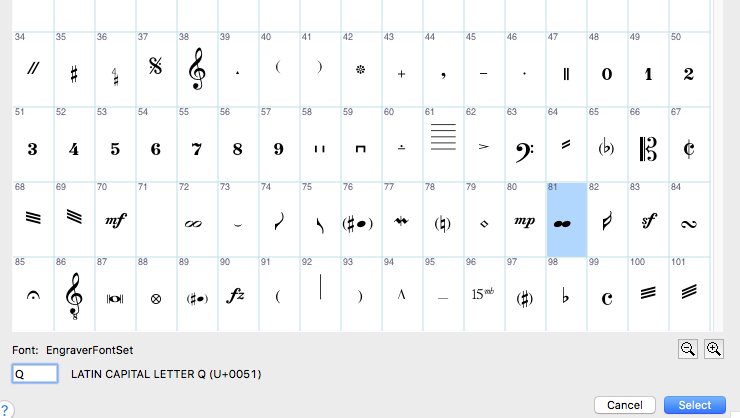
Regarding the double noteheads on a single stem, The Engraver Font Set has double notehead characters setup in that font. They exist for quarter noteheads, half noteheads and whole noteheads.


I would just enter this as a regular single notehead, then use Special Tools/Note Shape Tool to substitute the double notehead character.

Comment actions Permalink
Avatar
0

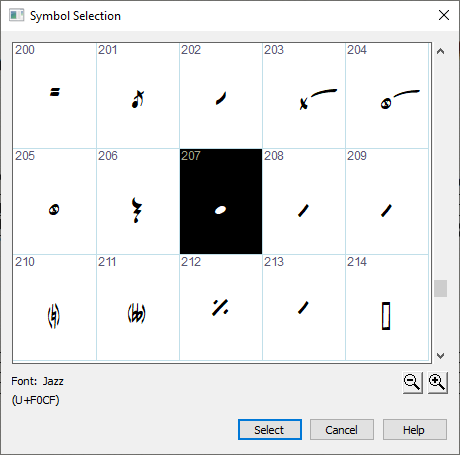
Except that there isn't a double notehead shape in that dialog box. 

Comment actions Permalink
Avatar
0

It's in the Engraver Font Set, not Jazz.


Comment actions Permalink
Avatar
0

How can I change the font in the Symbol Selection box? Do I need to change the font of all of the notation, or can I just change that one character? 

Comment actions Permalink
Avatar
0

You can switch everything to the Engraver Font if you like.


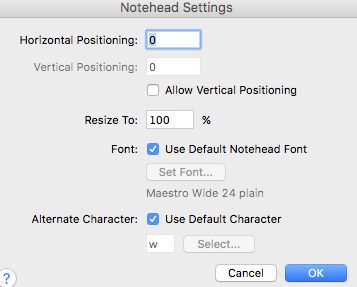
Or you can just use this double notehead from Engraver Font in your file. To do this, open Special Tools, Note Shape Tool. CLick once on the measure that needs the double notehead. Each notehead will have a handle. Control Click on the notehead you want to change, then choose "Edit".

This dialog box will appear.


Uncheck "Use Default Font", then select Engraver Font Set as the font. Uncheck "Use default Character", then select the double notehead character. Click okay and it should be in your document now. It's a bit time consuming but it looks like your document has a number if things that are time consuming. Good luck.

Comment actions Permalink
Avatar
0

To get a double notehead in the Standard Staff, there is no need for a special notehead.

In the Simple Entry Tool, enter the two noteheads as a second.

Then, select the wrongfully positioned notehead, and move it in position with the Arrow key.

In Other Words:

Enter the interval as a second, and then change it to a unison.

Comment actions Permalink
Avatar
0

PETER,


I believe there is a more direct method of getting a unison. At least on PC, pressing the '1' key in Simple Entry gives you the unison.

Comment actions Permalink
Avatar
0

George,


You are right.

The number ‘1’ key also works in Mac Finale - at least in the Default Shortcut Table.

Comment actions Permalink

Please sign in to leave a comment.