New post
Avatar
0

There's is a number you can use for setting more than one syllable on one note. I cant recall it... OF COURSE searching for it in the manual about 15 different ways brings up nothing. Anyone remember?

it's something like - ctrl/shift 0160 

Trying to set multiple words on one whole note.

11 comments

Date Votes
Avatar
0

The answer depends on your operating system. I use a Mac, so we use "option-space" to create a hard space. It's been a while since I use Windows, but I think the keystroke might be "Alt 0160".

Comment actions Permalink
Avatar
0

THATS IT

Now im gonna put this on a post it note.

Why is this so impossible to find in the manual?

THANKS~

Comment actions Permalink
Avatar
0

NO this doesn't work but it's close - someone help!

Comment actions Permalink
Avatar
1

Jeff is correct; Alt-0160 is a hard space in Windows. Greg, what happens when you try it?


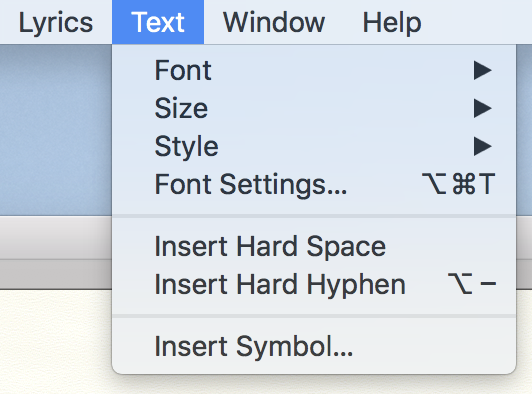
You might also look in the text menu when the Lyric tool is selected. You can apply a hard space from there on a Mac. Is it different on Windows?


Comment actions Permalink
Avatar
0

Yes. With the Lyrics tool chosen, the Text menu allows insertion of a Hard Space into the lyric. ALT+0160 also produces a non-breaking space, but one must type all four digits (including the initial zero) while holding down the ALT key.


(And Mike, thank you. I did not previously know one could use the Text menu while in the Lyrics Tool. Kudos!)

Comment actions Permalink
Avatar
0

I did find the hard space option. You can also get a hard space by holding Ctrl and tapping the space bar.

HOWEVER the alt/0160 not longer works in the version 26. I tried it 100 times

Comment actions Permalink
Avatar
0

Maybe it’s because the newer versions are now unicode savvy, so the ALT codes are no longer needed?

Comment actions Permalink
Avatar
0

Hmm I confess I don't know what a unicode is...however the hard space option works well and is faster.

Comment actions Permalink
Avatar
0

I used the ALT+0160 earlier today, and it worked just fine. Sorry if others are having trouble.

Comment actions Permalink
Avatar
0

How strange...but what version of Finale are you using?, sincein earlier versions it worked.

Comment actions Permalink
Avatar
0

It worked for me, when I was using Windows (up until ‘07 or so.)

Comment actions Permalink

Please sign in to leave a comment.