New post
Avatar
0

For some reason, I've started having poor spacing when starting out editing a part. None of the systems are locked in the part.

I would describe the spacing as having enough room in the bar for the notes, yet they collide anyway.

If I select the entire part and Utilities->Note Spacing->Apply Note Spacing  or Beat spacing it seems to fix it.

I personally think beat spacing makes more sense, and time signature spacing seems to fail most times for me.

I notice that there doesn't seem to be a check mark next to the currently chose spacing for the selected bars.

Is there a default somewhere I should have set that maybe has gotten unset somehow?

4 comments

Date Votes
Avatar
0

The systems will only be locked if you specify a specific number of measures per system when you generate parts, or if you lock them manually.


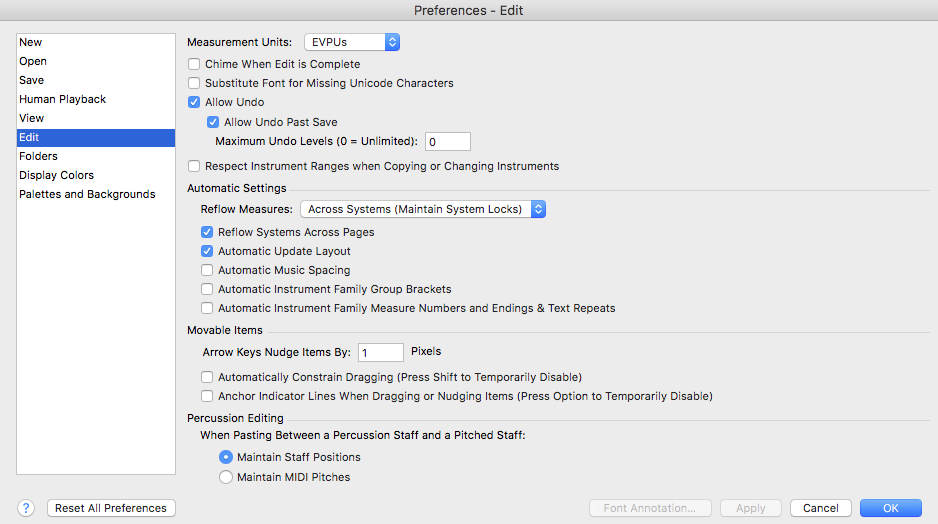
Spacing will be applied automatically if you have selected in your Finale preferences. Same thing with update layout. WHen I'm working on part layout, I prefer to have auto spacing turned off, and apply it manually. Just select a range of measures or the whole document, and press 4. That shortcut applies beat spacing.

Comment actions Permalink
Avatar
0

When I am ready to deal with layout, I

  • Select All
  • Run Music Spacing
  • Lock all systems
  • Then I go through and make individual changes from start to end.


As I make changes I may

  • Unlock all systems from the one after my latest change to the end
  • Re-run Music Spacing
  • Re-lock the systems.


When I reach the end, if I don't like where the music ends on the page, I may work backwards to have the ending come out as I wish.


That's my preferred workflow on Finale. Others presumably have different steps that work for them.

Comment actions Permalink
Avatar
0

Jeffrey,


Thank you. I couldn't seem to find the Preference setting to automatically run note spacing or beat spacing when opening a linked part for the first time.

Comment actions Permalink
Avatar
0

Here's the preference menu (Mac). You can see that I have automatic music spacing unchecked. Put a checkmark here on your computer to see if this is what you're looking for.


Comment actions Permalink

Please sign in to leave a comment.