Hi. I am working on a piece that has the human playback set to swing. I have a few measures at the end where I want it to play in straight time. Is there a way to disable the swing for those few measures?
Finale 26, Windows 10


Yes. You have to set up an expression. Call it loco, or straight eighths, or whatever you like. On the Playback tab, set Effect (or whatever it’s called) to Swing, and the amount to zero.
Why that’s not included, since they have a Swing expression, I don’t know. Remember, if you have multiple staves, you need to Edit the expression category to apply them to all staves.
I’m not 100% sure this will work, when you use HP to add swing. I always use the Swing! expression, myself, and this is how I turn it off.


Sure did--thanks!
HP--Standard
Expression: Expressive Text... Create...
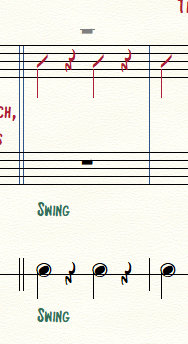
Swing measures: created swing expression, Playback type: Swing, Set to value 100 Standard Swing Values
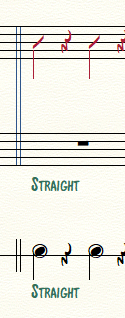
Straight measures: created straight expression, Playback type: Swing, Set to value 0 Standard Swing Values
Only problem; can't get the expression to populate on top staff, even though selected it in the Assign step. May be
b/c it's layer 2? Somewhere, though, I clicked on something that said "show on all layers" or something, so I don't know what's going on with that. You can see in the 2 pics below, the expression doesn't appear on the top staff.
1.
2.
Please sign in to leave a comment.
7 comments
Date Votes