New post
Avatar
0

Hi, I'm making a music sheet with Flute and Piano using Finale 2014.

Until last night, I finished typing all the notes.

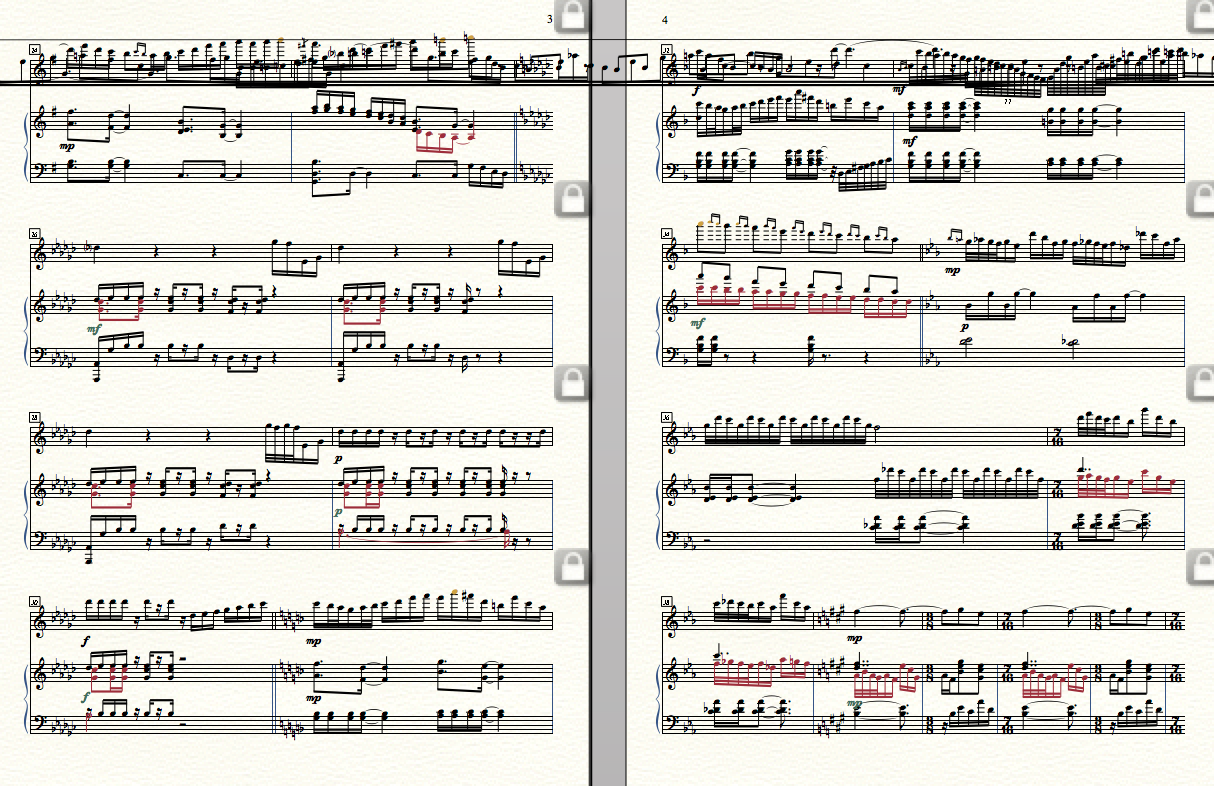
but when I reopened the file this morning, it was all messed up.

I guess the overlapped notes are the latter half of the flute line.

I don't know how to handle it.

Can anyone gives me a tip for this?

https://www.dropbox.com/sh/5q0g683wpjm54zg/AABwJBXPqr4W9f2qkdkXpmpSa?dl=0 
 

4 comments

Date Votes
Avatar
0

I don't know what caused it. I tried exporting as XML, and then, importing it. No change. Then, I inserted a new staff after the Flute, and copied the flute line into it. It looked OK, so I deleted the original flute line. It seems to be working now, on my machine at least. See if it works for you, as well.


https://www.dropbox.com/s/cxm7imsuy5zxzv2/sin%20fixed.musx?dl=0

Comment actions Permalink
Avatar
0

I played with the file also. Don't know what caused it, but the problem is in the flute part in measure 46. Highlight just that one measure and clear all entries from it. AT this point the problem should be gone. Now just re-enter the music into that flute measure. I would try this on a copy of that file, just in case.....

Comment actions Permalink
Avatar
0

MIKE ROSEN// Thanks a loooot. I think I can handle the issue now!

After I made a new flute staff and copied, it showed me the notes on each measures at least.

I'll reorganize the flute part from now on.

Thanks to you that I don't need to work everything again:)

Comment actions Permalink
Avatar
0

Jeffrey Turner// thank you Jeffrey, that you figured out the measure 46. I don't know why I got it..maybe.. 13 triplets...? I don't know..

I might need to re-do or re-organize after copying it.

Thanks for your help:)

Comment actions Permalink

Please sign in to leave a comment.