New post
Avatar
0

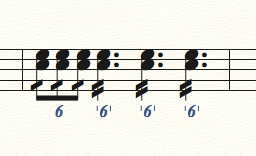
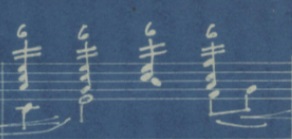
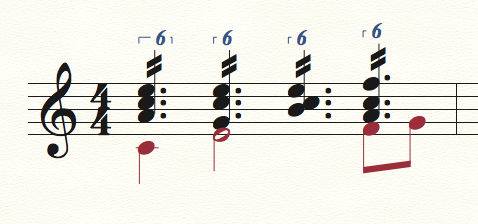
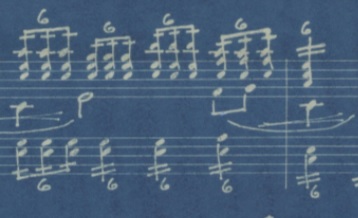
Hello, I am running Finale V.26 and am attempting to input piano sheet music in which repeated sextuplets are abbreviated/simplified with slashes (see picture). I am unsure how to do this, despite looking through the manual and searching for similar questions in the community.
I have tried typing in the quarter note, then selecting the tuplets feature and choosing "six sixteenths in the space of one quarter," then adding the tremolo marking, but am getting very strange results, including an extra rest and playback sounding like four regular sixteenths. 
Would anyone be able to indicate how to do this, with proper playback? Thank you.
17 comments

Date Votes
Avatar
0

The problem is that the piece you are copying is incorrect! If you want 6 beats to play back in the space of 4, you need to show all six beats in the score. Make those quarter notes on beats 2, 3, and 4 into dotted quarters. Then apply the 1-slash articulation to the eighths and 2-slash to the dotted quarters, and all will be well.

Comment actions Permalink
Avatar
0

Hi, Mike. Thank you for your response!

Perhaps my music theory is lacking in this regard, but I don't understand. The piece is in 4/4. Here is another sample measure. Each quarter note is to be played as a sextuplet-- six notes to a quarter, but still four beats to the measure. I don't understand how the dotted quarters could enter into this. For example, if we were dealing with eighth-note triplets, of which four groups are in the measure, each triplet set is equal to one quarter note, not one dotted quarter note. ?

Comment actions Permalink
Avatar
0

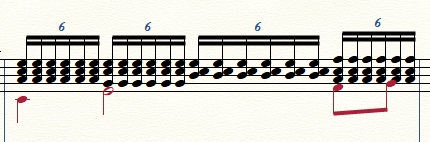
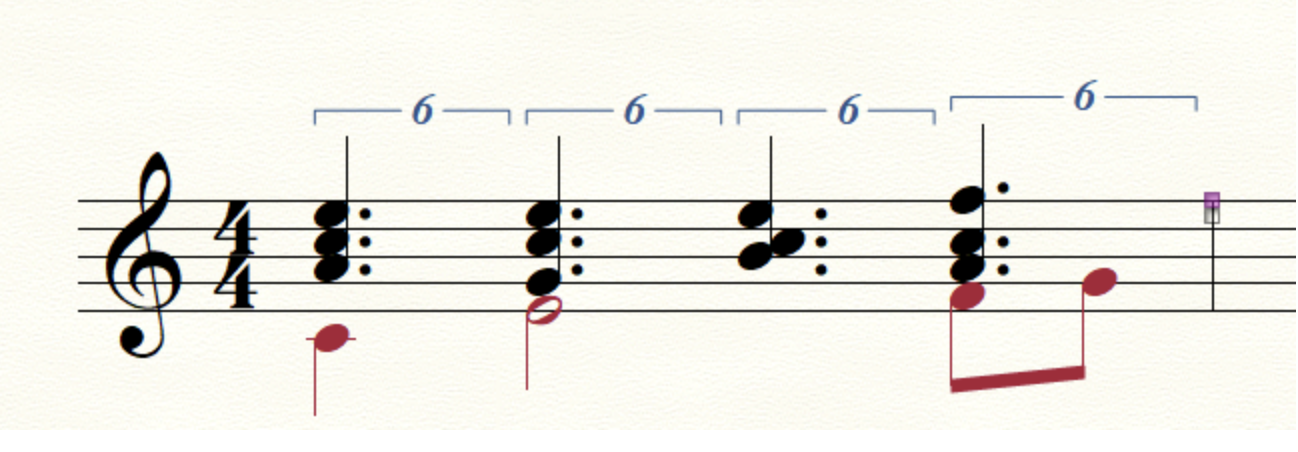
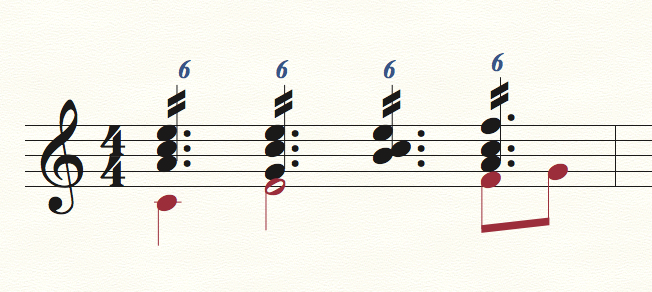
Here is what I have done, but I would much prefer it to be notated with the slashes as above.

Comment actions Permalink
Avatar
0

Do you need it to play back correctly?

Comment actions Permalink
Avatar
0

Yes, I would like playback, though I suppose I could notate the playback version in a hidden layer.

Comment actions Permalink
Avatar
1

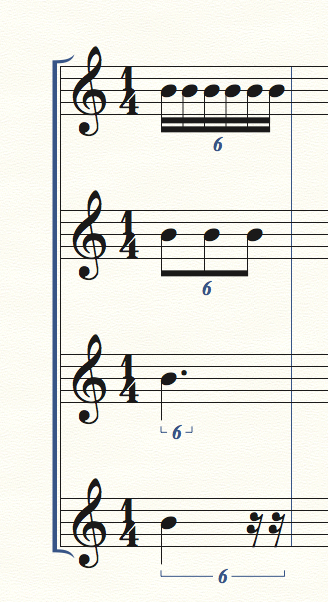
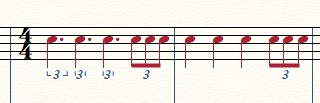
If you did it all in 16th notes, you would show 24 of them, in groups of 6. Your tuplet brackets show that each group of 6 is played back on one beat. A dotted quarter also contains 6 of your 16ths, and again, they play back in one beat.


Take a triplet in its simplest form: 3-eighth notes in the space of 2-eighth notes, you have shown 3 notes, totaling 1.5 beats, but played in the same amount of time that you would use for 1 beat. In your case, you want to show 6, 16th notes, but have them play back in the space of one, quarter note. So, you could use six, 16th notes, or three, eighth notes, or one, dotted quarter. Each of those contain 6 of the 16ths.


I did this example in 1/4, so you can see what occupies one beat, subdivided by 6.


Comment actions Permalink
Avatar
1

Here is your second example. I don't know why the bracket is not showing to the right of three of the numbers, but that's a separate issue. Spacing doesn't seem to be the problem, but I suspect it can be fixed in the document options. I will send this in to tech support.


Comment actions Permalink
Avatar
0

Mike, thank you so much for your solution. You have already gone well above your pay grade!

It turns out the entire problem was indeed what you identified in your first comment: that the quarters should have been indicated as dotted quarters. Like the composer, I also did not realize that. Your image makes it blindingly obvious. Your solution not only works for the notation, but also plays back just as expected. Thank you so much! This is going to save a lot of typing!

Comment actions Permalink
Avatar
0

Glad I could help!

Comment actions Permalink
Avatar
1

Regarding the incomplete brackets, here is the answer I got from MM. I'm not sure I like the way it looks, but I have to admit that it makes the beat division more clear. I would prefer to use just the number, with no bracket.


It appears that the brackets are showing on beats 2, 3 and 4, they are just very small and not aligning properly. Beat 1 is actually not aligning properly either. I think that the nature is tuplet setting itself is causing the poor appearance since there is only one note on the beat.

To get a better appearance you can go to Document Options > Tuplets and check Bracket full duration. This option does not work retroactively though so you will need to select the Tuplet tool and check this option for these in the Tuplet Definition Window. If you now expand the measure with the Measure Tool, you should get good results.  Granted this is a few steps that shouldn't necessarily be required, but this is also not a very typical usage for a tuplet, so probably not very commonly encountered. 

Comment actions Permalink
Avatar
1

Even with no brackets, the number does not align on beat one. I have to call bug.

Comment actions Permalink
Avatar
1

You can change the appearance of already existing tuplets:

Utilities menu > Change > Tuplets…

Comment actions Permalink
Avatar
0

Mike, thank you for pursuing this and posting the follow-up. I am not as concerned with alignment of the numbers, but am still having trouble implementing the tuplet tool properly. I will show it here with triplets.

Whenever I'm doing something "fancy" that Finale does not like in the last beat of a measure, I do one of two things:

a) Notate that beat first, and then complete the earlier part of the measure last;

b) Notate that fancy beat in the first beat of the measure, change the time signature (such as from 4/4 to 2/4), copy and paste the work into a new measure, then go back and change the time signature to 4/4, and have the fancy beat brought back in to the original measure.

On the piece I'm working on (discussed above), this has not been working, since tuplets entered with the tuplet tool do not seem to cut-and-paste. Here are two measures: the first I notated as such (with the fourth beat notated differently because I can't figure out how to get Finale to accept the tuplet tool on that final beat); the second was cut and paste from the first. Notice that the pasting removed the tuplet markings and converted the dotted quarters back to quarters. Given that the music I'm working with has about 20 measures of those sextuplets, a cut-and-paste feature would be quite nice! But, as mentioned above, this is probably not a common need and might require a lot of programming.


Comment actions Permalink
Avatar
1

Carrie Burdzinski,


1) Ending a measure with a tuplet is an issue with the way you enter tuplets.

To solve,

- use one of the other ways to enter a tuplet,

- or simply de-select Check For Extra Notes.

By The Way:

Mike Rosen has a tuplet tutorial on his web site.


2) To copy the tuplets without getting them “retranscribed”, use Stack Selection.

Making a Stack Selection of a single staff in a multi-staff document at first seems impossible, but there is a trick:

Program a Staff Set of just that single staff.

While viewing the new Staff Set (of just that single staff) you can make a Stack Selection of that staff.

Comment actions Permalink
Avatar
1
Comment actions Permalink
Avatar
0

Peter and Mike,

Thank you both. I have bookmarked this page and am learning a great deal about Finale from your suggestions. For years I'd been notating fairly simple music with PrintMusic, and am now being stretched with some more complicated sheet music in the full version of Finale. There is much to learn, but it seems everything is possible!

Comment actions Permalink
Avatar
0

… it seems everything is possible …


If you (ever) manage to find something Finale can not do, please let us know.

Comment actions Permalink

Please sign in to leave a comment.