New post
Avatar
1

OS High Sierra; Finale 25.5

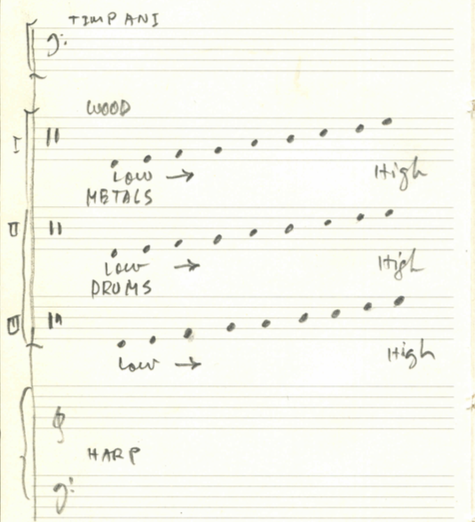
I want to create 3 staves with 9 instruments on each staff and employ standard notation.  In addition, I want to design the placement of an instrument where I want it, not any of the defaults Finale employs.  I've read the manual and watched YouTube videos.  They do NOT address this question in a straight forward manner.  Can you assist me.

Thank you.

Yours,

Erik Lundborg 

33 comments

Date Votes
Avatar
0

Your thread is titled “Percussion Map”.

You have upgraded to Finale v25.5 from an older version (that used Percussion Maps), right?


In v25.5 the Percussion handling is different from the older Finale version you used before.

There are Percussion MIDI Maps, and there are Percussion Layouts.


Somewhat similar to a font, a Percussion MIDI Map is located in a special file in a special folder.

From there the Percussion MIDI Map is available to all your Finale documents.

It is not saved inside the Finale document.

You can create your own, custom Percussion MIDI Map(s), but you never ever need to do so - since the default Percussion MIDI Maps are all, you need (probably).

In the ScoreManager, in the chiclet Instrument List, you can customise the View so that Percussion MIDI Maps are shown.

If your Finale document uses a special, custom Percussion MIDI Map, and you need to send your Finale document to someone else, then you should send the custom Percussion MIDI Map along with the document.

This is similar to the situation where your Finale document uses a special font.


On The Other Hand, a Percussion Layout is saved inside the Finale document.

Again, use the ScoreManager’s Instrument List to view the Percussion Layouts.

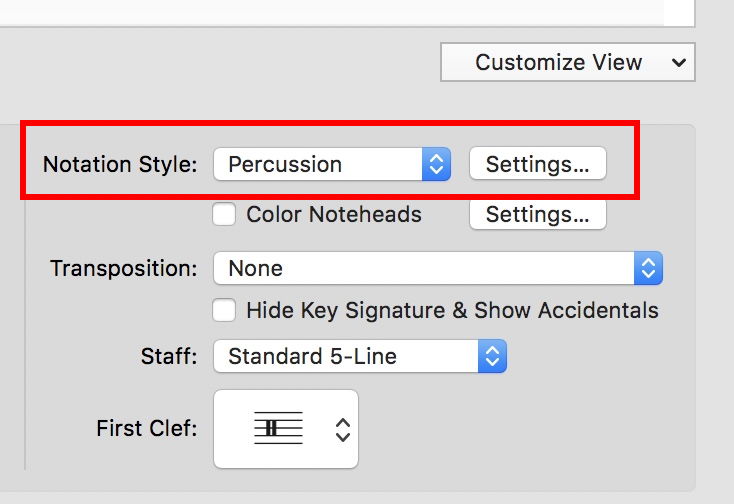
In the pop up menu Notation Style, choose Percussion.

You can create your own, custom Percussion Layout(s).


If you need more detailed instructions, let me know.

Comment actions Permalink
Avatar
0

Peter Thomson:
Thank you! I will attempt to follow your instructions tomorrow.
Best,
Erik

Comment actions Permalink
Avatar
0

Thanks again for taking the time to review this issue!  Please do send exact details as to how to customize a Percussion Layout.  Below, please find where I am presently stuck:

My understanding, so far, is that one one determines which note on the staff is associated with a given instrument by establishing a midi note to that particular instrument, hoping that that instrument is in Finale's list.  (If it's not, then what?). Please see picture, below, of what I'm attempting to do.  Since the clef is a percussion clef and one designates a given midi note as the the pitch uniquely associated with that instrument, I attempted to follow Finale's Percussion Layout by pressing 62 as the pitch for a Bass Drum, but nothing happens when I strike that pitch on the keyboard.  

The implication that one can design the Percussion Layout oneself by selecting the instrument then selecting the midi note for it, dashes any hope of successfully completing the task.  Moreover, if one presses the midi keyboard and literally presses each key on the keyboard, one ultimately reaches an A-flat an octave above middle-C and a minor sixth and a low gong sound is found.  (By the way, no composer would want to employ whatever percussion instruments are already fixed into the staff.). This is confusing, since one would never write an accidental for a non-pitched percussion instrument, nor a pitch that is that high in register.  Completely dumbfounding!  It would suggest that the people who designed the program are not musicians and didn't go to music school.  I'm sorry, but you must've heard this complaint millions of times.  Obviously, it's a great program.  What is needed is extreme clarity and logical assumptions about the procedure.  Of course, I've consulted the internet, YouTube, etc., the Finale Manual and so on, but the instructors on YouTube do not have much clarity, go too fast and make too many assumptions.  

It could be that what I am hoping to do is basically at odds with the way Finale is set up to do, in this connexion? 

(Percussion Midi Map is not understood; I don't know how to see it, access it or do anything to it, as it does not seem to exist in any form that I can fix or change or adjust, despite following your instructions as best I could.)

Thanks again!

Erik Lundborg

Comment actions Permalink
Avatar
0
  • First, you are going to need a separate Percussion Map & Layout for each of your three percussion staves.
  • Second, matching MIDI numbers to instrument sounds will depend what sound set you are using. Addictive Drum sounds may be quite different than Garritan JABB3 or World Instruments.


You start by choosing, adding, or creating a MIDI device and MIDI map connecting MIDI note numbers (given in your soundset documentation) with the corresponding instrument name.


Once you have all your instrument names associated with the MIDI numbers for your sound set, you then go to your Percussion Layout to add and connect each sound with a notehead type and staff position.


The process is quite flexible, but also rather confusing. If you are lucky, your sound set uses standard MIDI numbers (values available via charts on the internet), which would allow you to use the existing MIDI Percussion Map to create your Layout.


If you create a new Map, be sure to save it as a Library so you can load it into future projects.

Comment actions Permalink
Avatar
0

Thank you!  I'll try to do it and see if it works!

Best,

Erik

Comment actions Permalink
Avatar
0

Sorry.  Not working.  

The procedure is to select

1.  "General Midi" first, then

2. "New" then

an instrument like 3. Bass Drum, then

4. enter the midi note value 62 for D above middle-C, then

5. enter Staff Position "0" for middle-C or "1" for the "D" above middle-C in my attached picture, above, then

6. "OK"

No.  The above scenario does not work, so what works?  The staff position is most important to me.  I want that to be under my control, no matter what and Finale keeps sending it back to "0".  Why?

Can you please be crystal clear, even more crystal clear than normal, to describe each step.  Part of the problem here are the assumptions Finale makes.  For example, why should I employ General Midi instead of Garritan's library?  Presumably each have entirely different setups that I need to obey, constraints that are not necessarily logical or intuitive.

Thanks again for your help!

Comment actions Permalink
Avatar
0

Erik,

I really think that, at this point, you should contact tech support, and let them know that their instructions are not clear enough for you to follow. Remember, this is a user forum. It's important for the PTB to know that they are falling short.

Comment actions Permalink
Avatar
0

One more thing: when entering notes in the percussion staff with the hope that by pressing a key on the midi keyboard, say middle-C, Finale MIGHT correctly place the so pressed key on the correct staff position.  But if I methodically ascend by employing the white keys in close succession, Finale skips and places the notes on the WRONG staff position.  How can this be?

Comment actions Permalink
Avatar
-1

Ok, thanks!  "PTB" = Persons To Bother?  Sorry, I've never heard of the abbreviation.

In your experience, do these Finale people really pay attention to poor users like me who struggle with their product?  In addition, how long does it take for them to figure out and follow through on an issue, an issue they have caused?

Comment actions Permalink
Avatar
0

Erik Lundborg,


To help you we need more info from you:


Your attached graphic shows that the first staff has 9 instruments called “wood”.

What instrument is “wood” - precisely?


The middle staff has 9 instruments called “metal”.

What instrument is “metal”?


The last staff has 9 instruments called “drums”.

What is “drums”?


By The Way:

PTB usually means the Powers That Be.

Comment actions Permalink
Avatar
0


Thank you!  Wood, Metals and Drums merely describe the "choir" or group of instruments on a given staff.  That's it.  Since there are hundreds of wood instruments and same for metals and drums, it's too early in the game to specify which exact instrument, within each category, is to be placed on a particular staff position.  Moreover, the instruments Finale provide through each of the possible choices, General Midi, Garritan library and so on, might not have what I need.

For example, the Woods could start low on Large Log Drum and and end on a Small Wood Block or Claves.  Metals might start low on a Garbage Can and ascend to Chinese Water Cymbals.  Drums could start low on Large Bass Drum and ascend to Piccolo Snare Drum or Small Bongo.  There's no good reason to specify the exact kind of instrument that's placed on the staff at this point and I don't want Finale's defaults to determine what I want to write and where to write it on the staff.  In any case, Finale will not let me determine which staff position to place an instrument, as I described above.  There's something wrong with it, something non-intuitive.

If this is a Playback issue, then let's be clear about that from the outset, since probably the instruments I want to hear are NOT in Finale's list of instruments.  Maybe they are.  I don't know.

Comment actions Permalink
Avatar
1

If you don't know what instruments you want, and if playback doesn't matter (unless I misunderstand you) then what difference does the percussion map make?


But I agree, intuitive it is not.

Comment actions Permalink
Avatar
-1

I do know the instruments I want, and ideally, a clean playback of those chosen instruments.  At this point, I can't even enter the data for 1 instrument without difficulty and under my hegemonic control.  What I'm doing now is to try to understand the procedure for entering the data in the correct manner before launching into making a larger map for 27 instruments.  

So, if I change the scenario to just two instruments on a staff, say bass drum and oil can--as a test--how does one do that so the staff position is correct and playback works?

Comment actions Permalink
Avatar
0

Erik Lundberg,


Baby steps.

Keep It Simple.


In this example let us create a staff with 9 Drums.


1) First, a custom Percussion MIDI Map. It will not be saved inside your document, but from its folder (= MIDI Device Annotation) it will be available to all your Finale documents.

Go to

Library/Application Support/MakeMusic/Finale/MIDI Device Annotation


Select the file General MIDI.xml - and duplicate it.

Name it e. g. 9Drums.xml (the idea is that the new Percussion MIDI Map will only contain 9 drums, nothing else).


2) Launch Finale.

Go to

MIDI/Audio menu > Device Setup > Edit Percussion MIDI Maps…

You get to the Percussion MIDI Map Editor.


In the pop up menu Device (at the top) you will find your duplicate copy 9Drums.

Choose it.


In the pop up menu Map, you see a map called General MIDI.

In the line below you can rename the Map - and call it e. g. 9Drums.


From this Map, remove all the Note Types except 9 drums.

This step may take you some time since you have to go through all the Note Types, and decide for 9 of them (all those decisions!).


Click OK.


Just to check it, go back, and take a look:

MIDI/Audio menu > Device Setup > Edit Percussion MIDI Maps…

- make sure the new Percussion MIDI Map “9Drums” is as needed.


3) File menu > New > Default Document


4) MIDI/Audio menu > Play Finale Through MIDI

(is perhaps already selected)


5) Selection Tool. Select the entire staff (all the measures).

Utilities menu > Change Instrument…

Change the Instrument to Percussion.


6) ScoreManager > Instrument List

In the right side there is a pop up menu where you can customize the view.

Select Percussion MIDI Map.

A new column will show up in the Instrument List (Perc MIDI Map).

Choose your new 9Drums.


That was the Percussion MIDI Map. Whew!

Take a break, and dry off the sweat.


Now for a custom Percussion Layout.

Unlike the Percussion MIDI Map, your new Percussion Layout will be saved inside the Finale document.


7) In the Instrument List, next to Notation Style: Percussion, click the button  Settings…

You get to the Percussion Layout Selection.


8) Select the percussion Layout “Percussion” (at the top), and duplicate it.


9) With the duplicate copy selected, click Edit…

You get to the Percussion Layout Designer.

Name your new Percussion Layout (perhaps 9Drums?)

For each drum, set its Staff Position as needed.


When you return to the score, you have a Percussion staff with 9 drums.

And it plays back correctly.


I just tried it, and it works for me.

Comment actions Permalink
Avatar
0

Thanks, Peter. This is definitely going in my scrapbook!

Comment actions Permalink
Avatar
0

Wowed!  Thank you!  I'll try to follow your instructions and see if it works.E

Erik

Comment actions Permalink
Avatar
0

Peter,


Your instructions are VERY good, but I still cannot duplicate what you did.  I don't know at what step the thing refuses to work.  The drums in the Percussion Layout simply play pre-existent sounds unrelated to those I painstakingly selected and positioned in the staff.  I didn't realize that to position a note connected to a sound, one had to actually move the notes up or down instead of entering number value.  Once I figured that out, I thought I'd be hitting a home run but no.  I placed the 9 drums I had hoped to hear but the default instruments performed.

The first set up that's accomplished outside of Finale and within Library/Application Support was difficult to even find.  It's not listed within the Library on the HD.  I had to consult the internet for the correct path.  I could set up a 9 Drum Percussion Map but that didn't work either.  I am mystified by the Midi/Audio: Play through Midi rather than Audio Units.  I never choose "Play through Midi."  Can you explain.  Moreover, the Percussion Midi Map, since it's independent of any particular Finale file, what is it exactly?  Something one can access for ANY Finale file for future use?

Thanks again!

Erik

Comment actions Permalink
Avatar
0

… I didn't realize that to position a note connected to a sound, one had to actually move the notes up or down instead of entering number value …

Entering a number value in the field Staff Position does work.

The trick is that you will not see a change in the Percussion Layout Designer until you click in another text field.


… I placed the 9 drums I had hoped to hear but the default instruments performed …

I am not sure what went wrong for you; it works for me.


… I am mystified by the Midi/Audio: Play through Midi rather than Audio Units.  I never choose "Play through Midi." …

It is a matter of two different ways of producing instrument sounds.


“Through MIDI” means that the sounds are generated by the computer, via mathematical formulas.

This sound technique does not take up much hard disk space, and you can get any pitch (high/low).


“Through Audio Units” means that the sounds are generated by playing sound samples.

This sound technique takes up a lot of hard disk space (and RAM), and you can only get the pitch range that is included in the sound set.

Any notes outside the range will not play.

On The Other Hand, you can get more realistic sounds via Audio Units.


… Moreover, the Percussion Midi Map, since it's independent of any particular Finale file, what is it exactly?  Something one can access for ANY Finale file for future use? …

It is “exactly” located in a special file (= not inside your Finale documents).

Just like a font, a Percussion MIDI Map is available to all your Finale documents.

(You probably already know that fonts are not located inside your Finale documents)

Beware, though, that if you create a Finale document that uses a special font, or a special Percussion MIDI Map, and send the Finale document to another Finale user, then you must also send the font or Percussion MIDI Map along with the Finale document.

Comment actions Permalink
Avatar
0

Sorry, I don't know why it's not working.  Could it be the original choice of sounds, like General MIDI or Garritan, is the source of the problem?

Thanks again for taking the time to assist me.

Erik

Comment actions Permalink
Avatar
0

… I don't know why it's not working.  Could it be the original choice of sounds, like General MIDI or Garritan, is the source of the problem? …

I am afraid I do not understand.

Where in my post did I make “the original choice of sounds, like General MIDI or Garritan”?

I have read my post several times, and I can not find my “original choice of sounds”.

Are you perhaps talking about the time when I duplicate the file ‘General MIDI.xml’ (and re-name the duplicate copy to 9Drums.xml)?

Inside the file ‘General MIDI.xml’ there are some Percussion MIDI Maps.

In my duplicate copy ‘9Drums.xml’ I created a new Percussion MIDI Map by customising an already existing Percussion MIDI Map.

Comment actions Permalink
Avatar
0

Sorry! Maybe I can’t read properly or confuse many separate items. I will attempt to follow your test word for word again.
Thanks!

Comment actions Permalink
Avatar
0

Peter,

Thanks again for your patience.  I tried your approach again and it did not work, unfortunately.  I see that you did not choose any sound source such as General MIDI or Garritan, but with the following advice from Mr. Cusick from Make Music, I was able to correctly place a given sound on a line or space and actually see that the sound is there with the small text in the staff next to a Speedy Entry vertical bar.  I cannot hear the sounds in playback, but I can enter the pitches with a non-sounding keyboard (?).  The concept now makes a little more sense given the explanation below from Mr. Cusick:

"Erik,

After reading through your forum thread and given the information here, there seems to be some basics that are being overlooked here. Playback Device, can be Garritan or General MIDI sure, but you also need to be concerned with the playback Sound. What this is and has sound samples for is essential for what you are trying to do. In order to understand this better I think we need to take a look at a basic document rather than a custom one.

Go to File > New > Document From Setup Wizard. Choose Create New Ensemble and keep Engraved Style selected. Press Next. For instruments choose Percussion in the left column and Percussion right column and add this. Finish the setup. 

When the document opens, go to MID/Audio > Audio Units Banks and Effects... Now click on the Edit pencil next to the ARIA Player that is loaded there. The ARIA Player will open and you will see Basic Orch. Percussion on track 10, click just below the 10 to select this instrument.

The keys that turn white on the virtual keyboard are keys that have samples assigned to them. Click on the keyboard and you can hear the sound for the MIDI note. You cannot change these and adding note types in the percussion MIDI Map Layout will not change this either. The sounds available here are not dictated by the Percussion Layout but rather the layout has to be setup to work with this.

While you can move the Bass Drum note type's position on the percussion staff with the layout, this will not change the location of sound in the ARIA Player instrument nor does it change the Note Number sent by this note.

Does this make sense?"

BUT, it still doesn't work.  I'm appalled that it's taken you and me so long to figure this out.  Sorry to inconvenience you!

Best,

Erik

Comment actions Permalink
Avatar
0

Peter,

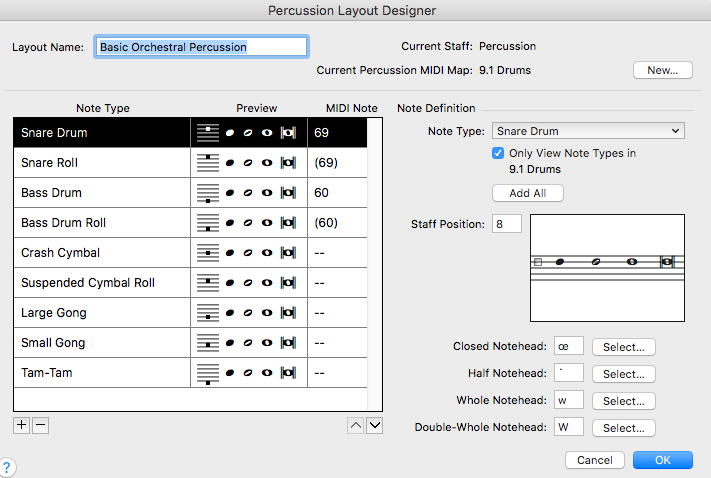
If you can please take a peek at the image below.  The MIDI Note indicated: is it correct and is it intimately connected to a given sound source, such as Garritan or General MIDI?  In the 9 Drums I designed, isn't there a sound source where these instruments come from and, as Mr. Cusick says, has a Midi Note established as its location inside the sound source, but that is not where a given sound is located in the staff.  That is something the user controls.  Yes?

Thanks again!

Best,

Erik

Comment actions Permalink
Avatar
0

Erik Lundborg,


I am not sure I understand, but I shall try to answer you:


… The MIDI Note indicated: is it correct and is it intimately connected to a given sound source, such as Garritan or General MIDI? …

I am not sure what you mean by your word ‘correct’. Please explain.

Also, I am not sure what you mean by your words ‘intimately connected’.


… In the 9 Drums I designed, isn't there a sound source where these instruments come from and, as Mr. Cusick says, has a Midi Note established as its location inside the sound source, but that is not where a given sound is located in the staff.  That is something the user controls.  Yes? …

Yes, the user controls where a given sound is located in the staff.

That is the idea with a Percussion Layout.

You control the vertical position by entering a number in the field Staff Position.

When you have entered a number in the field Staff Position, you will not see any change until you click another text field (see my previous post).

Comment actions Permalink
Avatar
0

The MIDI number of a sound is specific to the soundset you use. If you are not sure what the note number of a specific soundset is, read the manual for that soundset.

Comment actions Permalink
Avatar
0

Adrian,

Thank you kindly for contributing to my misery and attempting to fix it!

This discussion assumes I want to hear playback of the instruments I've designated in a given percussion staff.  Ideally, I want to have three staves with 9 different sounds in each staff: Percussion I-Drums; Percussion II-Metals; Percussion III--Wood

Please look at the Percussion Layout Designer, above.  The MIDI Note in the above example indicates Midi Note 69 as a Snare Drum, then the following one Snare Drum Roll as Midi Note (69).  Why are there parentheses around "(69)"?  To me, this is confusing.  I would think that each and every sound from a given "soundest," as you call it, would be identified with a unique number from 0 to 127.  Moreover, in the example above, the remaining instruments, Crash cymbal, Suspended Cymbal Roll, Large Gong, Small Gong and Tam-Tam, aren't identified by a Midi Note at all.  Why?  The user has not control over those Midi Note numbers, do they?  Those are preset by the manufacturer, aren't they?

Peter,

MIDI Note and the word "correct": all I meant was that the Midi Note associated with a given sound is a fixed and locked item that the user has not control over, since it's buried within Garritan or General MIDI or whatever manufacturer.

Regarding the Staff Position, I seem to now have control where a sound is located in the staff and thank you for explaining it, but I cannot hear anything that I place in the staff.  I hear instead those sounds that are preloaded and happen to occur in the staff I'm using, namely, D4 to E5.

Thanks again for everything!

Erik

Comment actions Permalink
Avatar
0

You need to figure out the MIDI numbers from the Garritan Manual. The ones you see in parentheses in the Layout screen are not available in the soundset/map you are using.

Comment actions Permalink
Avatar
0

Adrian,
Ok, thanks!
This is new information to me, as I thought “Midi numbers” are actual numbers, not descriptions in common musical terms., as displayed above. Besides this additional confusion, what is a “Midi Note” as distinct from Midi Number?” As you can see the example I provided above, there’s no “Midi Number” only “Midi Note.” Please clarify.
Thanks!
Erik

Comment actions Permalink
Avatar
0

Middle C on a keyboard is MIDI Note 60. Whether notation systems call that C3 or C4 depends; they are not consistent.


There are other MIDI numbers to control other functions: Continuous Controller (CC) codes affect various options of attack velocity, volume, panning, and the like, depending whether the receiving device (software or hardware) has been designed to receive them.


I do not know why Garritan manuals describe MIDI functions by note name rather than MIDI code, perhaps to aid folks playing live with Garritan sounds, but I do know that Finale has an option hidden somewhere to show the MIDI numbers of notes in a percussion staff (reflecting whatever has been designated in your Percussion Layout).

Comment actions Permalink
Avatar
0

Thank you!

Yes, I understand the distinction between MIDI Note and traditional musical notation that defines where a pitch is located in register.

I still have a problem hearing the percussion instruments I choose in playback.  Do you know the procedure to get a given sound to make noise?

Thanks again.

Erik

Comment actions Permalink

Please sign in to leave a comment.