New post
Avatar
0

I have a percussion part with slash notation on layer 1 and ensemble hits on layer 2 but only the slash notation is displaying. When I click on the measure with the Speedy Entry Tool, layer 2 shows up (and I can edit) but disappear as soon as I click off. Strangely, I'm able to get both layers to display on other measures without a problem. 

5 comments

Date Votes
Avatar
0

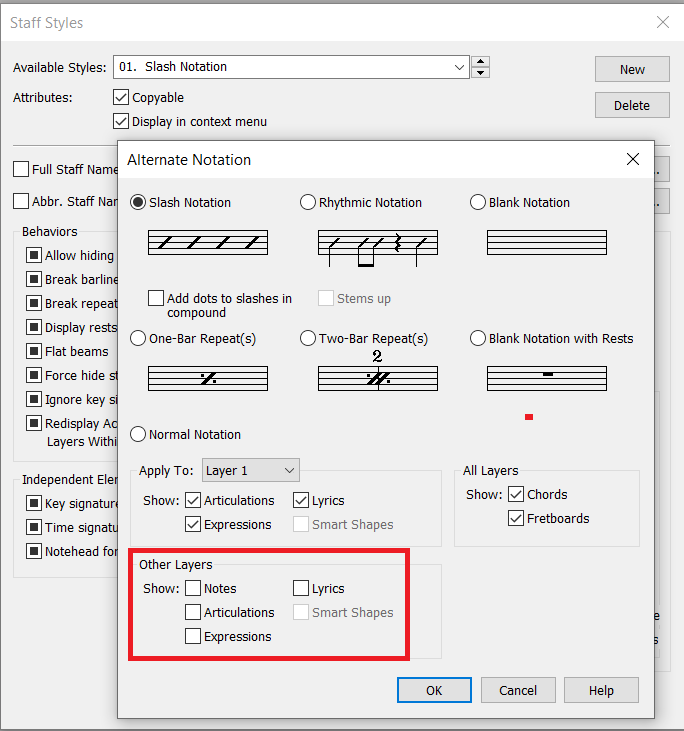
Fiddle with this in Staff Styles and see if that works.


Comment actions Permalink
Avatar
0

Thanks. That's the first place I went and it work but it changes the entire part globally which messes with my other notation. Even if I just select a measure or 2 it changes every in the part.

Comment actions Permalink
Avatar
0

In that case you probably need an extra, custom staff style you can apply “locally”.


You do understand that there is a difference between the (global) Staff Attributes and a (local) Staff Style, right?


You did notice that Adrian’s screen shot shows a Staff Style, right?

Comment actions Permalink
Avatar
0

Yes, but how do you apply a custom staff style "locally"?

Comment actions Permalink
Avatar
0

By definition, a Staff style is a configuration that is used to differ locally from the Staff Attributes, which are global (as Peter mentioned).

While in the Staff tool, select a region and apply a staff style via the Staff menu (an existing one or one that you created).

A staff style can be applied to the score AND parts OR to one of the two.

Comment actions Permalink

Please sign in to leave a comment.