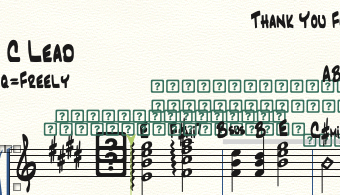
I wrote this arrangement in 2008. Just bought v26 and tried to open it. Why does it look like this? Please help! I have read around a few of the forums but I'm still confused.
running iMac 2013 Mojave


I'm not sure that your Jazz fonts are not recognized, as the music mostly displays OK.
Try to install the MakeMusic Font Pack : https://makemusic.zendesk.com/hc/en-us/articles/217585418-Music-fonts-display-incorrectly

HEY GOT IT WORKING!! Thanks Michel the link you sent had a hidden menu I had to expand. The detailed explanation WORKED. Thanks all!
Now I have to figure out why the audio is not working. Did "rewire reset" when I got the audio engine failed to load. Now I have to see why there's still no sound.
Will create new ticket here if I need advice. Many thanks to all!!! Happy charting.
NEVER MIND I got the sound working looks like the > Window > Mixer has everything set to MUTE and one track is SOLO'd by default. Strange.
All good thanks again everybody.
Although I will say it's super weird that the space bar doesn't work to play back music unless the playback window is open.
>HEY GOT IT WORKING!! Thanks Michel the link you sent had a hidden menu I had to expand. The detailed explanation WORKED. Thanks all! <
Great! It normally does — that's why I wanted you to try it first.
>Although I will say it's super weird that the space bar doesn't work to play back music unless the playback window is open.<
There are some iOS apps that don't follow that convention. I had to stop using them over that.
Please sign in to leave a comment.
12 comments
Date Votes