New post
Avatar
0

Hello!

I am currently composing a piece which requires the use of multiple nonstandard key signatures, however I am running into a great deal of difficulty trying to understand how to use more than one in a single document. For whatever reason, every time I shift to a new nonstandard key signature in the piece, the old one(s) are changed as well. How can I use multiple nonstandard key signatures?

Thank you for whatever clarification you may be able to provide! :)

5 comments

Date Votes
Avatar
0

The better we understand, the better we can help.


A clear description of all the nonstandard key signatures would clarify a lot.

- only standard accidentals (flat, natural, sharp), or microtonal accidentals?

- standard diatonic scale pattern, or some sort of other (micro-chromatic) scale pattern?


Also, are the key signatures simultaneous (= vertically below each other, playing at the same time), or are they playing after each other (= horizontally after each other, like different movements)?


By The Way:

What version of Finale?

Windows or Mac?

Comment actions Permalink
Avatar
0

The key signatures used only use standard accidentals and carry a standard diatonic scale pattern, and they occur after each-other. I am using Finale v. 26 on Mac.

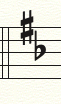
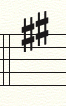
Should it be useful, I have also attached images of the signatures being used thus far.

Comment actions Permalink
Avatar
0

Jack Reeves,


I see no problems in the two nonstandard key signatures shown in your attached graphic.

Finale can do that.

In the dialog box Nonstandard Key Signature, click the button Next twice, to get to Linear Key Format 2 (since Linear Key Format 0 is “hardwired” as major, and Linear Key Format 1 is “hardwired” as minor).


For the following key signature, use Linear key Format 3 (not Linear Key Format 2 again!).


Not that it matters, but I wonder about the accidental order.

Why not the flat first, and then the sharp?

Is there a “demand” for a specific accidental order?

(Just a thought)

Comment actions Permalink
Avatar
0

I'm sorry; I may not have been clear about the error at hand. The creation of the keys isn't the problem, in fact I took those screenshots from keys that I created in the score. It's just that for some reason, whenever I try to input the second of the two later in the score, the first key from before is changed to the second as well. It's as if I can only have one nonstandard key signature in a document (which I'm sure is not the case). As for the order of having the sharp placed prior to the flat, it's simply the convention which I was formerly made familiar with and prefer the visual aesthetic of. No particular reason outside of that.

Comment actions Permalink
Avatar
0

Thankfully, I've found the solution to the conflict I was facing. I simply wasn't thinking to switch the value of the nonlinear key format. I believe I should be all good from this point on :)

Thank you for your contributions!

Comment actions Permalink

Please sign in to leave a comment.