New post
Avatar
0

I am running Finale vs. 25.0.0 on my MacBook Pro (OS 10.11.6).

Although I CAN change the SETTING for the Chord Font (Document->Document Options->Fonts->Chords) , when I put a new chord in the document, Finale uses the original Jazz font.

Has anyone out there found a solution to a problem like this?  

4 comments

Date Votes
Avatar
0

In order to give you the best possible help we need more info from you.


In the sub-menu for

Document->Document Options->Fonts->Chord

there are four menu items:

Symbol

Suffix*

Alteration

Fretboard


● About which menu item are you talking?


Notice the * on the menu item

Suffix*

This means that a font change will only affect new suffixes.

Already existing suffixes are not affected by the font change.


● Do you need to change chord suffix font(s)?

Comment actions Permalink
Avatar
0

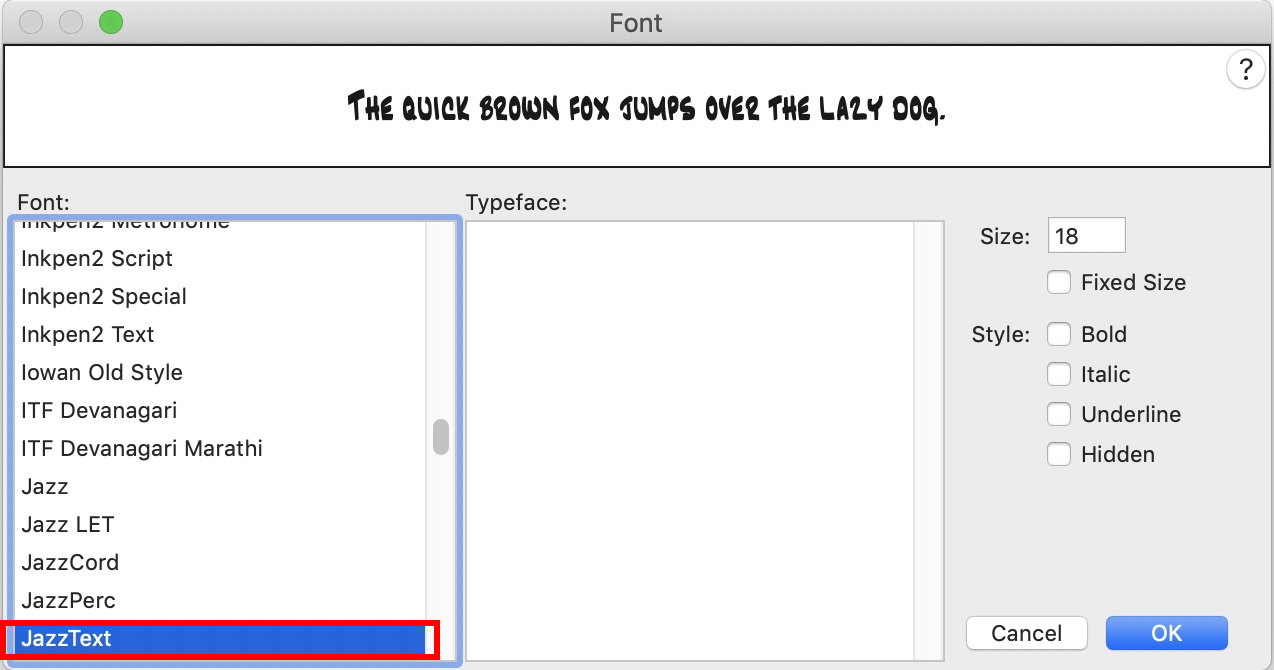
In both the suffix edit and the chord symbol edit areas, I can see that I have changed the fonts.

And I can close the document and then re-open and still see the new choice of font(right below the drop-down menu).
 
But when I delete the chords from the first staff, and then enter chords anew, the the chord symbol and suffix default back to the Jazz font.
 
I suppose I can create a new document, and re-enter all the music notation, but that sure seems wonky. 
Comment actions Permalink
Avatar
0

… In both the suffix edit and the chord symbol edit areas, I can see that I have changed the fonts.

And I can close the document and then re-open and still see the new choice of font(right below the drop-down menu) …
 
Just to make things clear:
● By your words “the suffix edit and the chord symbol edit areas” you mean the dialog box Font (which you get to from Document->Document Options->Fonts->Chord by clicking the button “Set Font”), right?
● And by your words “the drop-down menu” you mean the leftmost column, right?
 
 
Comment actions Permalink
Avatar
0

Yes. that is right. 

But - after restarting my macBookPro, the Fonts for the Chord Symbol and the Chord Suffix now display, and print out, as specified. 

I rarely see this kind of behavior on a Mac, but used to see it all the time on Microsoft based systems.

Anyway, I did not have to re-start from scratch, which makes me happy.

Comment actions Permalink

Please sign in to leave a comment.