New post
Avatar
0

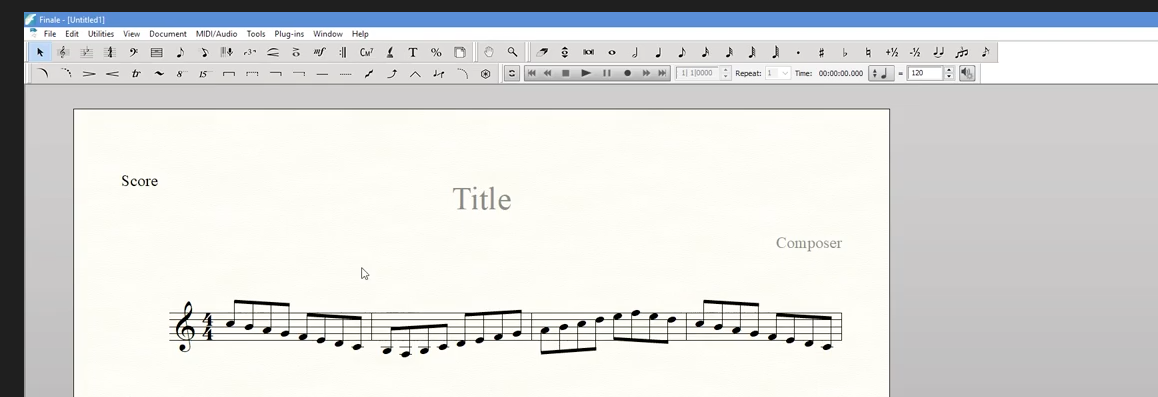
Hi everyone, I am using Finale 26 on a macbook pro 2017 and a 2009 Mac Pro desktop. Would anyone be able to tell me if i can customize the Finale toolbar like the picture i have attached to this post. I believe the user is on a PC, but i like the idea of changing out of floating menus to something more consolidated. I cannot find a "customize toolbar" option for Mac.

Thank you, 

- Mark
13 comments

Date Votes
Avatar
0

The toolbars can be customized on a Mac but they cannot be anchored like on a PC.

Comment actions Permalink
Avatar
0

Thank you, Mike

Comment actions Permalink
Avatar
0

How can they be customized? The best I'd been able to do is to try to rearrange some icons for functions I don't ever use and then carefully shrink the toolbar to, in effect, hide them. I'd been told it is not possible in macOS to remove functions (eg, simple entry, a few others) that I don't use. Yes, very true one cannot really anchor them.

Comment actions Permalink
Avatar
2

Let's collectively chant: we want an anchor, we want an anchor, we... Lol


Comment actions Permalink
Avatar
0

>Let's collectively chant: we want an anchor, we want an anchor, we... Lol<


Big thumbs up on that. I understand the desire—Mac users have been asking for many years—but it's not my issue. I like the floating toolbars but I want the toolbars to stay put. I use multiple monitors and put the toolbars on my side monitors — every damned time I open Finale. We should have the options.


There are other apps that I use frequently or every day where the window assignments are just as I left them including all my browsers, Digital Performer (going back to 2003, I think). I'd ask, How hard can this be? but, without access to the source code, I have no idea.

Comment actions Permalink
Avatar
0

While anchoring would be nice, for me (and I suspect others as well), it would be great to be able to hide elements from the toolbar without having to go through a major effort to rearrange and hope a dragging to hide some of those rearranged elements sticks. I suspect many of us are tired of accidentally clicking the simple entry tool and having to hit Esc to stop from entering unintended notes. If I think of all the times I've done that (I never use simple entry-sorry) over nearly three decades, I'd probably have composed a lot more music ;-)


Thanks.

Comment actions Permalink
Avatar
0

The smaller palette is what I got after dragging unwanted things to the right and then carefully dragging the toolbar from the lower right to the left to just cover those elements up. It usually sticks but not always. Also don't use Hyperscribe and have hit that one too many times by accident as well. 

Comment actions Permalink
Avatar
0

Oh... My... God... Please, make them dockable. I don't understand why we can't have that on Mac. The only reason for me to like Finale on Windows is that, and I really dislike Windows. Is there at least one reason, good or bad, for not having that option? For me is a major issue having floating windows around. Mess with my ADHD.

Comment actions Permalink
Avatar
0

It’s absurd. Not only should it be dockable if desired (I mean, even crappy electron apps can do that) but customizable.  

Comment actions Permalink
Avatar
0

If you press and hold the shift key then click on any tool in the palette... you can reposition the highlighted tool anywhere in the palette. Similar to arranging app icons on an iPhone home screen.   Then re-size the palette to hide the tool buttons you don't want to see. To resize the palette - position your pointer in lower right corner of palette, when the pointer changes to the double ended arrow, click and drag to resize.

Comment actions Permalink
Avatar
0

"If you press and hold the shift key then click on any tool in the palette... you can reposition the highlighted tool anywhere in the palette. Similar to arranging app icons on an iPhone home screen.   Then re-size the palette to hide the tool buttons you don't want to see. To resize the palette - position your pointer in lower right corner of palette, when the pointer changes to the double ended arrow, click and drag to resize."


As mentioned in my post above from three years ago. But it doesn't always stick and it's a clunky solution. I want to be able to remove/hide things like simple entry that I never use and only show what I do use, which is way more efficient.

Comment actions Permalink
Avatar
0

Has this been posted in Feature Requests lately?

Comment actions Permalink
Avatar
0

Not recently but in the past, yes. Nothing ever happened. 

Comment actions Permalink

Please sign in to leave a comment.

