New post
Avatar
0

Hi all!


I'm running Finale 2014.5 on an iMac 10.11.  I'm working on a score where the trumpet has some extended rests.  To help keep the player engaged while counting rests, I put cues from the violins in the trumpet part.  I used the plugin to create the cue notes so the cues are in Layer 4 in the trumpet part.  They display just fine in Score View but they disappear when I view just the trumpet part on its own, either in scroll or page view.  The label for the cue notes is still visible but there's no notation on the staff.  What am I doing wrong?

11 comments

Date Votes
Avatar
0

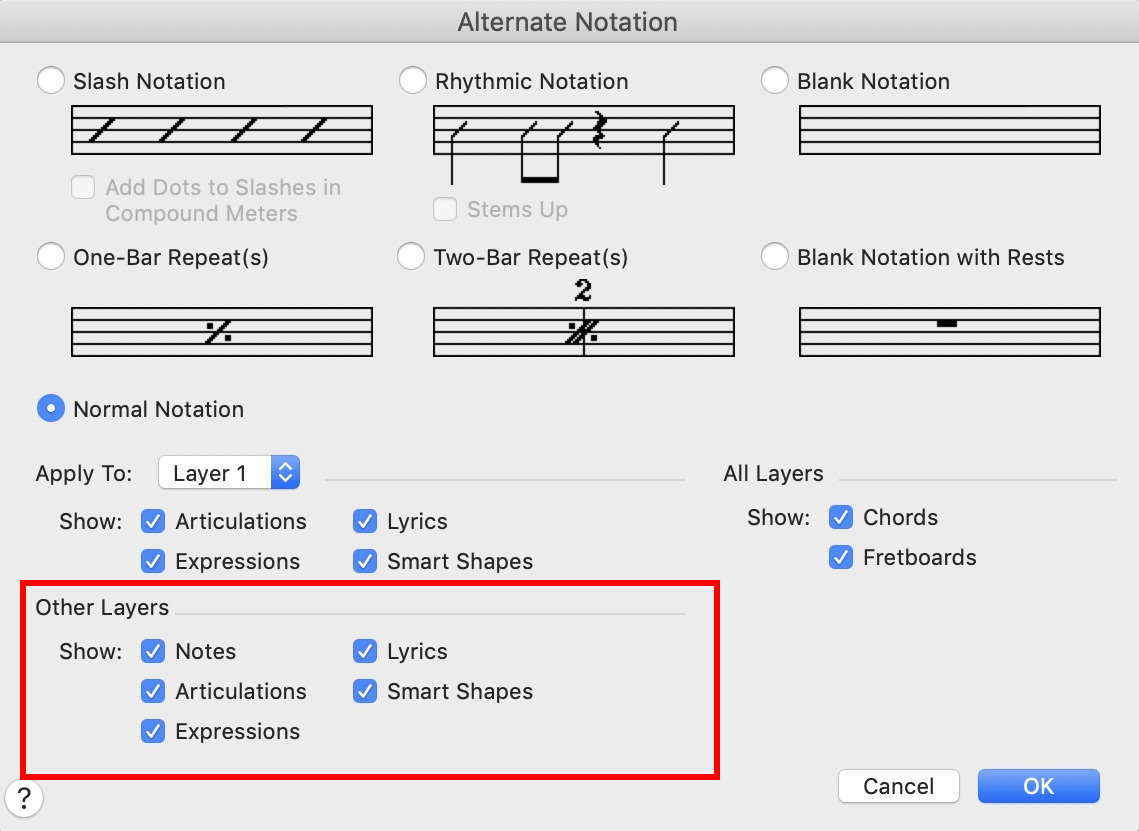
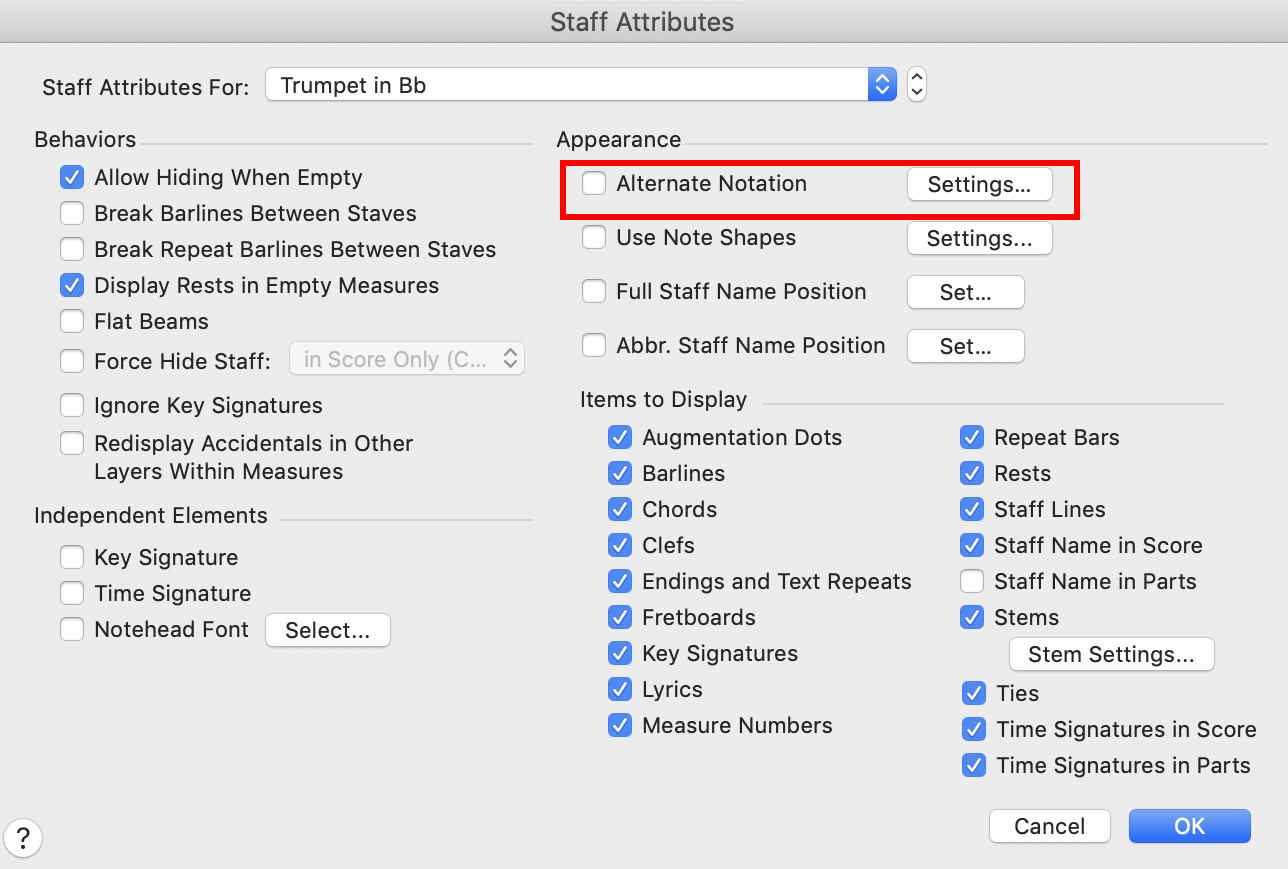
My first guess would that the Staff Tool is the culprit, possibly in the Staff Attributes, or in a custom staff style:


Comment actions Permalink
Avatar
0

That was the first place I looked but there were no Staff Styles applied.  I even tried clearing Staff Styles from both score and parts just in case but that didn't fix the problem.

Comment actions Permalink
Avatar
0

To add more information about what I've tried, I've done the following:

• Cleared the cue notes from the trumpet part and recopied them from the violin part using the "Add cue notes..." shortcut.

• Tested cue notes in other staves.  Cue notes come through just fine when viewing just the violin part.

• Tried moving the cue notes in the trumpet part to Layer 2.  They still don't come through when viewing just the trumpet part.

• Tried applying and clearing various Staff Styles to the trumpet part.  Nothing changes.

Comment actions Permalink
Avatar
0

… That was the first place I looked but there were no Staff Styles applied.  I even tried clearing Staff Styles from both score and parts just in case but that didn't fix the problem …


And what about the Staff Attributes?

(I wrote: … possibly in the Staff Attributes, or in a custom staff style …)


Comment actions Permalink
Avatar
0

Yes, I went through all the Staff Attributes.  I tried everything in that menu, especially the Alternate Notation settings.  No matter what I set them to, the cue notes disappeared when I viewed the trumpet part on its own.

Comment actions Permalink
Avatar
0

In that case we may need to examine an actual Finale document with the problem.

You can not attach a Finale sample document here, but you can upload the Finale document elsewhere, and then here add a hyperlink to the document.

Comment actions Permalink
Avatar
0
Comment actions Permalink
Avatar
0

You cues are hidden in the multimeasure rests. The easiest fix is under document options/multileasure rests, put a check next to "update automatically". Then click apply.


Now check your cues.

Comment actions Permalink
Avatar
0

Good suggestion but incorrect.  The multimeasure rests are breaking correctly to display the individual measures that contain the cues.  The labels for the cues are there but the notes themselves are not.  Cue notes are displaying correctly in all other parts where I have used them.  I see them just fine in score view but they go away when viewing the individual part, whether that's in page view, with the multimeasure rests, or in score view, with no multimeasure rests.

Comment actions Permalink
Avatar
0

Toby Hanson and Jeffrey Turner,


You are both right.


Jeffrey is right that the Violin part cue at m. 23-24 is hidden in a multimeasure rest.


Toby Hanson is right that there is something wrong in the Trumpet part.


And it is not just the cues notes:


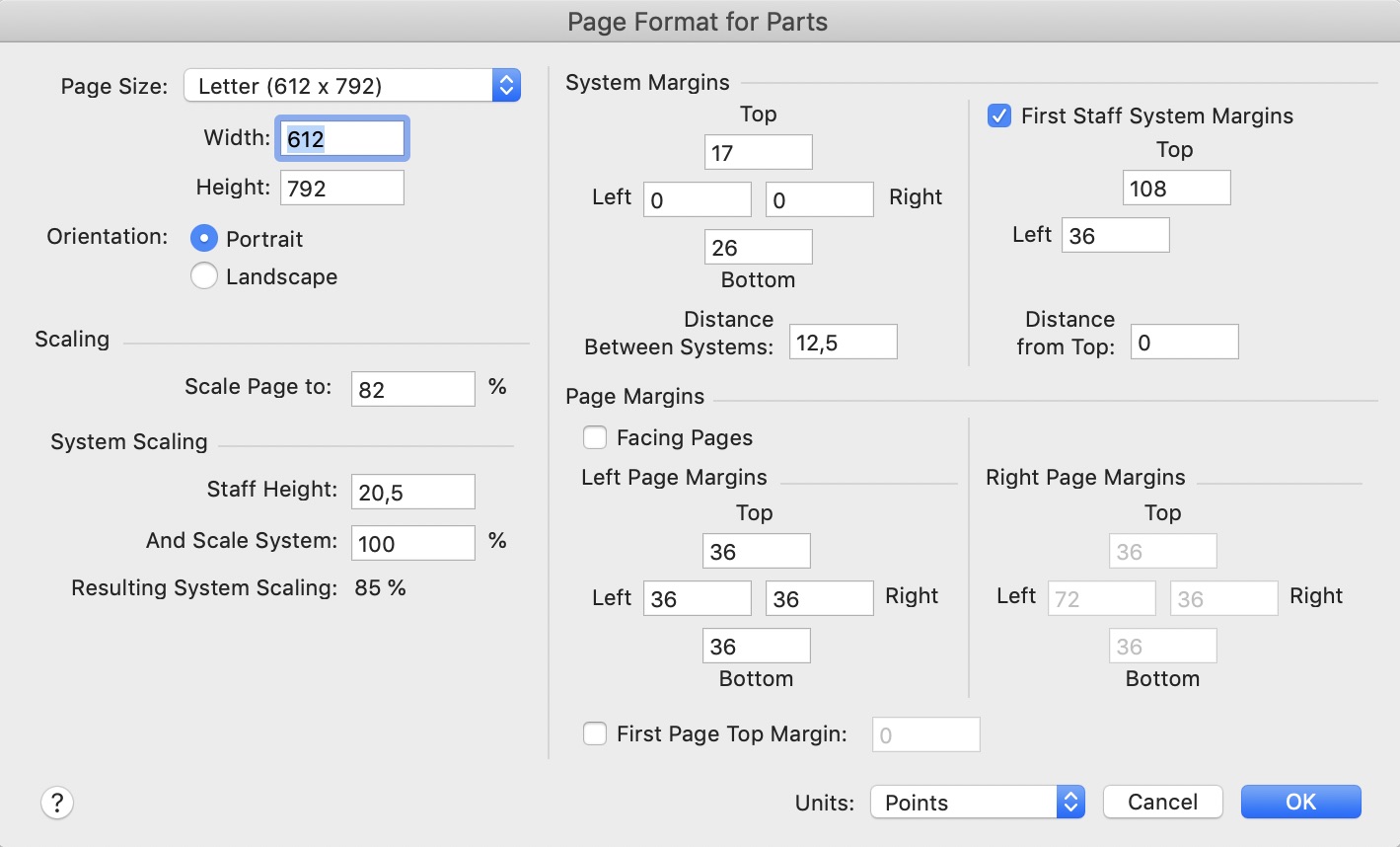
1) If you go to Document menu > Page Format > Parts

you will see the default formatting for parts.

But when you examine the individual parts, you will see that only the Trumpet part (of all parts!) has the default formatting.

The different parts have different formatting.

Quite confusing.

I would use the same formatting in all the parts.


2) In the Trumpet part the Part name is in-correct. The name should be ‘Trumpet in B♭’. But in the Trumpet part it says ‘Bb Trumpet’.


3) While viewing the Trumpet part neither the Simple Entry Tool nor the Speedy Entry Tool will work on the entries in the Trumpet part.


Conclusion:

I suspect some sort of file corruption in the Trumpet part.


What I would do:

1) Go to Document menu > Page Format > Parts…

and change the settings to this (I think these settings are, what you need):


2) Go to Document menu > Manage Parts…

and Generate Parts again.


As Far As I Can Tell, these two steps will fix all the problems in the parts.

Comment actions Permalink
Avatar
0

I did what Peter suggested and it fixed the problem.  I was aware of the cue notes being covered up in the violin part.  Had I not run up against the missing notes in the trumpet part my next step would have been to fix those multimeasure rests not breaking for the cue notes.  Fortunately, generating the parts anew fixed all of the problems.  I'm finding that when I go back and work on older scores with newer versions of Finale these kinds of issues pop up.  I really like Finale 2012 because it was the last stable, easy-to-use version and I never had these kinds of issues with it.  Still, I have to keep up with what my peers are doing and move up to newer software.


Thanks to both of you for your help in troubleshooting this problem.

Comment actions Permalink

Please sign in to leave a comment.