New post
Avatar
0

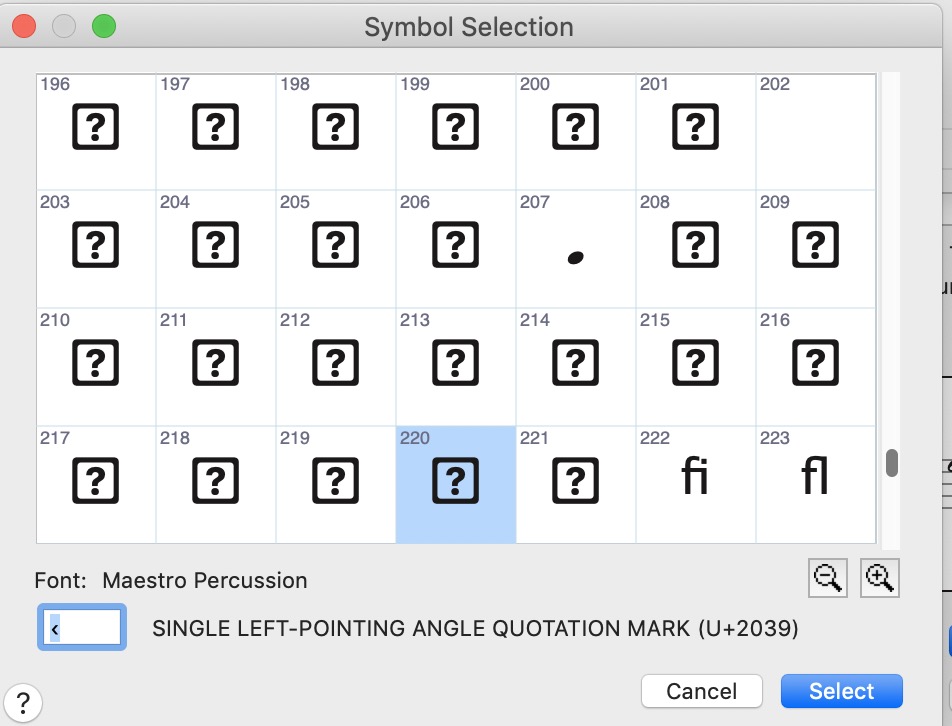
Suddenly the font selection for percussion parts looks like the attached... with a lot of the familiar symbols missing, or not where they used to be.

"220" used to be one of the "x" noteheads for percussion, or spoken words in a vocal part.

I've used the same percussion layouts in a million files, and suddenly they're somewhat unrecognizable. I haven't upgraded or changed anything in a long time.

Anyone knows what's up with that?

I'm on a Mac, Finale 26.1.0.484 (i.e. I haven't gotten the latest recent upgrade – because I was in the middle of a project.)
4 comments

Date Votes
Avatar
0

… I haven't upgraded or changed anything in a long time …

If I understand you correctly, you have neither upgraded nor updated Mac OS for a long time, right?

What is your current version of Mac OS?


You may have to re-install the Finale fonts.

Comment actions Permalink
Avatar
0
Comment actions Permalink
Avatar
0

Thanks Peter, Thanks Mike –

I meant that I haven't upgraded to the latest Finale from the previous 26 – I'll do so shortly and see if that clears things up.

I upgraded from an ancient 2012 Mac Pro to a new Mac Mini this summer – so this problem might indeed be due to some shuffle between the two computers.

I tried the fix you recommended, Mike – the reinstallation of the fonts – but no cigar (see results attached)

What were the next fixes or workarounds you mentioned?

Meanwhile, I'll upgrade to the latest Finale and see how that goes.

Comment actions Permalink
Avatar
0

Remove the Finale fonts from Font Book.app. Trash them. Reboot. Now reinstall the fonts and reboot again. There’s an even longer way but this should do it.

Comment actions Permalink

Please sign in to leave a comment.