New post
Avatar
0

D.S. al coda playback repeats endlessly without ever taking coda.

When it reaches D.S. al coda, it jumps back like it is supposed to. When it gets to "to coda", playback ignores it as if it weren't there and plays straight through until it gets to the "D.S. al coda" again and then jumps back. Just an endless playback loop (it just keeps playing mm. 16-39 over and over)

Also, the cursor that follows playback (whatever that's called), continues to run straight through the music as if there was no "D.S..." etc.

Why doesn't the cursor track with the music correctly?

Finale 25.3..0.0276

Windows 10


7 comments

Date Votes
Avatar
0

From your description it sounds like the text repeat "to coda" is not defined correctly for playback.

Could you perhaps attach a screen shot of the Text Repeat Assignment dialog box for the "to coda" text repeat?


The issue with the playback cursor may be a display issue, but let us first deal with the playback.

Comment actions Permalink
Avatar
0

Comment actions Permalink
Avatar
0

My first guess would be that the jump to coda should be on Pass 2, not on Pass 1.


I do not see any measure numbers in the score layout, but I suppose that the first coda measure is measure 41, right?

Comment actions Permalink
Avatar
0

Supposed to jump to measure 41 is correct.

I have previously tried changing this to pass: 2, and tried it again on your suggestion.

It still just plays through and repeats endlessly like before.

Comment actions Permalink
Avatar
0

Update: I actually removed a measure, so now it is measure 40 (and yes, I adjusted the target measure to measure 40).

It plays measure 39 and goes back to measure 16 as intended.

When playback gets to measure 29, it does not jump to measure 40, instead it plays through measure 39 and jumps back to measure 16.

It continues to repeat measures 16-39 in an infinite loop.


Comment actions Permalink
Avatar
0

I would definitely say that “Pass 1” can not be right. No way.


But “Pass 2” ought to work.

Can you make the playback jump to another measure, e. g. m. 39 - or m. 38?


One thing more to try:


Close the Finale document, and open it again.

Sometimes closing the document makes Finale “update” the playback.


By The Way:

To check the repeat playback you do not have to play the document back.

Just go to

Repeat menu > Check Repeats…

Comment actions Permalink
Avatar
0

I did not know about "Repeat menu > Check Repeats".


Seeing this option also brought the Repeat menu > Repeat Options to my attention.


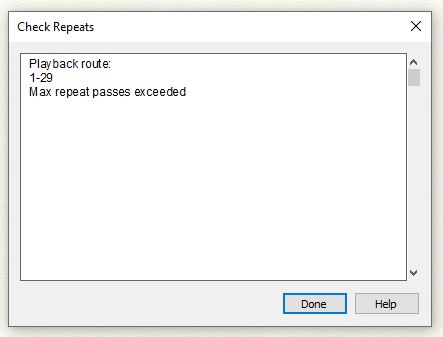
The Maximum Repeat Passes was default set to 20. I think the endless loop might have actually ended after 20 repeats, I just pressed stop long before that.


If I set max repeat to 1,2, or 3... the playback route changes to:

That exactly how it plays back... at m. 29 it just stops.


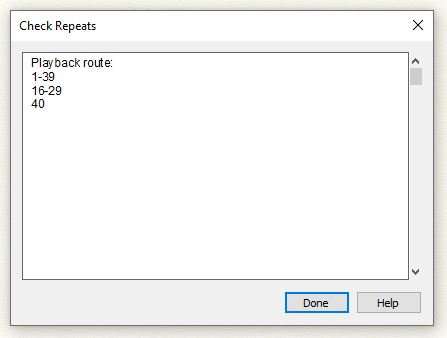
If I change max repeats to 4... playback route returns to normal (what I would like it to play)

But when it gets to m. 29 the second time, it stops. It never plays m. 40.

(THIS IS THE CLOSEST IT HAS COME TO THE CORRECT PLAYBACK.. If it would just play measure 40 afterward, it would be complete)


For curiosity sake I changed the max repeat to 5. Play back route remains the same, but in reality it plays

1-29

16-29

16-29

Then it stops and never plays m. 40


If I changed max repeats to 6, I assume actual playback would be:

1-29-

16-29

16-29

16-29

Stop without playing measure 40


At least I am closer to correct playback though!!!!

Comment actions Permalink

Please sign in to leave a comment.