New post
Avatar
0

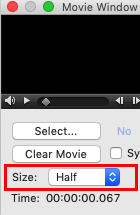
I'm trying compose music that syncs with a video in Finale. I have successfully selected a .wmv file to use with the movie window, but when I do, the movie window gets so large that I cannot see the control bar at the bottom to adjust volume, etc. How can I change the size of the movie window?

Note: I have already tried selecting Window > Movie Window > Size > Half Size before selecting a video to use and that did not change anything.

8 comments

Date Votes
Avatar
0

Can't you resize the window by dragging its side or bottom right corner ? (you don't mention which OS - Mac, PC - you use nor your version of Finale).

Comment actions Permalink
Avatar
0

Sorry, I'm on Windows 10 and I'm using Finale 2014.5 and no, the movie window cannot be resized by dragging the sides. I'm not sure about the bottom right corner because the window is so incredibly large that I can't see the bottom right corner.

Comment actions Permalink
Avatar
0

Try redefining the preferences to force the window to display within the limits of the screen.

You can also try a higher monitor definition, so you can see the edges of the window and resize it.

(using the bottom right corner is a Mac feature, I think, so forget it)


Comment actions Permalink
Avatar
0

Where within Preferences would I be able to achieve this?

Comment actions Permalink
Avatar
0

On Windows, you have to locate the Finale.ini file and remove it. Relaunch Finale, the file will be recreated and the video window reset to its default size.

I think you'll find the file here :

C:\Users\Me\AppData\Roaming\MakeMusic\Finale 2014.5\

Comment actions Permalink
Avatar
0

Okay, I found the file and deleted it, but the movie window is still very large. Is there something else I could try to do after deleting the .ini file?

Comment actions Permalink
Avatar
0

"You can also try a higher monitor definition, so you can see the edges of the window and resize it."

And there is a popup to select a size, wouldn't that help ?

Comment actions Permalink
Avatar
0

I've tried setting the window to half size before selecting a video file and it doesn't change the size. I've also tried the other two options ("normal" and "double" size) and nothing changed. It always make the window the same size.

Comment actions Permalink

Please sign in to leave a comment.