

Greetings! I am running Finale 26.2.2.2.493 on a MacBook Pro running High Sierra.
I've been using Finale for a few years and feel pretty comfortable in it now. However, I'm now exploring the guitar chord features and I need a little help.
I am using attempting to add new chord fingerings for guitar using the Chord Definition dialogue box (all of these options make sense to me and the features are awesome!) But I'm confused about one thing:
For chords that are higher up on the fretboard (8th fret, for example), I see that I can add the fret number as well as adjust the number of strings appearing in the chord symbol. However, the word "fret number" appears at the upper right hand corner of the chord symbol. I'd like to be able to move it vertical center of the fretboard and to the opposite side of the fretboard. I've attached a screenshot. I'd like to be able to move the fretboard number to the location indicated by the orange horizontal line. I'd also be able to add a slightly thicker black line indicating where that fret number is in the picture...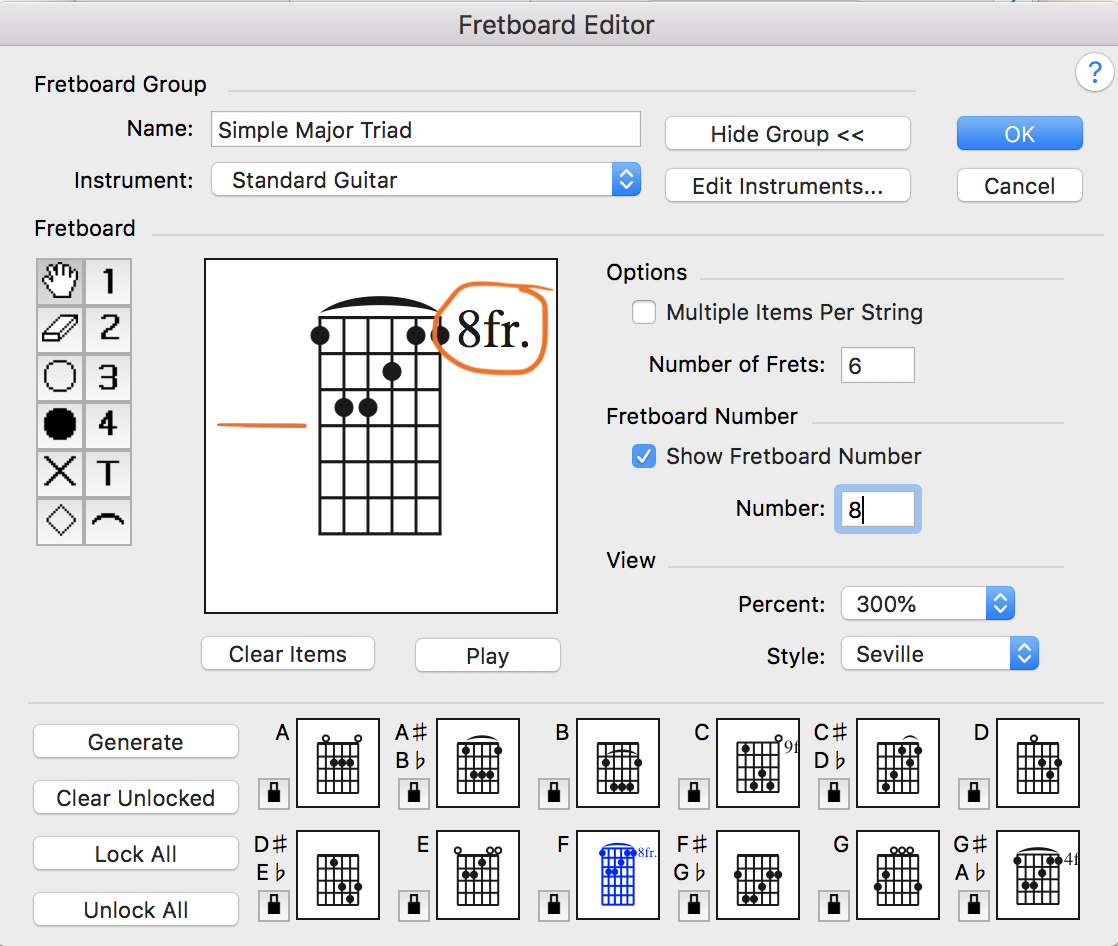 Am I missing something obvious??
Thanks in advance for your help!
Best,

4 comments
Date Votes