Is anyone familiar with a Hachek which is a 'v' looking mark placed over a c, s, or z in the slavic languages?


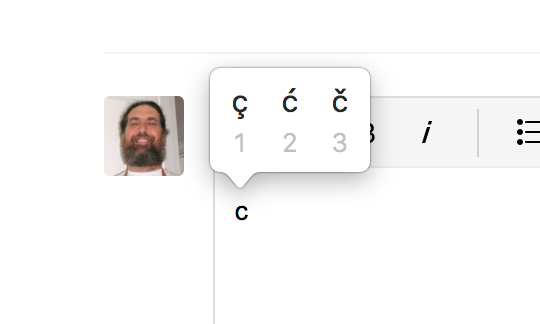
On a Mac, simply hold down the c, s, or z keys for a couple of seconds. You will get a small popup window, with the accents applicable to that letter. Just tap the number that corresponds to the accent you want: č, š, ž
Step through the keyboard, especially the vowels, and see all the options!

… Where would that be on an iMac? …
It is not clear what you are asking for.
Please be more specific.
What do you need? What is the problem you are trying to solve? Your thread title mentions lyrics.
The better we understand, the better we can help.
The character č is a single character, not a composed character composed of the two characters ‘c’ and ‘Hachek’.
Similarly, the character š is a single character, not a composed character composed of the two characters ‘s’ and …
And the character ž is a single character, not a composed character composed of the two characters ‘z’ …
However, you can also get the ‘Hachek’ as a single, stand-alone character.
Each character is located in a specific character slot (with a specific slot number) in the font.
Generally, the same character is located in the same slot number in all text fonts.
Example: the character č is located in slot #269 in all (Unicode) text fonts.
269 is Unicode Hex number 010D.
* Was that what you are asking for?
* Or are you asking for ways to enter these font characters?
Please explain.
Please sign in to leave a comment.
4 comments
Date Votes