

Hello! Finale 25.5; Windows 10. I'm working on a score for bass clarinet and vibraphone. I'm having multiple issues.
With this first problem, I'm beaming over rests. In this example, the beam disappears if the layer is not currently selected. The rests for both layers are on top of each other. The top image has layer 1 active, and the bottom image has layer 2 active.
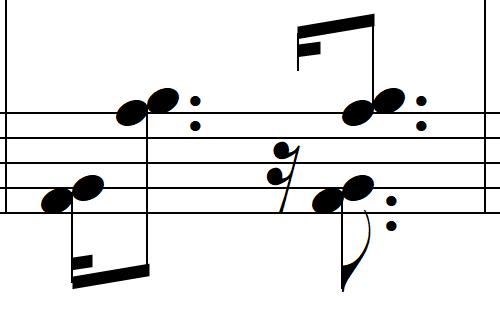
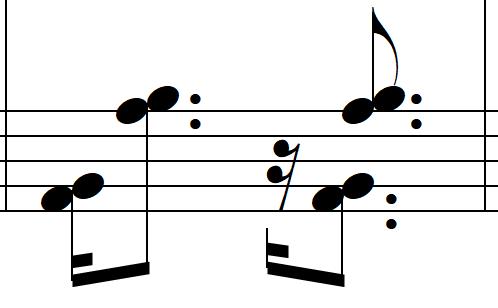
Also, the stems on the dotted eighths are not aligning.
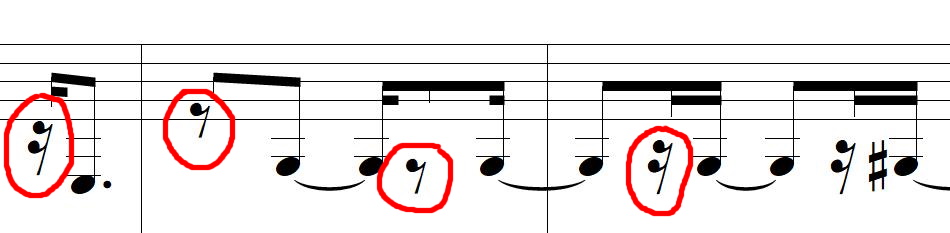
In this next example, the vertical placement of the rests seems haphazard and inconsistent. I can move the rests, but I'm not sure exactly what the correct vertical placement is.
In the first measure below, the double dotted eighths in the first measure are too close to the thirty-seconds. When I drag them into place, their placements get undone after multiple revisions. In situations like this, I sometimes fix the spacing by putting in hidden rests in another layer. Is there any way to get Finale to correct it automatically?
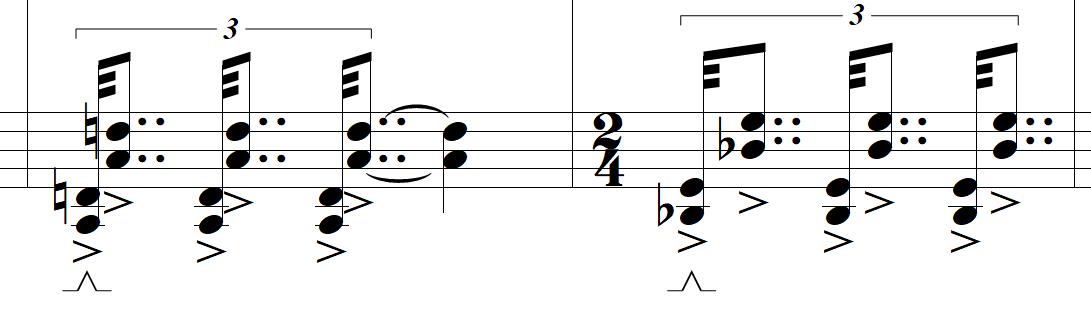
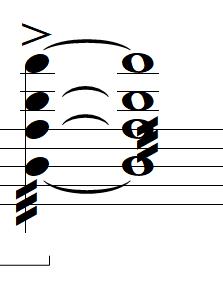
The placement of the tremolo on the whole note below looks wrong to me. What is the correct placement? Should it go where there would be a stem if it had one like a half note?
Thanks!

3 comments
Date Votes