I just got a new MacBook, and installed Finale, etc. When I try to play back anything it says"
The requested virtual instrument plugin could not be found." for each part.


Can you start the Aria Player from the Application folder? If so , check (in the Setup tab) to see that it is the most recent version of the Player. When I installed GPO4 from DVD recently on a new computer, it installed the older, then current 32-bit version of the Aria Player, which of course no longer works at all. I had to download the 64-bit version before I could proceed.

The playback option is no longer available so that I can listen to what I've written to check the melody as to correct/incorrect note values nor whether the harmony is correct. I'm using 14.5 which is way out of date but at this point it is all I can afford. I'm 92 years old and been writing four part hymns and gospel songs since 1955. So my computer skills are slow doing something I use to do totally by hand. Be patient with this old man who still enjoys putting down a melody. Ed
You should be able to get playback from Finale 14.5. I'm sure the option is available; the question is whether your program and computer setup has changed so that they are not working together.
I use Finale 26 (and Windows 10) so my screen may look slightly different that yours. You didn't say what operating system your computer uses.
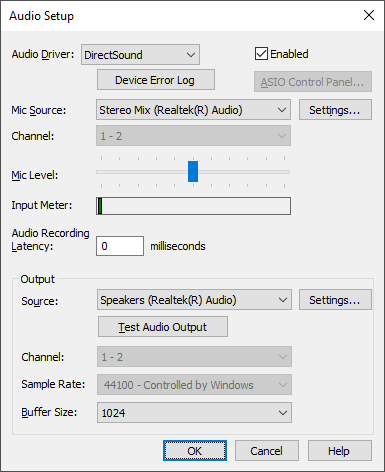
In the MIDI/Audio menu > Device Setup > Audio Setup, what is your Adio Driver (and is it enabled)? Mine works best with DirectSound. (A Mac appears to handle this automatically.)
The other thing to check is your Output Source to make sure it is connected to the speakers you use. (On a Mac, you should probably choose their standard output speakers.)
That would be where I would start.You might also check the Score Manager in the Windows menu to make sure you have sounds assigned and none are muted.
Feel free to post more questions if none of this works.

Please sign in to leave a comment.
7 comments
Date Votes