New post
Avatar
0

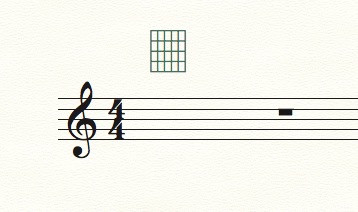
I want to make sheet music with blank fretboard diagrams so I can write in new diagrams in pencil at a rehearsal. I don't have notes to attach the diagrams too. How do I make blank diagrams?

6 comments

Date Votes
Avatar
0

There's a blank fretboard character in the Seville font along with the others. You could even enter it as an expression.

Comment actions Permalink
Avatar
0

Thanks!

I can probably look this up, but how do you access the Seville library in the expression tool?

Also, any idea how to resize a fretboard in the chord tool?

Comment actions Permalink
Avatar
0

First look at the character map for the Seville font, find the blank fretboard and the corresponding keystroke. IN the expression tool, create a new expression, choose the Seville font and type your character in. Now you can place the blank fretboard anywhere in your file as an expression.

Comment actions Permalink
Avatar
0

I'm dumb and your patience is impressive. Where do you access the character map for the Seville font?

Comment actions Permalink
Avatar
0

According to the v26 help files, it's only included for compatibility, since the new versions use a different system. Using PopChar, I found it at Shift-0. That's on a Mac.


Windows may be different. Or, and older version might include it. Look in the Help Menu > Character Sets


Comment actions Permalink
Avatar
0

Shift 0 did it! Expression is just fine, I can make a working page with no problem. Thank you very much for the quick help!

Comment actions Permalink

Please sign in to leave a comment.