New post
Avatar
0

Using Windows 10 (up-to-date) 

Finale 26.3.1.520

Trying to create a TTBB score with the tenor parts on 1 staff and the bari/bass parts on another.  I hope I'm missing something but there doesn't seem to be a good way to do this.


Option 1: Create 1 staff and put 1st tenor in layer 1 and 2nd tenor in layer 2.  However, unless both parts sing identical words and rhythms, lyrics are impossible

Option 2: Create 2 staves.  One for the 1st tenor and a second for the 2nd tenor.  However, it's then impossible to have a score with one staff showing both 1st and 2nd tenor parts.

Please educate me on best practices here.

Thanks,

Brian


16 comments

Date Votes
Avatar
0

Best practice is whatever is the most clear for the singers, and that will vary depending on the demands of the score and the genre.


If each part has widely varying lyrics, each one needs its own staff.


If there are only a few differences, you can put the parts on a single staff, apply the main lyrics to one voice, usually below the staff, with the differences above. This is very common in barbershop, where the leads are written where you would put T2, with their lyrics below. The tenors (in the T1 position) sing with the leads, but if there is a difference like an echo lyric, that would go above the staff.


Can you post a screen shot of what you're doing?

Comment actions Permalink
Avatar
0

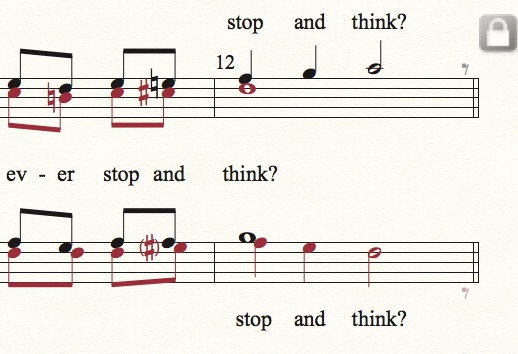
Here's a barbershop example. (T L / Ba Bs) Everyone is singing together, leading into the final measure, so they are all on the same lyric line. In the last measure, the leads and baritones hold their notes for the full measure, but the tenors and basses sing the echo, and get their own lyric lines.

Comment actions Permalink
Avatar
0

The lyrics differences are minor.  I'd like to do what you suggest and have the 1st part above the staff.  I can't figure out how to make that happen unless I put the 1st tenor lyrics in a separate verse.  That solution, however, is problematic for me.

Comment actions Permalink
Avatar
0

Mike, that is exactly what I'd like to accomplish.

Comment actions Permalink
Avatar
0

I've got the 1st tenor part in layer 1 and the 2nd tenor part in layer 2.

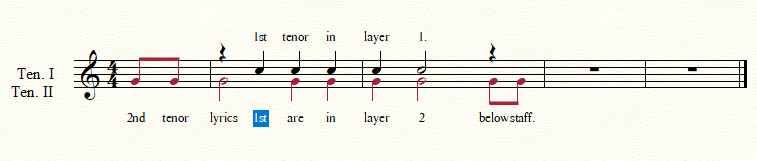
Add lyrics for 2nd tenor (layer 2)  Add lyrics for 1st tenor(layer 1).  Things look okay until I edit the lyrics.  Then I get this.


Comment actions Permalink
Avatar
0

Also, order of operations appears to be very important.  If I add 1st tenor lyrics first (layer 1) and put them above the staff.  There does not appear to be a way to get the 2nd tenor(layer 2) lyrics below the staff.

Adding 2nd tenor lyrics(layer 2) first and things are okay until you need to edit the lyrics.

Comment actions Permalink
Avatar
0

The biggest issue with this solution is that I can't print a 1st tenor part with lyrics.  Maybe I just have to give that up.

Comment actions Permalink
Avatar
0

Are you putting the lyric lines in separate verses? And attaching them to the correct layer? That's very important.


But if you want to separate and print each line with their own lyrics, then you have to do them individually.


Here's a video I did explaining the barbershop way, but it may help you as well. You can also contact me directly, if you need more guidance. My email is encoded in my signature.


https://www.dropbox.com/s/t86t7xfkej82p6a/Lyric%20entry.mov?dl=0


Comment actions Permalink
Avatar
0

Putting the lyric lines in separate verses is not acceptable.

For me that would mean:

  1. Verse 1 2nd tenors have the melody.  1st tenor 'echo parts' for verse 1 would be labeled, in Finale, as verse 2.
  2. Verse 2, in Finale, would have to be labelled verse 3. 1st tenor 'echo parts' for verse 2 would be labeled, in Finale, as verse 4.

Way to confusing.


I'll just keep the parts in their own staff.  It's way easier.

Comment actions Permalink
Avatar
0

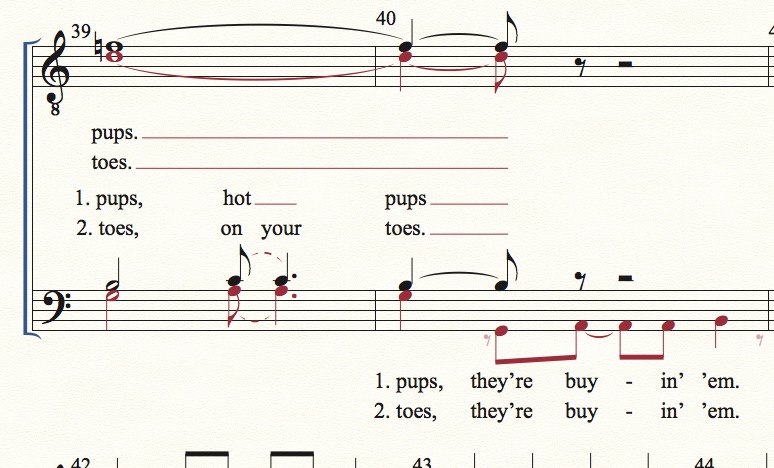
Here's a more complex example. I'm not trying to talk you into anything! If it's as complicated as you say, then separate lines is the way to go.

Comment actions Permalink
Avatar
0

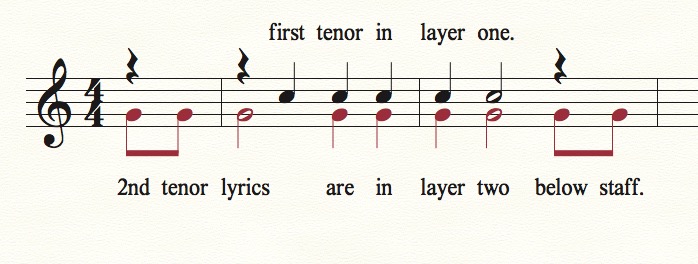
I've copied your example. First tenor lyrics are assigned to verse one, and attached to layer one. Second tenor lyrics are in verse two, attached to layer two.

Comment actions Permalink
Avatar
0

Yeah, that works, it's just weird telling Finale that verse 1 for the 2nd tenor is verse 2.

Comment actions Permalink
Avatar
0

Not if you think about them as stacked, 1-T1, 2-T2, 3-B1, 4-B2, just like the voices. And if I have multiple verses, I use 5, 6, 7, and 8.

Comment actions Permalink
Avatar
0

One can also assign alternate lyrics to "Section" or even "Chorus" if desired and set the position on those separately from the Verse lyric baselines.

Comment actions Permalink
Avatar
0

Thanks for the help.  I do appreciate it.

It's an interesting solution but, from my point of view, I'd have to give up to much to use it.

Comment actions Permalink
Avatar
0

If you say so. Best of luck with the project.

Comment actions Permalink

Please sign in to leave a comment.