New post
Avatar
0

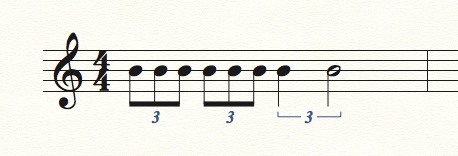
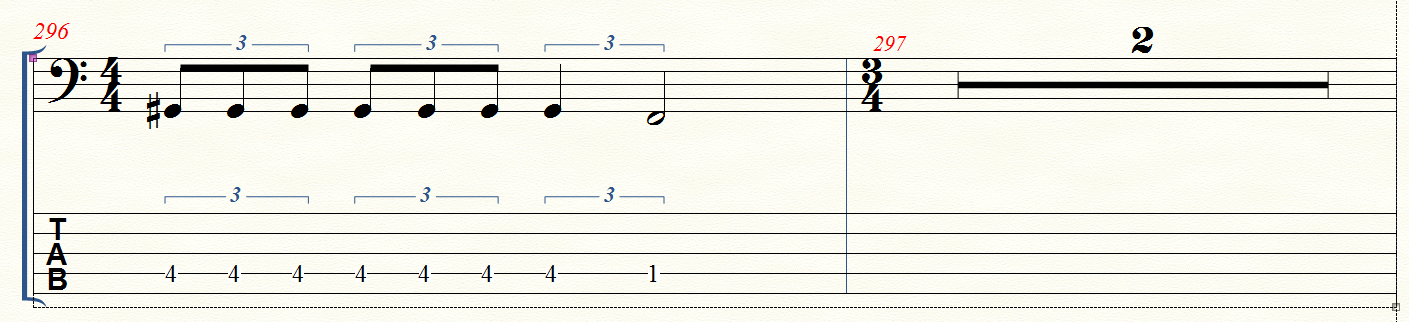
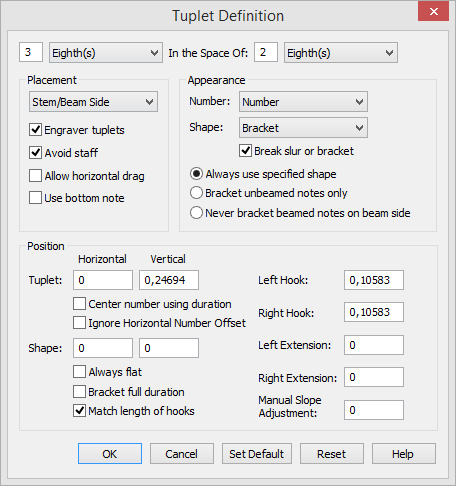
I wan't to make a tuplet with one 1/4- and one 1/2-note as in the figure (third tuplet). The two first tuplets give no problem : two tuplets 3 eight(s) in the space of 2 eight(s). I have made many calculations and combinations but I cant get a right tuplet for the quorter and half note in the third tuplet. Please some help in the definition of the tuplet.
3 comments

Date Votes
Avatar
0

This works for me:


3 Quarter(s) in the space of 2 Quarter(s).


However, you should try it in various measures, on various beats.

I suspect that the issue here is not the tuplet definition, but rather

{how to end a measure with a tuplet}.

Try various tuplets at the end of a measure (example: 4/4, dotted quarter + 8th triplet).


Tuplets in Finale can be entered in many ways.

If you can not end a measure with a tuplet, then I have some qualified guesses about the way you enter tuplets.

In short: you must be using the Simple Entry Tool.

Go to

Simple menu > Simple Entry Options…

and de-select

Check for Extra Notes.

Comment actions Permalink
Avatar
0

As Peter said...


Enter the quarter note of your final triplet. Alt-9 will open the tuplet definition frame. Set it as Peter describes, and tap OK. You will go back to the score, and see the quarter note and two quarter rests under the bracket. Don't change or delete anything. Switch to the half note, and enter it by tapping the appropriate pitch key on the QWERTY keyboard.


No need to deselect "Check for Extra Notes" if you do it my way!


Here is a link to a tutorial I wrote: https://www.dropbox.com/s/weehrytsb4x0wao/Tuplets%20with%20Simple%20Entry.pdf?dl=0

Comment actions Permalink
Avatar
0

Hi Peter and Mike,

Thanks to your quick and adequate answers, I was able to write the correct measure, for which my sincere thanks!

Special thanks to Mike for the manual which was also helpful.

Musical greetings, Benny
keep it safe and healthy


Comment actions Permalink

Please sign in to leave a comment.