New post
Avatar
0

I am using Finale 25.5.0.259 with Mac OS 10.15.7.  I have had problems with tuplets in the past but am continuing to do so.  Here are the latest, which I am attaching.

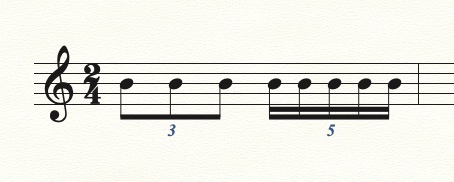
• I'm trying to simply write 5 sixteenths as the second beat of a 2/4 measure.  It keeps coming out like this.  I do not know why this is even a possibility no matter what one's other settings are.  How could this happen?  

• I would like to write an eighth note triplet as a quarter note and one eighth note and not, as below, as two tied eighth notes and an eighth.  Doesn't seem possible.

17 comments

Date Votes
Avatar
0
Comment actions Permalink
Avatar
0

Hi -
I'm using an iMac (desktop) without a number pad so I am not at all sure how to do this.  Are there methods to do this with my setup?  
Thank you

Comment actions Permalink
Avatar
0

Won't CTRL+5 (on the number row above the QWERTY keyboard let you set tuplets in Speedy Entry?

I do not think you need to use the numeric keypad.

Comment actions Permalink
Avatar
0

On a Mac using Speedy, the option key is used to define tuplets. You don't need a separate numeric keypad for this.


1. While in Speedy entry, click on the measure you want to put tuplets in.

2. (For 16th note quintupets) press option-5. A "5" will be displayed in the Speedy frame. Now by pressing the "3" key, enter the pitches you want for the 16th notes.


For other tuplet durations press option-3 for triplets, option-6 for sextuplets, and so on.


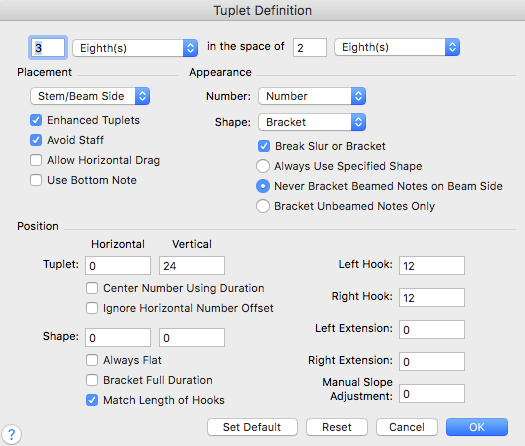
Another option is to press "option-1" while in a measure in Speedy. This command brings up this dbx,


You can then enter the exact tuplet parameters that you need (i.e., 5 16ths in the space of 2 8ths)

Comment actions Permalink
Avatar
0

Thanks for everyone's help.  I was able to solve this using the simple entry.  I didn't realize you need to shift-click the first note of the tuplet. Not sure why this would be necessary, but apparently so.  I'm dumbfounded by why the example I gave (two "5"s over the quintuplet and a 128th rest(!) would even be possible.  If that is not a glitch I don't know what would qualify as one.

Comment actions Permalink
Avatar
0

Having entered tuplets for 15 years without ever needing to shift-click, I have to assume it’s because you’re on laptop. 

Are you using the Laptop Shortcut Set?

Another option might be to get an inexpensive USB numberpad.

It’s not a glitch. You did something the program didn’t like, either in how you entered or how you set up the tuplet. The documentation on tuplets is pretty poor. (At least, it used to be. Since I figured out the method in my tutorial, I never went back to check what they say.)


Comment actions Permalink
Avatar
0

Some music requires nested tuplets. I am guessing you stumbled into that in your initial example. It is not a bug.

Comment actions Permalink
Avatar
0

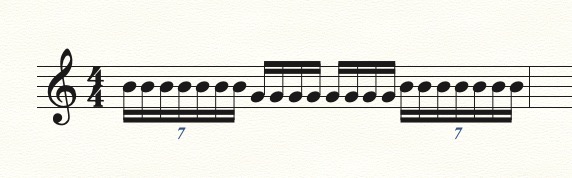
As I stated before, I'm not on a laptop, I'm using an iMac desktop.  My keyboard does not have a number pad.  To test out the explanations given, I set up a new document and simply tried entering tuplets with the tuplet tool. I did not shift click, etc.  I used "7 16ths in the space of 2 eighths." The first beat of 7 is fine; the fourth beat was not.  Clearly I am missing something here, but I do feel it is strange that something like this could even be possible.

Comment actions Permalink
Avatar
0

Set it up as seven 16ths in the space of four 16ths. I know it's the same thing, but it seems to work better. (An extended keyboard is available from Apple. It costs, but it's worth it for me. I use the number pad a lot in Finale. Or, as I suggested earlier, get a USB numberpad.)


Comment actions Permalink
Avatar
0

Seven 16ths in the space of four 16ths.  This is why I curse Finale a lot.

Comment actions Permalink
Avatar
0

William McClelland,


I notice that your problem comes, when you try to end a measure with a tuplet.

This issue (= ending a measure with a tuplet) only occurs in the Simple Entry Tool (never in Speedy Entry Tool).


With the Simple Entry Tool there are several ways to enter a tuplet.

As you can see above, Mike Rosen can end a measure with a tuplet.


Just a wild guess:

You have the option {Check for Extra Notes} toggled on - right?

Toggle {Check for Extra Notes} off, and try (again) to enter a tuplet at the end of a measure..

Comment actions Permalink
Avatar
0

Thanks Peter.  This seems to do it.  I appreciate your help.

Comment actions Permalink
Avatar
0

I don’t do that. Never have.


William,

Please give me the exact step-by-step what you have been doing to enter a tuplet. 

Comment actions Permalink
Avatar
0

>>"I don’t do that. Never have."


That's cause you're a pro. :-)

Comment actions Permalink
Avatar
0

Not so! I found a way that works, that's all. And I'm happy to share it with anyone who asks.

Comment actions Permalink
Avatar
0

I know that, Mike. If everyone you have helped  just with this tuplet entry over the years were to post a thank you, this would be a long thread indeed.

Comment actions Permalink
Avatar
0

<blush>

Comment actions Permalink

Please sign in to leave a comment.