New post
Avatar
0

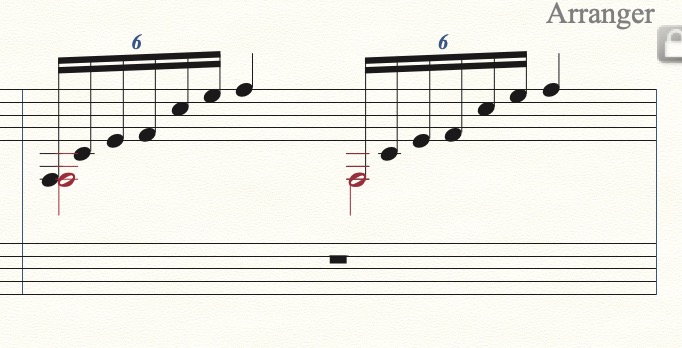
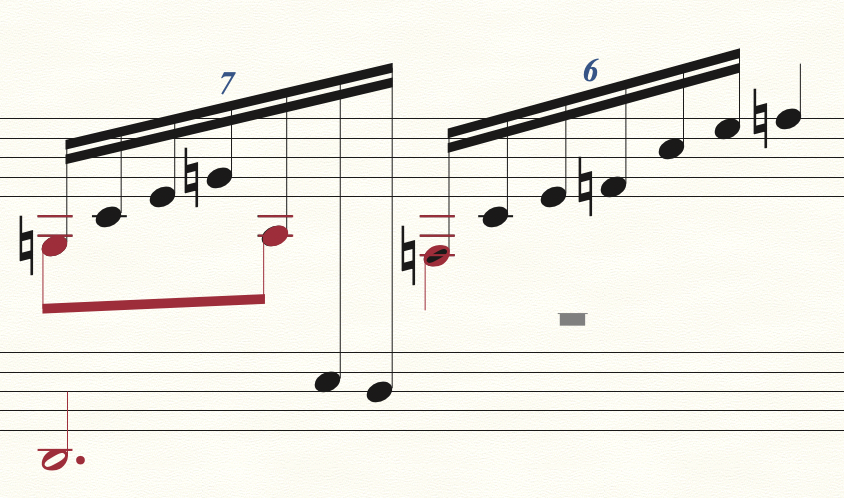
When I have a half note (or dotted half note) on Layer 2 that is coincident with a note head in Layer 1, the half note shows a solid fill when printed. On the screen, I can see it's a half note (in red) with a transparent center and through that transparent center the black of the Layer1 note shows through. When it's printed it all shows black. I want the notes coincident (not staggered). How can I get the half note to show properly with a white center? Attached is a sample from a manuscript along with the music as entered into Finale. Finale 26.3.1.643 on Mac OSX 10.15.7

6 comments

Date Votes
Avatar
0

There are a number of ways to handle it. In Document Options > Music Spacing, you can select Avoid Collision of Unisons: Different Noteheads, and you will have my first example. Another choice is to use Utilities > Change > Noteheads > Hollow (Half Note) on the layer one note, and leave them superimposed. A third choice would be to use JW Change > Noteheads > Visibility, and hide the layer one notehead.


And just BTW, I don't think the opening septuplet is correct. The second layer two eight note would not be on that beat, but somewhere in between.


Comment actions Permalink
Avatar
0

Thank you for your prompt reply. 

I want to keep the notes coincident rather than staggering them to be consistent with the style of the time this piece was written. Changing the note head to a hollow (half note) is a good suggestion. However, there are a lot of them, so I was hoping there was an easier way without editing each one individually.

Comment actions Permalink
Avatar
0

In that case, look at JW Change. It gives you lots of ways to filter which note you apply it to. You still may have to do some individually, but with a little effort, the plugin should get most of them.

Comment actions Permalink
Avatar
0

Thanks for the tip on the JW Change Plugins. I'll look at that.

Regarding your comment on the first septuplet, you are correct that "proper" notation would have the Gb in Layer 2 midway between the notes in Layer 1. That was where it was when I first entered it, but I moved it over manually to it's current position to conform to the old manuscript. This is part of a piece written by Marcel Tournier for harp. There are a lot of strange notation details in this manuscript.

Comment actions Permalink
Avatar
0

Keep in mind that, just because it’s old, that doesn’t mean it’s right!

Comment actions Permalink
Avatar
0

OK, I've got it the way it needs to be. Thanks for your help.

A classically trained harpist would recognize this notation and play the lower stave with left hand, the first 4 notes with right hand, then 3 with left, 4 with right, and the last 3 with left hand. 7 notes are played on the first beat, 6 notes on the second beat. The G natural, A flat, and F natural (which have the stems down) would be accented as the melody line.

Comment actions Permalink

Please sign in to leave a comment.