New post
Avatar
0

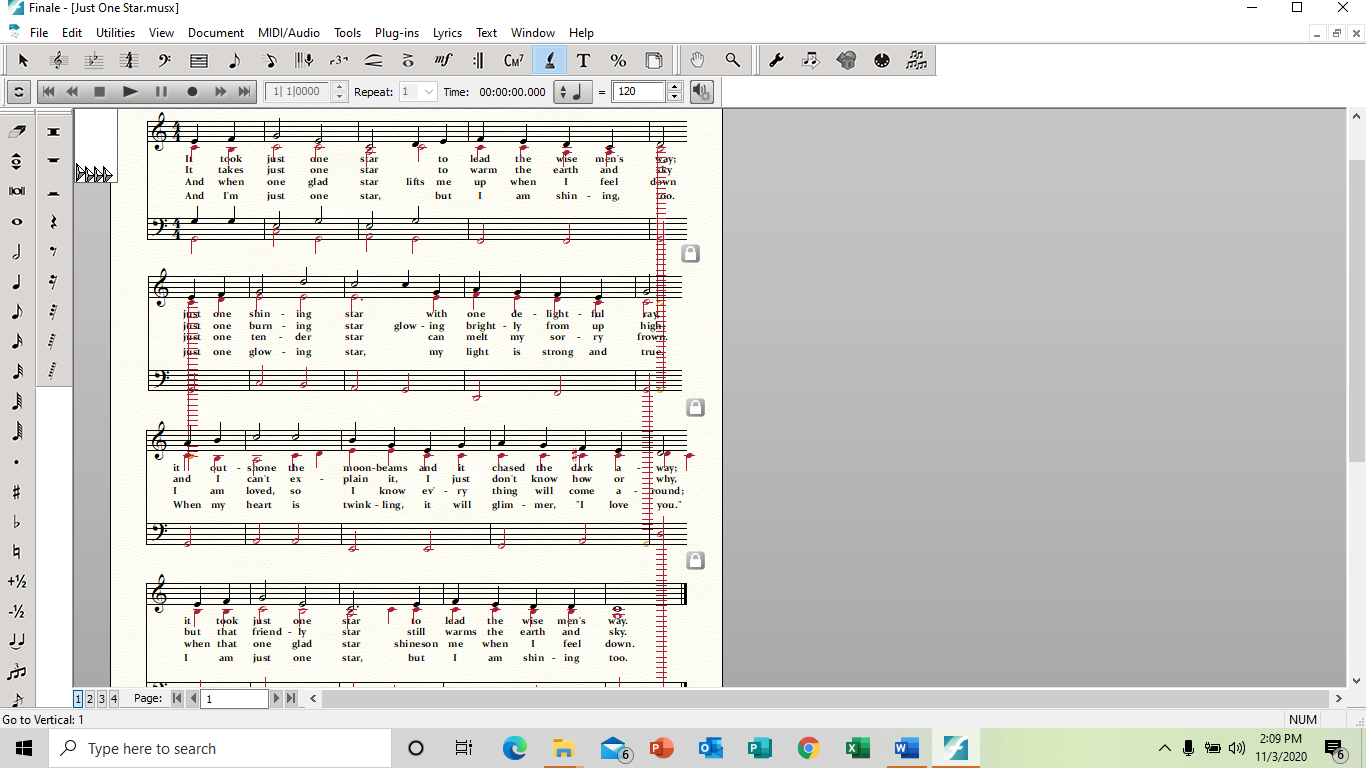
When I create a song in page view, then split a measure, I get these incredibly long and totally nonsensical notes that show up on my score, and when I print. I don't know how to get rid of them. Can anyone help me with this? I'm in windows 10, I think, and the latest version of Finale. 

7 comments

Date Votes
Avatar
0

Since this ridiculous excuse for forum software doesn't allow posting Finale docs, can you give us a screenshot?


Or, send me the file, and I'll have a look. My email is in my signature.

Comment actions Permalink
Avatar
0

Comment actions Permalink
Avatar
0

 Very strange. I haven’t seen that, before. What happens when you delete them?

Comment actions Permalink
Avatar
0

That's part of the problem. I can't delete them. It has to do with splitting measures, I think.

Comment actions Permalink
Avatar
0

Paul Janssen,


There are two ways to split a measure (Measure Tool with Horizontal Split Points; or the plug-in Split Measure).

Have you tried both ways?

Comment actions Permalink
Avatar
0

I've only ever used the Measure Tool with Horizontal Split points. I'll try the plug-in if I can figure out where to find it. I'm sure it's easy. Thanks for the tip! Just tried it! Seems to have eliminated the issue of creating those ghosties - at least, until I put lyrics in. We'll see what happens then. But, boy, I wish I'd known about that plug-in before! (When was it added? I'm ready to face-palm myself if it's been there all along)


Comment actions Permalink
Avatar
0

If you can't delete the notes individually, try clearing that measure of all entries in layer 2. Then just re-enter the correct notes.

Comment actions Permalink

Please sign in to leave a comment.