New post
Avatar
0

Hello,

Currently, I am having the issue of Finale not playing the tempo it is set at. Both the playback tempo and the written tempo are the same, but the program is playing it much faster than what is written. How do I remedy this issue? I use a HP 15 touchsmart laptop with Finale version 26.


16 comments

Date Votes
Avatar
0

Three things control the tempo in Finale:


MIDI Tool (= the recorded tempo changes)

Expression Tool (= the expression tempo changes)

Playback Controls


And they work in a hierarchical fashion.


The tempo in the Playback Controls is overridden by an Expression that sets a tempo.

This is overridden by the MIDI Tool, which is at the top of the “Tempo Hierarchy”.


From your description it sounds like the culprit is in the MIDI Data - Tempo Changes.


Something to try (on a backup copy):

Selection Tool.

Select All.

Edit menu > Clear Selected Items…

In the dialog Clear Selected Items, de-select everything except Tempo Changes.

Comment actions Permalink
Avatar
0

For some reason, that did not fix the issue. Is there anything else I could try?

Comment actions Permalink
Avatar
0

Allison Feamster,


If I understand you correctly, you cleared Tempo Changes, but that did not fix the issue - right?


As a test, try to change the tempo, either via an expression or via the Playback Controls.


Can you make the document play back at another tempo?

Or does the document always play at the same tempo, no matter what you do?

Comment actions Permalink
Avatar
0

I am able to change the tempo now. The problem is however, when I do type in a tempo, it plays faster than it should. 

Comment actions Permalink
Avatar
0

You are using expressions from the expression category Tempo Marks - right?


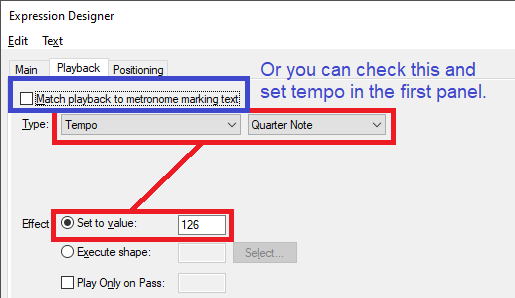
From your description it sounds like the option {Match Playback to Metronome Marking Text} is not selected in the expression’s Playback chiclet.

Comment actions Permalink
Avatar
0

Or she is setting the wrong note value as the beat for the mm marking.

Comment actions Permalink
Avatar
0

I legit can't find that. I am so sorry. Where is it?

Comment actions Permalink
Avatar
0
Comment actions Permalink
Avatar
0

Thank you. I found it. However, it still did not solve my issue. Everything is still playing faster than it should be. Is there anything else I can do?

Thank you for your patience.

Comment actions Permalink
Avatar
1

Allison Feamster,


If everything “is still playing faster than it should be”, then I suspect that the Tempo Mark is defined incorrectly.


As a test I would redo the text.

In this example let us say that the text should say

(Quarter = 120)


Then the steps would be (Expression Designer, Main):

1) In the pop up menu, choose the Tempo Mark category’s Text Font, and enter the (

2) Choose the Tempo Mark category’s Music Font. (this step is not strictly necessary)

In the pop up menu Insert Note, choose a Quarter.

3) Choose the Tempo Mark category’s Text Font (again), and enter the seven remaining characters:

(space) = (space) 1 2 0 )


If {Match Playback to Metronome Marking Text} is selected, then the expression should make the document playback at the tempo

(Quarter = 120)

Comment actions Permalink
Avatar
0

I have tried this. I have even tried copying the tempo and even assigning the tempo manually. I also deleted the preference files for both the MIDI and Finale. However, nothing is working. Is there anything else that I or the program could be doing wrong that caused this issue?

Comment actions Permalink
Avatar
0

Th next thing to test is whether the problem is document specific.


What happens if you create a new document?

In this new document, do all Metronome Marks give faster playback tempo than they should?

Comment actions Permalink
Avatar
0

If I open other documents that already exist, then they suffer the same fate. For new documents, however, MIDI playback is gone for some reason. Despite that, it does appear too fast as well.

Comment actions Permalink
Avatar
0

In that case I suspect that the problem is specific for your hardware/software combination.

You are using Windows - right?


My best suggestion is that you contact the folks in MakeMusic’s Tech Support.

Comment actions Permalink
Avatar
0

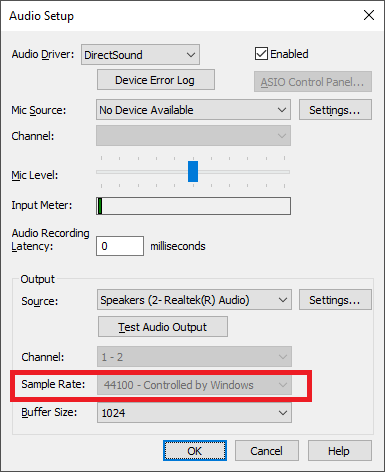
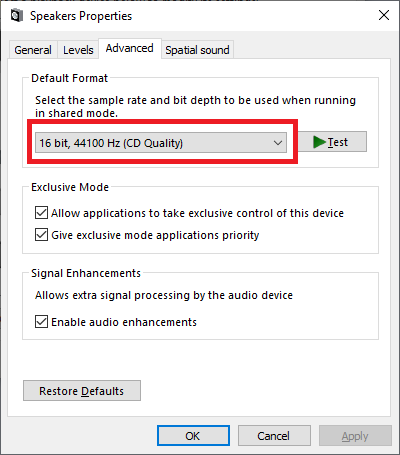
Look at your audio device setup and also at your computer OS sound setup. This sounds as if you have one set at 44.1K and the other set at 48K which may be affecting pitch (slightly) as well as tempo.


Comment actions Permalink
Avatar
0

Thank you, but I a m afraid that did not solve my issue either.

Comment actions Permalink

Please sign in to leave a comment.