MAC - High Sierra
"Tampo Alterations" & "Tempo Marks" - when I try to enter tempo changes on the score - all I get are
letters - "q's" & "e's" - etc. - how can I fix to get actual notes....?


If I understand you correctly, your steps are like this:
You are entering ready made expressions from the expression categories Tempo Marks and Tempo Alterations - right?
In the window Expression Selection (and in the Expression Designer) the expressions display correctly, with note symbols - right?
But as soon as you click the button Assign, the expression appears in the score as letters instead of note symbols - right?
… isn't Finale set up to show notes rather than letters? …
Actually, this particular setting is a document specific setting, not a program setting in Finale.
When creating a new document Finale makes it as a duplicate copy of a template, so that the new document will have the same settings as the template, it was created from.
From what template did you create your document?
… is there a way to hide the tempo marks …
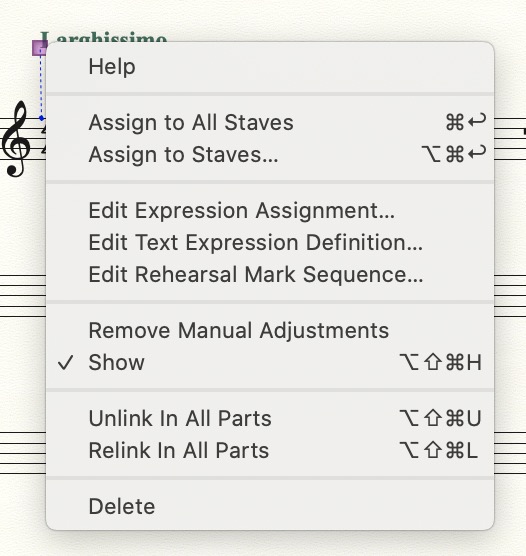
Switch to the Expression Tool, and context-click the expression handle.
In the context menu there is an option to Show/Hide.
… if I want to create a gradual rits. or accels- rather not show a number of tempo marks within one or two measures …
Instead of adding a lot of Tempo Marks, why not use a single expression with an accelerando?
You can let Human Playback interpret the accelerando, or you can give the expression a playback effect, via an executable shape.
went to the Expression tool (on both my computers ) Finale 25 & Finale 12 - can't find the show/hide function
also - the pages on my templates on 25 are very white & bright - with small note heads- my Finale 12 has darker pagers with
larger notes - really great contrast - easy on the eyes- any way to darken the pages on 25 ....?

Please sign in to leave a comment.
12 comments
Date Votes