New post
Avatar
0

I am new to v26. First 6 measures of an orchestral composition involves 3 instruments. The next system involves 12 instruments. I want to display both systems on one page. I have hidden all empty staves. How can I do this assuming there is room for both on the page? When I select 6 measures from page 2 and try to shift them to page 1, they are just added onto the existing single system on page 1 instead of displayed separately below the existing system.

3 comments

Date Votes
Avatar
0

Lock your systems, then move them around.

Comment actions Permalink
Avatar
0

1) Finale will “automatically” put both systems on Page 1 if there is room for them.

(You may have to Update Layout in Scroll View, or in Page 1)


2) However, you can not make System 2 display at the bottom of Page 1 if System 2 has a so called “Page Break” (Finale-speak}.

The “Page Break” will force the system to, always begin a new page.

With the Page Layout Tool you can add/remove a Page Break (look in the Page Layout menu).

If a system has a Page Break, then Finale will display a small page icon at the beginning of the system.


3) If there is no Page Break on System 2, it will go to the bottom of Page 1 - provided that there is room for System 2.

To find out, switch to the Page Layout Tool.

Click on System 1, to select it, and go to

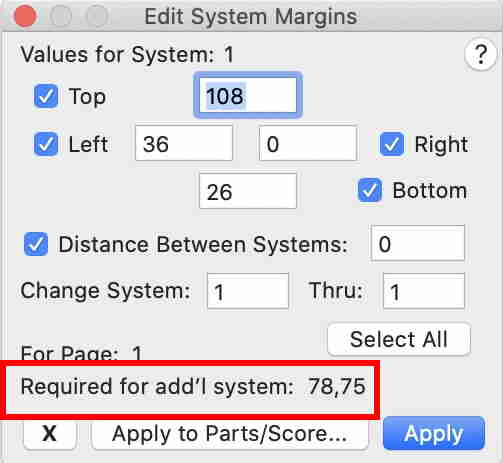
Page Layout menu > Systems > Edit Margins…

At the bottom of the dialog box Edit System Margins you can see how much space is required to make room for an additional system.

(in this screen shot the Measurement Units are Points)


Comment actions Permalink
Avatar
0

Thank you for your quick assistance! It solved my problem and I was able to move forward. I am grateful for all the advice!

Comment actions Permalink

Please sign in to leave a comment.